
As web browsers continue to evolve,
they are no longer just tools for accessing websites—they have become powerful
platforms for productivity, customization, and innovation. Among all browsers,
Apple’s Safari stands out for its focus on performance, privacy, and seamless
integration with macOS and iOS devices. This makes Safari Extension
Development an exciting opportunity for beginners who want to create useful
tools and learn modern web development skills.
Safari extensions allow developers
to enhance browser functionality by adding new features, improving workflows,
and offering personalized browsing experiences. From productivity tools and ad
blockers to language translators and developer utilities, Safari extensions are
shaping how users interact with the web.
For beginners, Safari Extension Development might seem complex at first, but with the right approach and
understanding of basic web technologies, it becomes an achievable and rewarding
learning path. This guide explains Safari Extension Development in a simple and
beginner-friendly way, covering its importance, benefits, tools, use cases, and
best practices.
What Is Safari Extension Development?
Safari Extension Development is the process of creating browser add-ons that extend or
customize the behavior of the Safari web browser. These extensions are built
using familiar web technologies such as:
- HTML
- CSS
- JavaScript
Safari extensions use Apple’s
WebExtensions API, which is similar to the APIs used by Chrome and Firefox.
This allows developers to create extensions that can:
- Modify web page content
- Add toolbar buttons and popups
- Block or filter content
- Communicate with external services
- Enhance security and privacy
Safari Extension Development focuses
on making browsing smarter, safer, and more efficient for users.
Why Safari Extension Development Is Important for Beginners
For beginners, Safari Extension
Development offers a practical and engaging way to learn real-world
programming. Instead of building large and complex applications, beginners can
start with small projects that solve simple problems.
Some key reasons why Safari
Extension Development is ideal for beginners include:
- Easy entry point into web development
- Hands-on learning with real results
- Strong focus on user experience
- Opportunity to publish work publicly
- Integration with Apple’s ecosystem
Safari Extension Development helps
beginners understand how browsers work and how software can interact with web
content in meaningful ways.
Understanding the Safari Extension Ecosystem
Safari extensions are distributed
through the Apple App Store. This ensures:
- High security standards
- Quality control
- User trust
- Global reach
Safari also emphasizes privacy and
performance, which means developers must design extensions responsibly and
efficiently.
The Safari extension ecosystem
includes categories such as:
- Productivity tools
- Security and privacy extensions
- Developer tools
- Educational utilities
- Entertainment add-ons
By learning Safari Extension
Development, beginners can contribute to this growing ecosystem.
Technologies Used in Safari Extension Development
To start Safari Extension
Development, beginners should understand the following technologies:
1. HTML
Used to structure extension
interfaces such as popups and settings pages.
2. CSS
Used to design and >
3. JavaScript
Used to control logic, handle
events, and interact with browser APIs.
4. WebExtensions API
Allows the extension to communicate
with the browser and web pages.
5. Xcode
Apple’s development tool used to
package and manage Safari extensions for macOS and iOS.
These technologies make Safari
Extension Development accessible to anyone with basic web development
knowledge.
Benefits of Safari Extension Development for Beginners
1. Simple Learning Curve
Safari Extension Development builds
on existing web skills. Beginners who know basic HTML, CSS, and JavaScript can
start creating simple extensions without learning complex frameworks.
2. Real-World Problem Solving
Extensions solve everyday problems
such as:
- Managing tabs
- Blocking distractions
- Translating text
- Saving bookmarks
- Improving accessibility
Safari Extension Development helps
beginners create solutions that users can immediately benefit from.
3. Builds a Strong Portfolio
Creating Safari extensions is an
excellent way to showcase skills. Beginners can demonstrate:
- UI design
- JavaScript logic
- Security awareness
- Product thinking
This strengthens job applications
and freelancing opportunities.
4. Encourages Creativity and Innovation
Safari Extension Development allows
beginners to experiment with ideas quickly. They can prototype new tools and
test them in real browsing environments.
5. Supports Privacy and Ethical Development
Safari is known for its
privacy-first approach. Beginners learn:
- Permission management
- Secure data handling
- Responsible coding practices
This makes Safari Extension
Development valuable for building trust-based applications.
Common Use Cases of Safari Extension Development
1. Productivity Extensions
Examples:
- Task managers
- Note-taking tools
- Tab organizers
- Focus mode extensions
Safari Extension Development helps
users work more efficiently.
2. Security and Privacy Tools
Examples:
- Ad blockers
- Tracker blockers
- Password managers
Safari Extension Development plays a
key role in protecting user data.
3. Developer Tools
Examples:
- Code analyzers
- Debugging helpers
- API testing tools
These extensions improve developer
workflows.
4. Educational Extensions
Examples:
- Language translators
- Study planners
- Research tools
Safari Extension Development
supports learning and knowledge sharing.
Step-by-Step Overview of Safari Extension Development
Step 1: Plan Your Extension
Decide:
- What problem it will solve
- Who the users are
- What features are needed
Step 2: Set Up the Environment
Install:
- Safari browser
- Xcode
- Basic code editor
This prepares the system for Safari
Extension Development.
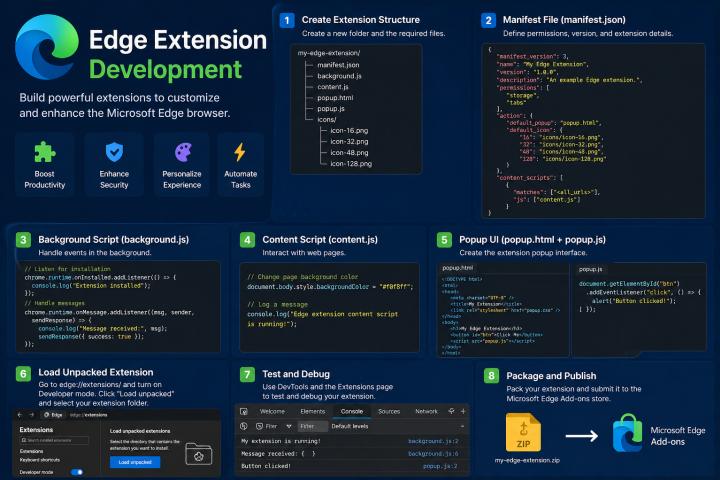
Step 3: Create the Extension Structure
An extension typically includes:
- Manifest file
- Background script
- Content script
- Popup interface
These components work together to
run the extension.
Step 4: Write Basic Code
Use JavaScript to:
- Listen for browser events
- Modify web pages
- Display popups
- Save user settings
This is the core of Safari Extension
Development.
Step 5: Test and Debug
Test your extension locally to
ensure:
- It works correctly
- It does not slow the browser
- It follows security rules
Step 6: Publish the Extension
Once tested, publish it to the App
Store for public use.
Best Practices in Safari Extension Development
1. Keep Extensions Lightweight
Avoid heavy scripts and unnecessary
features.
2. Focus on User Experience
Design clean and simple interfaces.
3. Respect User Privacy
Request only required permissions
and protect personal data.
4. Write Clean and Modular Code
This improves maintainability and
scalability.
5. Update Regularly
Keep extensions compatible with the
latest Safari versions.
Challenges in Safari Extension Development
While beginner-friendly, Safari
Extension Development comes with some challenges:
- Strict App Store review process
- Limited APIs compared to other browsers
- Performance optimization
- Compatibility with macOS and iOS
- User trust and security compliance
These challenges teach beginners
discipline and quality coding practices.
Comparing Safari Extension Development with Other Browsers
Safari Extension Development differs
from Chrome and Firefox in several ways:
- Strong focus on privacy
- Tight integration with Apple devices
- App Store distribution model
- Higher quality control
This makes Safari Extension
Development ideal for developers who value secure and ethical software design.
Career Opportunities with Safari Extension Development
Learning Safari Extension
Development opens doors to:
- Web developer roles
- Browser tool development
- SaaS product teams
- Security and privacy software
- Freelance extension projects
It also helps beginners transition
into full-stack development.
Business Value of Safari Extension Development
For businesses, Safari Extension
Development provides:
- Direct user engagement
- Brand visibility
- New revenue channels
- Customer feedback
- Integration with digital services
Extensions can become strategic
tools for marketing and productivity.
The Future of Safari Extension Development
The future of Safari Extension
Development looks promising with trends such as:
- AI-powered browsing tools
- Automation extensions
- Accessibility-focused tools
- Cloud-integrated services
- Privacy-enhancing technologies
As Apple continues to improve
Safari, extension capabilities will grow further.
Why Beginners Should Learn Safari Extension Development Now
Safari Extension Development is an
excellent starting point for beginners because it:
- Teaches core web technologies
- Builds confidence through real projects
- Encourages ethical development
- Supports creativity
- Prepares for advanced web and app development
It bridges the gap between learning
theory and building useful software.
Practical Tips for Beginners
- Start with a simple idea
- Follow official Safari documentation
- Use small projects to learn
- Test frequently
- Focus on user needs
- Learn from existing extensions
These tips make Safari Extension
Development easier and more enjoyable.
Conclusion
Safari Extension Development is a powerful and beginner-friendly way to enter the world
of modern web development. It allows beginners to build real tools, solve
everyday problems, and learn essential skills such as JavaScript programming,
UI design, and security awareness.
From productivity tools and privacy
extensions to educational and developer utilities, Safari Extension Development
offers endless possibilities for creativity and innovation. It also provides
career growth opportunities and business value while supporting ethical and
privacy-focused development.
For beginners who want to create
meaningful software and explore browser-based innovation, Safari Extension
Development is an excellent place to start. With patience, practice, and
curiosity, anyone can master Safari Extension Development and contribute to the
future of smarter and safer browsing.