Your Wi-Fi drops. Your video call freezes. Your game lags at the worst moment. The solution might be simpler and more classic than you think.
You're in the middle of an important video call when your screen freezes, and the frustrating "unstable connection" message appears. Or perhaps your online game lags at just the wrong time. You've restarted your router and moved closer, but nothing seems to help. Sound familiar?
Here's something many people overlook: Ethernet, that simple cable you may have seen plugged into the back of desktop computers, is still one of the most reliable, fast, and secure ways to connect to the internet in 2026. It's not outdated. It's just underused.
In this guide, we will explain what Ethernet is, how it works, its real-world benefits, and whether you should switch from Wi-Fi. No jargon, no fluff, just clear, useful answers.
What Is Ethernet, Exactly?
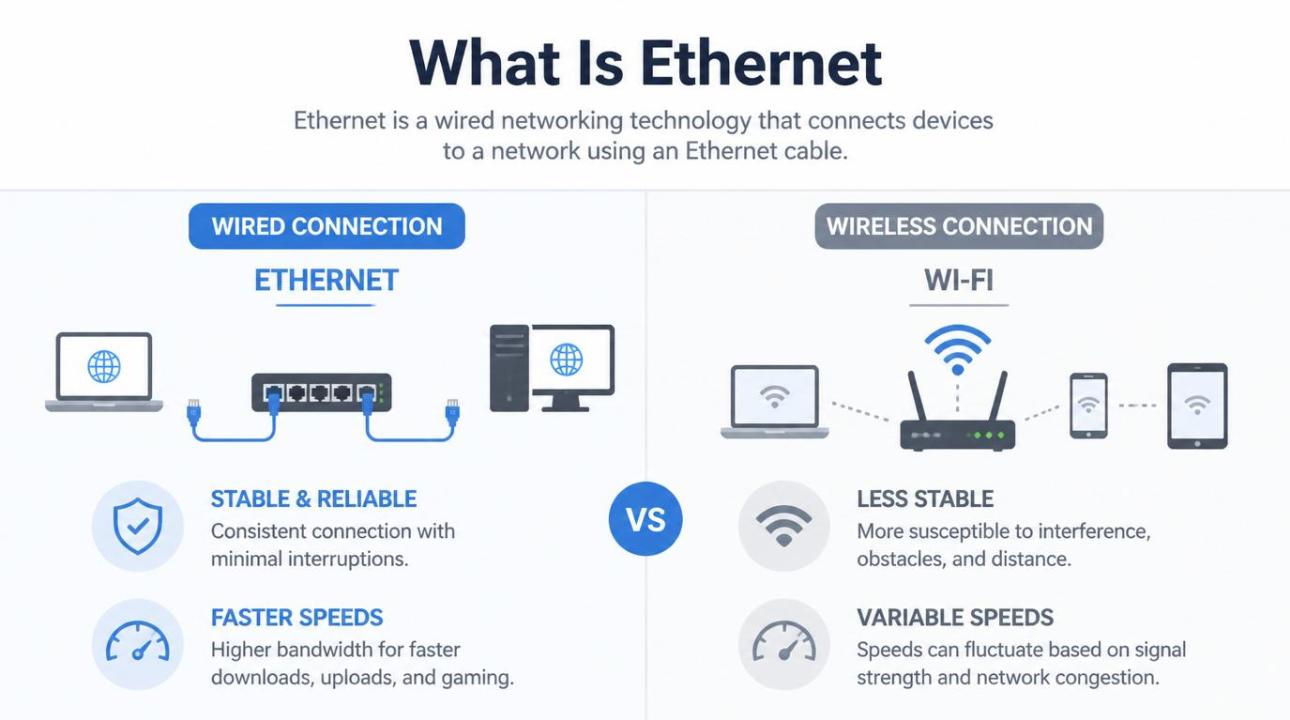
Ethernet is a wired networking technology that connects devices like computers, smart TVs, gaming consoles, and routers to a local network (LAN) and, through that network, to the internet. Instead of sending data using invisible radio waves like Wi-Fi, Ethernet sends data over a physical cable.
The technology was developed in the early 1970s at Xerox PARC by researcher Robert Metcalfe and his team. It was standardized in 1983 under the IEEE 802.3 specification and has been evolving ever since. Today, modern Ethernet can reach speeds of 10 Gbps and beyond, fast enough to transfer an entire HD movie in seconds.
Quick Definition
Ethernet is a set of wired networking standards that use cables and ports to connect devices within a network. It forms the backbone of most home, office, and data center networks worldwide.
The physical cable used is called an Ethernet cable (also known as an RJ-45 cable or a Cat cable). It plugs into a rectangular port on your device called an Ethernet port, and into a router, modem, or network switch on the other end. That's it. Simple, physical, reliable.
How Does Ethernet Work?
Think of Ethernet like a private road just for your data. While Wi-Fi sends your information through shared airwaves, similar to shouting across a crowded room, Ethernet gives your data a dedicated lane with no traffic jams.
Here's the basic flow of how Ethernet works:
1. Data Is Packaged
When you send a request to load a webpage, your device breaks it into small parts called data packets. Each packet includes the data itself, along with information about its destination and origin.
2. Packets Travel Through the Cable
These packets travel through the Ethernet cable as electrical signals at very high speeds. The cable provides a direct, interference-free path between your device and the router.
3. The Router/Switch Directs Traffic
A network switch or router receives your packets and sends them to the correct destination, whether that’s another device on your local network or out to the internet.
4. The Response Comes Back
The website's server then sends data back. It travels through your internet service provider (ISP) to your router, down the Ethernet cable, and back to your screen, often in milliseconds.
"Ethernet doesn’t just carry data faster; it carries it more reliably. In networking, reliability is crucial."
This entire process occurs billions of times each second. What makes Ethernet unique is that the cable creates a stable, consistent path, free from walls, competing signals, and interference from things like microwaves.
Types of Ethernet Cables: Which One Do You Need?
Not all Ethernet cables are the same. They have "Cat" ratings that show their speed and bandwidth abilities.
| Cable Type | Max Speed | Best For |
| Cat 5 | 100 Mbps | Older setups (largely outdated) |
| Cat 5e | 1 Gbps | Budget home networking |
| Cat 6 | 1–10 Gbps | Most modern homes and offices |
| Cat 6a | 10 Gbps | High-demand home/office networks |
| Cat 7 | 10 Gbps+ | Data centers, professional setups |
| Cat 8 | 25–40 Gbps | Enterprise / data centers |
For most home users, a Cat 6 cable is ideal: it's affordable, easy to find, and good enough for gigabit internet connections. If you're a gamer, a streamer, or work from home, a Cat 6a cable offers more capacity without a big price increase.
Key Benefits of Ethernet
So, why choose a cable over the convenience of Wi-Fi? Here are the real benefits of using Ethernet:
Faster Speeds: Ethernet consistently offers speeds close to your ISP's advertised rate. Wi-Fi can slow things down due to overhead and signal loss.
Lower Latency: Wired connections have significantly lower ping times. This is essential for online gaming, video calls, and real-time applications.
Rock-Solid Stability: You won’t experience dropouts or interference from walls, appliances, or neighbors' routers. The connection remains as reliable as the cable.
Better Security: It’s much harder to intercept a wired connection compared to a wireless one. No one can monitor your traffic without physically accessing your cable.
No Congestion: Wi-Fi channels often get crowded in apartment buildings. Ethernet provides a private lane that is not affected by your neighbors' networks.
Lower Power Usage: Ethernet adapters consume less power than Wi-Fi radios, which can help improve battery life on laptops and other portable devices.
Ethernet vs. Wi-Fi: Which Is Better?
Let’s be honest, Wi-Fi is here to stay. It offers convenience and flexibility, and it works well for casual browsing. But the two technologies really serve different needs.
| Feature | Ethernet | Wi-Fi |
| Speed | ✔ Consistently fast | Variable, depends on signal |
| Latency (Ping) | ✔ Very low (1–5ms) | Higher (10–50ms+) |
| Stability | ✔ Highly stable | Can drop or fluctuate |
| Mobility | ✗ Tethered to cable | ✔ Move freely |
| Security | ✔ More secure | More vulnerable to interception |
| Setup Ease | Requires cable routing | ✔ Plug-and-play |
| Best For | Gaming, WFH, streaming | Phones, tablets, casual use |
The best home network often includes both. Connect your desktop, gaming console, smart TV, and work laptop to Ethernet for maximum performance. Let your phone, tablet, and guests use Wi-Fi for convenience. This hybrid approach gives you the benefits of both options.
Common Uses of Ethernet in Real Life
Ethernet is not just for tech fans or office IT teams. You can find it doing important work every day in various areas:
Gaming
Online gaming is probably the main reason to switch to Ethernet at home. Reliable internet is crucial for gamers. Lower latency means less lag. This leads to fewer lost matches and a better competitive edge. Even a basic Cat 5e cable can greatly improve your gaming experience.
Work From Home
Zoom, Teams, and Google Meet work much better with a wired connection. You will experience fewer frozen screens, clearer audio, and no interruptions during crucial meetings.
4K Streaming
Streaming 4K video needs a reliable bandwidth. Ethernet provides that consistency much better than Wi-Fi, preventing mid-show buffering on Netflix, Disney+, or YouTube.
Office Networks
Almost every corporate office depends on Ethernet infrastructure. It supports everything from employee workstations to IP phone systems, security cameras, and servers.
Data Centers
The entire internet relies on Ethernet at its core. Data centers use high-speed Ethernet (10Gbps, 40Gbps, even 400Gbps) to transfer massive amounts of data between servers every second.
The Bottom Line
Ethernet has been the backbone of the internet for over 50 years and shows no signs of fading away. While Wi-Fi gets all the spotlight, Ethernet remains the gold standard for speed, stability, and security. This is especially true in a time when we are working, gaming, streaming, and video-calling from home more than ever.
Whether you are a gamer looking for that extra edge, a remote worker frustrated with frozen video calls, or someone seeking the best from your internet connection, connecting an Ethernet cable is still one of the smartest and most cost-effective upgrades you can make. Sometimes, the classic solution is the best one.
Frequently Asked Questions
Is Ethernet faster than Wi-Fi?
Yes, in most real-world situations, Ethernet is faster and more consistent than Wi-Fi. While the latest Wi-Fi 6E and Wi-Fi 7 standards can match Ethernet speeds in ideal lab settings, walls, interference, and distance all hinder Wi-Fi performance in reality. A wired Ethernet connection gives you the full speed your ISP offers with minimal packet loss.
What does an Ethernet cable look like?
An Ethernet cable looks like a phone cable but is a bit wider. It has a rectangular plastic connector (an RJ-45 plug) at each end that clicks into an Ethernet port on your router or device. The cable is typically grey, blue, or yellow, though it comes in many colors. It often has "Cat 5," "Cat 6," or "Cat 7" labeled on the jacket.
Does Ethernet reduce lag in gaming?
Absolutely. Ethernet significantly lowers latency (ping) compared to Wi-Fi, often by 10 to 40 milliseconds or more. In fast-paced games, that difference is very noticeable. It also gets rid of packet loss and jitter caused by wireless interference, making your connection steadier and more responsive throughout the session.
Can I use Ethernet without a router?
You can connect two devices directly with an Ethernet cable (using a crossover cable or a modern auto-sensing port) to share files between them without a router. However, to get internet access via Ethernet, you do need a modem and usually a router. In some cases, you can plug directly into a modem, but you will typically only get one active connection this way.
Is Ethernet still relevant in 2026?
Absolutely. Even with advances in wireless technology, Ethernet is still the top choice for desktops, gaming setups, smart TVs, work-from-home situations, and all enterprise networking. Its benefits in speed consistency, low latency, security, and reliability make it essential for any situation where performance truly matters.