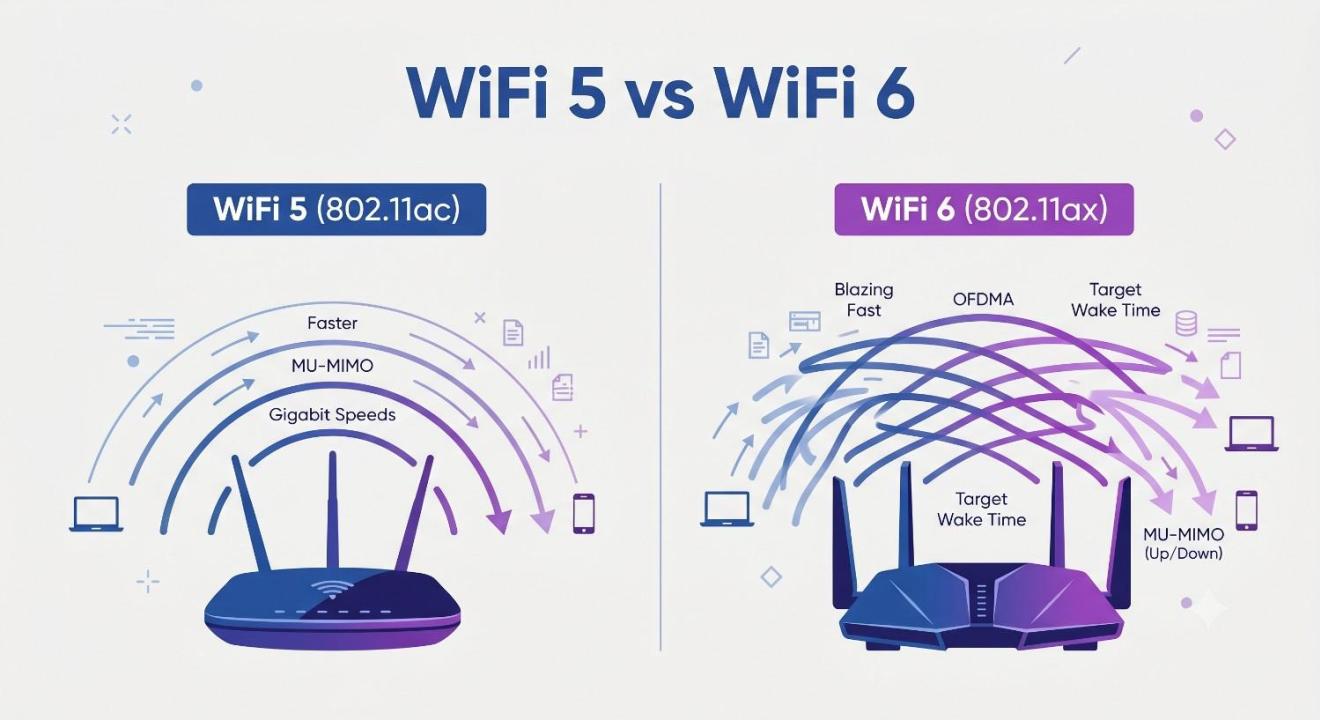
Your internet plan promises 300 Mbps, but your laptop is stuck buffering a video call while three other devices fight for bandwidth in the next room. Sound familiar? You're not imagining it; the problem usually isn't your provider at all. It's your router, and more specifically, the WiFi standard it's running on. If you've been shopping for a new router and keep seeing WiFi 5 and WiFi 6 thrown around like they're interchangeable, this is where we untangle that mess.
What Actually Changed Between WiFi 5 and WiFi 6
Wi-Fi 5, technically known as 802.11ac, has been the standard in most homes since around 2014. It did its job well for a household with one or two devices streaming Netflix. But WiFi 5 was built for a different era, one where "smart home" meant maybe a single Alexa speaker, not fifteen connected gadgets fighting for attention.
WiFi 6, or 802.11ax, was designed with today's reality in mind. Think about your own home right now: phones, laptops, smart TVs, doorbell cameras, thermostats, gaming consoles, maybe a robot vacuum. Every one of those is pulling from the same wireless connection. WiFi 6 doesn't just deliver higher speeds; it fundamentally rethinks how a router communicates with multiple devices at once.
The core difference comes down to a feature called OFDMA (Orthogonal Frequency-Division Multiple Access). WiFi 5 routers talk to devices one at a time, even if it happens fast enough to feel simultaneous. WiFi 6 splits each data channel into smaller pieces, allowing the router to serve multiple devices within the same transmission window. It's less like a single-lane road and more like a multi-lane highway with dedicated lanes for different cars.
Speed: Where the Real-World Gap Shows Up
On paper, WiFi 6 has a theoretical max speed of around 9.6 Gbps compared to WiFi 5's 3.5 Gbps. Realistically, almost nobody hits those ceiling numbers in daily use; your internet plan's actual speed is usually the bigger limiting factor.
Where WiFi 6 genuinely earns its keep is in congested environments. If you've got a one-bedroom apartment with just a laptop and a phone, you probably won't notice a dramatic speed jump from WiFi 5 to WiFi 6. But if you're in a house with a family of four, all on different devices, often in different rooms, that's when the improvements in WiFi 6 become obvious. Video calls stop freezing when someone else starts a 4K stream. Gaming latency drops because the network isn't constantly switching its attention between devices.
There's also a feature called 1024-QAM (Quadrature Amplitude Modulation), which sounds intimidating but basically means WiFi 6 can pack more data into each transmission. WiFi 5 uses 256-QAM. The result is roughly a 25% efficiency boost just from this one technical tweak, even before you factor in OFDMA.
Range: A Smaller Win, But Still a Win
People often assume WiFi 6 dramatically extends how far your signal reaches. That's not quite accurate. The range improvement is modest, not because the technology is weak, but because range is mostly governed by physics: radio frequency, transmission power, and obstacles like walls.
What WiFi 6 improves is signal consistency at the edges of your coverage area. Through a technology called BSS Coloring, WiFi 6 routers can better distinguish between your network's signal and a neighbor's overlapping network, reducing interference in apartment buildings or densely packed neighborhoods. So while your living room won't suddenly get covered by a router sitting two floors away, you'll likely notice fewer dead zones and less signal degradation as you move toward the far end of your home.
Battery Life: The Underrated Upgrade
This is the part most comparisons skip, and it's arguably one of WiFi 6's best features. Target Wake Time (TWT) lets connected devices schedule exactly when they check in with the router, rather than constantly listening for new data. For battery-powered gadgets like smart locks, security cameras, or your phone, this can mean genuinely better battery life. Your phone isn't burning power maintaining a 24/7 conversation with the router; it's checking in on a schedule and going quiet in between.
Do You Actually Need to Upgrade?
Here's the honest answer: it depends on your household, not just the technology. If you live alone with two or three devices and your current WiFi 5 setup isn't causing problems, there's no urgent reason to switch. WiFi 5 still works fine for plenty of use cases.
But if any of these sound like you, an upgrade is worth considering: you've got six or more connected devices regularly online, you live in an apartment complex with dozens of overlapping networks, you work from home and need stable video calls, or you're a gamer who notices lag spikes when other people in the house are streaming. WiFi 6 was essentially designed to solve crowded-network problems, so the busier your home network, the more value you'll get from switching.
One more consideration: your devices need to support WiFi 6 to actually benefit from it. A WiFi 6 router won't magically speed up an older laptop that only supports WiFi 5. Most phones and laptops released since 2020 do support WiFi 6, but it's worth checking your specific devices before assuming you'll see the full benefit.
A Quick Note on WiFi 6E
You may also come across the term WiFi 6E while researching routers, and it's worth knowing that it's a separate step beyond standard WiFi 6 vs 6E, mainly opening up access to the less crowded 6GHz frequency band for even less interference. It's a meaningful jump for very high-bandwidth needs, but for most households, regular WiFi 6 already solves the core congestion and speed issues that WiFi 5 struggles with.
Conclusion
The WiFi 5 vs WiFi 6 debate isn't really about chasing bigger numbers on a spec sheet. It's about whether your network can handle the way you actually live now, with multiple people, multiple devices, and multiple demands happening at once. WiFi 5 isn't obsolete, and it still serves simpler households well. But WiFi 6 was built to solve the exact frustrations that come with modern, device-heavy homes: slowdowns during peak hours, weak signal in far rooms, and devices competing for attention. If your current setup is causing daily friction, that's usually the clearest sign it's time to upgrade.
Frequently Asked Questions
Is WiFi 6 worth it if I only have a few devices?
Not necessarily. If you're a single user with just a phone and laptop, the difference will be minimal. WiFi 6's advantages really shine in homes with many connected devices running simultaneously.
Will WiFi 6 work with my old phone or laptop?
Yes, WiFi 6 routers are backward compatible with WiFi 5 and older devices. You just won't get WiFi 6 speeds on those specific devices; they'll connect at their own maximum supported speed.
Does WiFi 6 fix dead zones in my house?
Not directly. Range improvements are modest, and dead zones are usually caused by walls, distance, or building materials. A mesh WiFi system paired with WiFi 6 tends to solve dead zones more effectively than the standard alone.
How much faster is WiFi 6 compared to WiFi 5 in real life?
It varies widely depending on your devices and internet plan, but most users notice the biggest improvement in stability and reduced lag during multi-device use rather than dramatically faster single-device speeds.
Should I wait for WiFi 7 instead of buying WiFi 6 now?
Wi-Fi 7 is still rolling out gradually, and device support remains limited for now. For most households, WiFi 6 offers a solid, affordable upgrade without waiting on a newer ecosystem to mature.