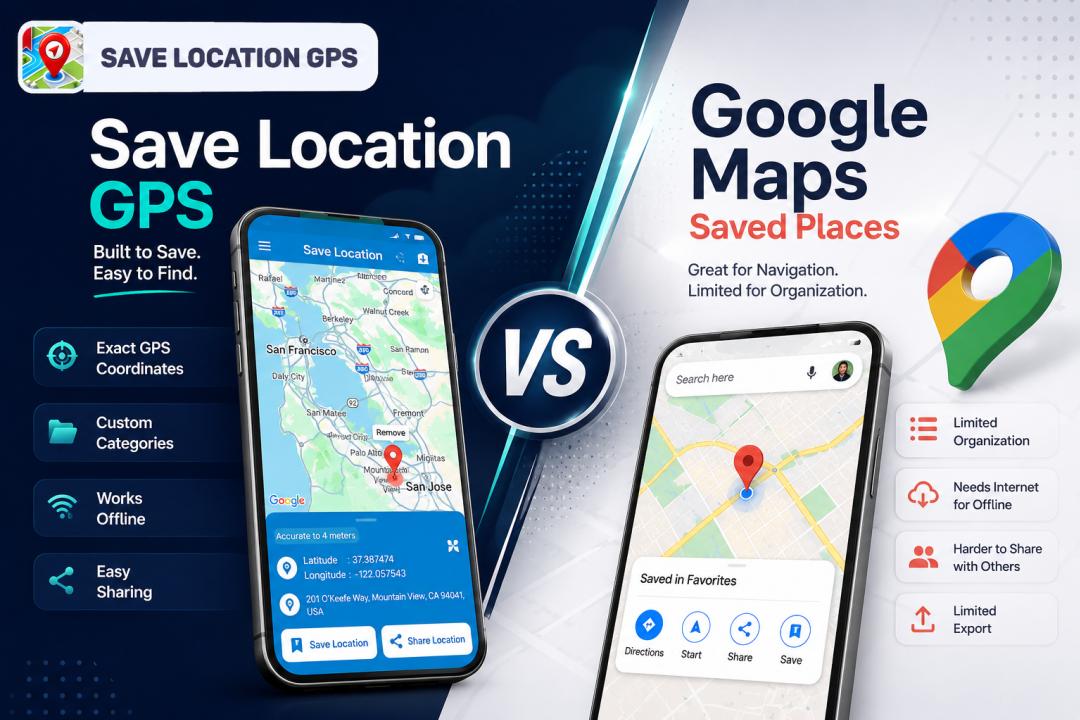
When you need to save location GPS data fast, two apps come to mind: Save Location GPS and Google Maps. Both let you pin a spot and come back to it later. But they work very differently, and choosing the wrong one for your needs will cost you time every single day.
Most people default to Google Maps because it's already on their phone. That's fair. But "already installed" and "built for this job" aren't the same thing. Google Maps is a navigation product. Location saving is a feature added on top of it. Save Location GPS is built from the ground up to store, sort, and share exact GPS coordinates, and that difference in purpose shows up across every part of the experience.
This comparison covers how both apps work, where each one falls short, and which one makes more sense depending on how you actually use saved locations.
What Is Save Location GPS and How Does It Work?
Save Location GPS is a dedicated location storage app. That's the whole product. You open it, it captures where you are, you name the spot and save it. The app is built around that action, and every other feature exists to make storing, finding, and sharing exact GPS coordinates easier.
Saving Exact GPS Coordinates Within Seconds
When you're standing at a spot you want to save, the app captures your precise latitude and longitude immediately. No searching for a business name. No dragging a pin to the right spot on a zoomed-in map. You tap save, give the location a name, and you're done. The coordinates are stored exactly where you were standing.
For anyone who saves work site locations, remote outdoor spots, or unmarked access points, that speed and precision matters a lot more than it might sound.
Organizing Locations Into Custom Categories
This is one of the clearest advantages of a dedicated gps location organizer app. You can create your own categories and sort every saved location into them as you go. Work locations in one folder, hiking locations in another, travel spots in a third.
Useful ways to organize a large location collection:
- By purpose: Work, hiking, travel, family, food
- By project: Client A, Client B, Q3 field sites
- By region: Northern route, south side, out of state
- By access type: Key required, open gate, appointment only
- By revisit priority: Active, archived, backup spots
The point is that the categories are yours. You decide the system before you have 300 unsorted pins.
Sharing Saved Locations With Family or Teams
Sharing a saved spot takes one tap. The app sends the exact GPS coordinates and location name in a format that opens in any map app the recipient uses. No screenshots. No "it's near the big tree past the second left." For small teams and families dealing with remote or non-standard locations, this is genuinely one of the most useful things the app does.
Finding Previously Saved Locations Instantly
In-app search pulls up saved spots by name instantly. Pick a category or type a few letters and the right location appears. When you've got hundreds of saved GPS places, that search function is not a nice-to-have. It's the difference between the app being useful and not.
How Google Maps Saved Places Actually Work?
Google Maps has a built-in saved places system that most people use without thinking much about it. You tap a location, hit save, choose a list, and move on. It works, and it's familiar.
Different Ways to Save Places on Google Maps
There are a few different ways to save a location in Google Maps:- Tap on a listed business or landmark and hit the save icon to add it to a list
- Long-press a blank area on the map to drop a pin at an unlisted location
- Search for an address and save the result
- While navigating, save your current destination directly from the route screen
- In Street View, save the location you're viewing
For places that already exist in Google's database, the first method is fast and easy. For locations without an address or listing, you're usually dropping a pin and hoping you've got it in the right spot.
Common Limitations Users Eventually Notice
The limitations tend to be invisible until you hit them. Here are the ones that come up most often:
- Large list management is clunky - Scrolling through 150+ saved places to find one is genuinely painful
- Offline access isn't automatic - Without pre-downloading a region, your saved places may not load without a data connection
- Sharing isn't seamless for non-Google users - Links work best between Google Maps users; sharing with someone on Apple Maps adds friction
- Export options are limited - Getting your google maps saved locations out of Google's system in a portable format is harder than it should be
- Coordinate precision is secondary - The app isn't designed around exact GPS coordinates, so saving a specific gate or trail junction can feel imprecise
- Your data lives in Google's ecosystem - That's fine for most people, but it's worth knowing
Save Location GPS vs Google Maps Feature Comparison
Here's a direct side-by-side look at how the two apps handle the features that matter most for serious location saving.
Feature Save Location GPS Google Maps Saved Places Save current location speed One tap, instant capture Multiple steps, pin or search required GPS coordinate accuracy Exact lat/lon stored Depends on how pin is placed Custom categories Unlimited, user-defined Fixed lists with limited nesting In-app search Fast, name and category based Basic, mixes saved places with general map search Sharing locations One-tap coordinate share, works in any map app Google Maps link, works best in Google Maps Offline access Coordinates stored locally, no internet needed Requires pre-downloaded offline maps Export options GPS coordinates exportable Limited, tied to Google ecosystem Works without an address Yes, coordinates only Partial, requires pin drop Best for large collections Yes, built for volume No, gets unwieldy past ~100 places Navigation integration Share to navigation app Built-in navigation Account dependency Minimal Requires Google account
Saving GPS Coordinates Versus Saving Addresses
Why Exact Coordinates Matter in Many Situations
An address gets you to a building. Coordinates get you to a specific point. A delivery address might be accurate and still put you at the wrong entrance. A hiking destination might have an address for the nearest town and nothing more useful than that. A work site on a large property might have one address for a building that's 400 meters from where you actually need to be.
When Street Addresses Are Not Precise Enough
Here are situations where an address genuinely isn't enough:
- Farm and rural properties with multiple gates, sheds, or outbuildings on a single address
- Construction sites where the entrance, site office, and delivery bay are all different points
- Hiking and camping where the trailhead, the campsite, and the water source each need their own precise location
- Fishing, hunting, and outdoor recreation spots that have no address at all
- Emergency or safety locations where exact coordinates could matter a great deal
- International travel in places where addresses aren't standardized or consistently geocoded
An app to save locations with coordinate-level precision handles all of these. A basic address-based bookmarking system doesn't.
Choosing the Best Format for Your Locations
For urban locations with clear addresses, either format works fine. But if you regularly save places in rural, outdoor, or non-standard settings, coordinates are the only reliable format. The best save gps coordinates app stores both the human-readable address and the exact lat/lon so you have both when you need them.
Which App Is Better for Different Types of Users?
The honest answer is that it depends on what you're actually doing with your saved locations.
Best Choice for Frequent Travelers and Tourists
For city travel between restaurants and hotels, Google Maps is genuinely fine and you probably know how to use it already. But if you're traveling to places with limited connectivity, saving spots from local tips rather than Google listings, or managing more than a few dozen locations across a trip, a dedicated save travel locations app with offline support is worth adding to your toolkit.
Traveling internationally in particular exposes Google Maps' offline gaps in a way that staying local doesn't. If your data plan doesn't work in the country you're in, pre-downloaded offline maps are your safety net. But they don't always cover your exact saved places the way you'd expect.
Better Option for Delivery and Field Workers
Save Location GPS is the more practical tool here. The ability to save work site locations with exact coordinates, categorize them by client or project, share them with team members in one tap, and access them offline without pre-planning is a set of features that matches how field work actually operates.
Delivery and field workers often deal with locations that don't fit neatly into Google's map database. Back entrances, access codes, parking instructions, gate locations on large properties. A gps bookmark app that stores the exact spot and lets you add notes handles these cases cleanly.
Ideal Solution for Outdoor and Hiking Trips
Save hiking locations with exact coordinates. That's the need. Save Location GPS handles it directly. A trailhead coordinate that's 100 meters off can mean starting on the wrong path. A campsite coordinate that's slightly imprecise means searching in the dark. For outdoor use, precision and offline access aren't optional features. They're the point.
Tips for managing hiking locations well:
- Save the trailhead, the campsite, and any key waypoints as separate named locations
- Add notes to each location with approach details or conditions
- Create a trip-specific category for each hike or expedition
- Export your coordinates before the trip in case your phone needs a reset
Recommended Choice for Everyday Personal Use
For most people saving a handful of places a month, Google Maps is enough. Your gym, a few restaurants, your parents' house. That use case doesn't need a dedicated app.
But the moment your collection grows past 50 places, or you need to share an exact spot with someone, or you're in an area with no data, the friction starts to appear. If you've already noticed that friction in Google Maps, that's usually the signal.
Better Ways to Organize Large Location Collections
Most people don't think about organization until their saved places list is already a mess. A bit of structure upfront saves a lot of frustration later.
Creating Categories That Keep Places Organized
Build your category system before you need it. A few simple principles:
- Use purpose-based categories over geographic ones (Work beats "Downtown")
- Create project folders if you're saving locations for specific clients or trips
- Separate active from archived so locations you no longer need don't clutter your active list
- Name every location clearly at the moment of saving, not later. "Mike's farm back gate" is findable six months later. "Gate 2" is not.
- Add short notes to locations where context matters: access codes, landmarks near the spot, or who to call when you arrive
Finding Saved Locations Faster With Search Tools
Good naming is more important than any app feature. Tags and descriptive names inside a location management app make search fast. Vague names make it slow regardless of how good the search tool is.
Avoiding Duplicate and Unnecessary Locations
Duplicates build up when you save the same spot twice under different names or forget you already have it. A quick review once every month or two keeps your collection clean. Delete spots you won't return to. Rename anything saved in a hurry with a placeholder title.
Offline Access, Backup, and Device Synchronization
Losing access to your saved locations at the wrong moment is more common than people expect. A dead data connection, a lost phone, or an app that didn't sync properly can leave you stranded at a location you can't find again. Getting your offline access, backup, and sync setup right before you need it is the kind of small habit that saves a lot of frustration later.
Accessing Saved Locations Without Internet Access
Save Location GPS stores coordinates locally on your device. No connection needed. Google Maps requires either active data or a region you've pre-downloaded in offline mode. For remote areas, travel in countries with expensive data, or anywhere you might lose signal, this is a real difference.
The situations where offline location access matters most:
- Remote hiking areas beyond cell coverage
- International travel with limited data plans
- Rural field work in low-signal areas
- Emergency situations where you need a saved location immediately without waiting for maps to load
Backing Up Important Location Information Safely
Phones get lost. Apps get uninstalled. If your location collection is important to your work or safety, back it up. Export your coordinates to a file periodically and store it somewhere you can recover it. Don't rely on one app on one device as your only copy of locations that matter.
Syncing Saved Locations Across Multiple Devices
Google Maps has a real advantage here. Your saved places sync automatically across every device you're signed into. Save Location GPS syncing depends on the app's export and import tools. If you use multiple devices regularly, check how sync works before you commit to building a large collection in a single-device app.
Privacy and Security of Your Saved Locations
Your saved locations say a lot about you. Where you work, where you live, where you go regularly. That's not information most people think about when they're quickly saving a spot on a map, but it's worth a moment of consideration when choosing which app holds all of it. Both apps handle privacy differently, and knowing the basics helps you make a more informed choice.
Controlling Who Can Access Your Saved Places
Both apps require you to actively share a location. Nothing leaves the app automatically. But the platforms themselves work differently. Google Maps is part of your Google account, which means your saved places are part of your Google data profile. That's worth knowing.
Keeping Sensitive GPS Locations More Private
If you're saving locations for private or security-sensitive reasons, a standalone location storage app that keeps data on your device is the more private option. The data doesn't feed into a large tech company's profile of your behavior and movements. For most people that distinction is minor. For some it matters.
Pros and Cons of Both Location Saving Methods
Biggest Advantages of Save Location GPS
- Captures exact GPS coordinates at your current position in one tap
- Custom category system scales to hundreds of locations without getting messy
- Works fully offline without pre-downloaded maps
- Sharing works across any map app the recipient uses
- Built specifically for location saving, not navigation with saving tacked on
- Doesn't require a Google account
Strongest Benefits of Google Maps Saved Places
- Already installed on most Android and iPhone devices
- Syncs automatically across all devices via your Google account
- Saved places include business photos, hours, reviews, and contact info
- Navigation from a saved place to turn-by-turn directions is one tap
- Familiar interface most people already know how to use
- Good for saving places that already exist in Google's map database
Limitations You Should Know Before Choosing
Google Maps saved locations:
- Organization gets messy fast with large collections
- Limited export options make your data feel locked in
- Offline access requires planning ahead
- Sharing works best between Google Maps users
- Coordinate precision isn't the focus
Save Location GPS:
- Not a navigation app. You'll still open Google Maps or Apple Maps to drive somewhere
- Device sync depends on export/import, not automatic background sync
- Places aren't pre-populated with business info, photos, or hours
- Less useful for saving places that already have a full Google listing
Try Save Location GPS for Free
If you've been relying on Google Maps saved places and hitting its limits, Save Location GPS is worth trying. It's free to download, takes about two minutes to set up your first categories, and the difference in how fast you can save and find locations is immediately obvious.
Download Save Location GPS and start organizing your locations the right way:
- Save exact GPS coordinates in one tap, anywhere you're standing
- Build custom categories that actually match how you work
- Share precise locations with your team or family instantly
- Access every saved spot offline, no data needed
Your locations are too important to live in a disorganized list inside an app that wasn't built to hold them. Visit savelocationgps.com to get started.