
Customers expect more from digital platforms than the ability to browse products or submit a support request. They want to access their accounts, track orders, manage subscriptions, review invoices, and receive relevant information without repeatedly contacting customer service teams.
However, many businesses still manage customer interactions through disconnected websites, email conversations, separate applications, and manual support processes. This creates friction throughout the customer journey and makes it difficult to deliver a consistent experience.
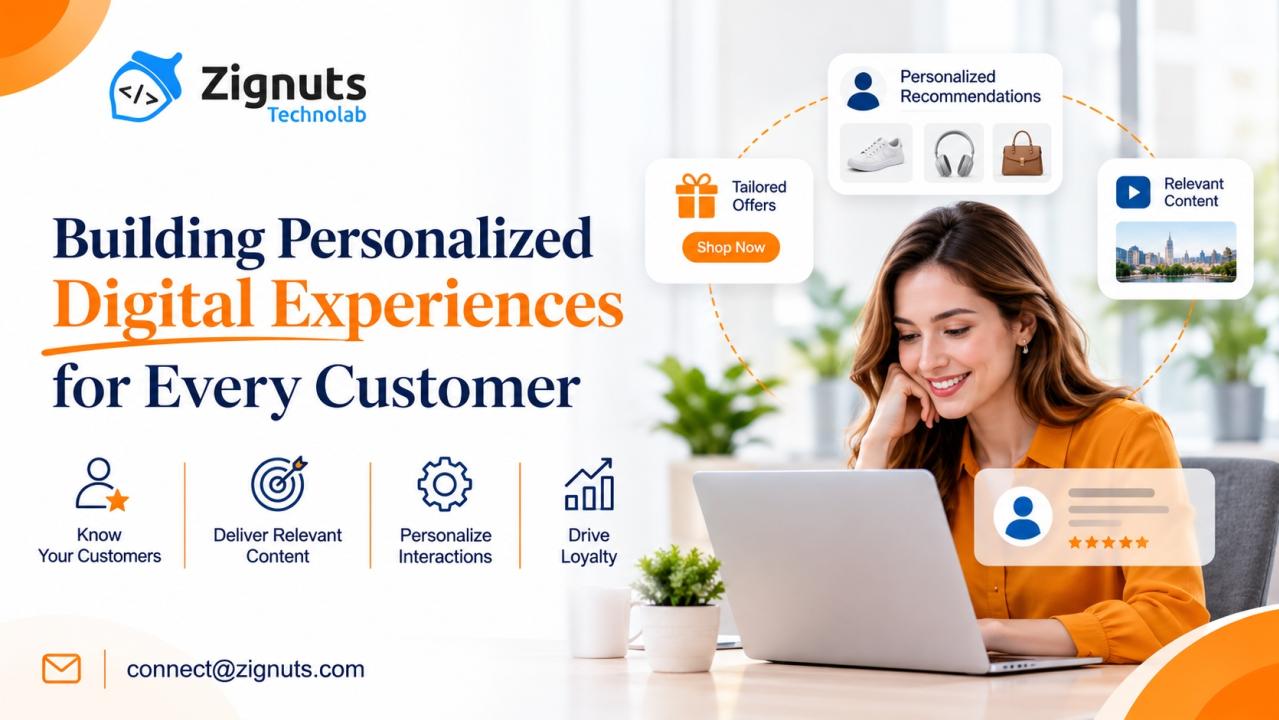
B2C Portal Development Services help businesses create customer-focused digital platforms where users can manage their relationships with a company through a single, convenient interface. From account management and personalized recommendations to order tracking and self-service support, a well-designed B2C portal makes everyday customer interactions easier.
The objective is to create an experience that feels relevant to each customer while helping businesses improve engagement, service efficiency, and long-term customer relationships.
B2C Portal Trends Shaping Customer Experiences in 2027
Customer expectations continue to evolve as digital commerce, mobile experiences, and AI-powered services become more common. In 2027, B2C portals will increasingly focus on personalization, convenience, and connected customer journeys.
| B2C Portal Trend for 2027 | Customer-Facing Application | Business Opportunity |
|---|---|---|
| AI-powered personalization | Relevant products and content recommendations | Improved customer engagement |
| Conversational self-service | AI assistants for common customer questions | Reduced support workload |
| Omnichannel experiences | Connected website, mobile, and service interactions | Consistent customer journeys |
| Real-time account updates | Live order, payment, and subscription information | Greater customer confidence |
| Personalized loyalty experiences | Individual offers and reward information | Stronger customer retention |
These trends highlight an important shift: customers increasingly expect businesses to understand their preferences and make digital interactions straightforward.
Why Businesses Need Customer-Focused Portals
A business website may explain products and services, but customers often need a dedicated environment to manage their ongoing relationship with the company.
A B2C portal provides this functionality through secure, personalized access.
Customers Want More Control Over Their Accounts
Customers frequently need to update personal details, manage addresses, review transactions, download invoices, or change subscription preferences.
If these activities require contacting customer support, even simple requests can become frustrating.
A customer portal allows users to manage many routine activities independently, reducing unnecessary communication and improving convenience.
Disconnected Interactions Affect Customer Satisfaction
Consider a customer who purchases a product online and later contacts support to check delivery status. If the support team cannot access the same order information displayed on the website, the customer may need to explain the situation again.
A connected portal can bring account information, order history, and support requests together. This helps create a more consistent experience across customer interactions.
Manual Support Processes Increase Operational Costs
Businesses often receive repetitive questions about orders, invoices, returns, subscriptions, and account access.
A portal can provide self-service features that help customers find answers and complete common tasks without requiring direct assistance.
Customer service teams can then focus more attention on complex requests that need personal support.
What Makes a B2C Portal Experience Personalized?
Personalization should help customers find relevant information and complete tasks more easily. It should not simply display different colors or promotional banners.
Individual Customer Dashboards
A personalized dashboard can present information based on the customer's account and activity.
For example, an ecommerce customer might see recent orders, delivery updates, saved products, available rewards, and recommended items.
A subscription customer may instead see renewal dates, active plans, billing information, and service preferences.
The dashboard should prioritize information that helps the customer take the next relevant action.
Customer Preferences and Account Settings
Customers should be able to manage their communication preferences, addresses, notification settings, saved payment methods through secure payment providers, and other relevant account details.
Clear preference management helps businesses deliver more relevant communications while giving customers greater control over their information.
Personalized Product and Service Recommendations
Recommendation features can help customers discover products or services based on relevant browsing behavior, purchase history, preferences, or other permitted data.
These recommendations should be useful rather than intrusive. Customers should also have appropriate options to manage personalization and privacy settings.
Contextual Customer Support
A portal can display support options based on the customer's current activity.
For example, a user viewing an order may be able to report a delivery issue directly from that order. A subscription customer might see renewal assistance when reviewing an upcoming billing date.
This connects support with the customer's actual situation.
Essential Features of a Modern B2C Portal
The right functionality depends on the business model, customer expectations, and the services being offered. Several features are useful across many B2C environments.
| Portal Feature | How It Supports Customers | Business Benefit |
|---|---|---|
| Customer account management | Updates personal details and preferences | Better account administration |
| Order and transaction history | Displays purchases and order status | Greater transparency |
| Self-service support | Handles common requests and questions | Lower repetitive support workload |
| Personalized recommendations | Suggests relevant products or services | Improved engagement |
| Subscription management | Manages plans, renewals, and cancellations | Better customer control |
| Notifications and alerts | Communicates important account updates | More timely communication |
These features should work together rather than operate as isolated modules. For example, an order notification should link to the relevant order details, while a support request should be associated with the customer's account and transaction history.
How B2C Portals Improve the Customer Journey
A customer journey includes multiple stages, from discovering a business to purchasing, receiving support, and returning for future transactions.
A portal can support each stage through connected digital services.
Before Purchase: Helping Customers Make Informed Choices
Customers may need product information, service comparisons, availability, saved items, or answers to common questions before making a purchase.
A portal can organize these resources and provide personalized information based on the user's interests and account activity.
During Purchase: Simplifying Transactions
A convenient purchasing experience should make it easy to review selections, confirm details, apply eligible offers, and complete checkout.
Integration with inventory, pricing, and payment services helps maintain accurate transaction information.
After Purchase: Providing Visibility and Support
The relationship does not end after payment.
Customers may need delivery updates, invoices, warranties, product documentation, returns, or support services.
A portal can centralize these resources and help users manage post-purchase activities without navigating separate channels.
Long-Term Engagement: Encouraging Continued Relationships
For businesses that depend on repeat purchases or subscriptions, the portal can support loyalty programs, renewal management, personalized offers, and relevant updates.
These features can help maintain customer engagement while giving businesses better visibility into customer interactions.
Integrating a B2C Portal With Business Systems
A customer-facing portal must communicate with the systems responsible for managing products, accounts, transactions, and customer service.
CRM Integration
CRM integration allows the portal to connect customer profiles, communication history, service requests, and relevant account information.
This helps support teams understand previous interactions and provide more consistent assistance.
ERP and Order Management Integration
ERP and order management systems can provide information about orders, inventory, invoices, fulfillment, and transaction status.
For example, when an order is dispatched, the updated status can become available in the customer's portal.
Payment Gateway Integration
Payment integrations allow customers to complete transactions through supported payment providers.
Businesses should use secure payment processing methods and avoid unnecessarily storing sensitive card information within the portal.
Marketing and Communication Integration
Email, SMS, and notification services can help communicate order confirmations, delivery updates, account changes, and other relevant information.
Communication preferences should be respected, and promotional messages should follow applicable consent and privacy requirements.
Customer Support Integration
Connecting the portal with helpdesk or customer service platforms can allow users to submit requests, review previous cases, and receive updates.
Support agents can also access relevant information without repeatedly requesting details from customers.
The Technology Architecture Behind a B2C Portal
A B2C portal must provide a responsive customer experience while managing secure access, transactions, integrations, and personalized data.
Frontend Development
The frontend determines how customers interact with the platform. Frameworks such as React and Next.js can support responsive interfaces, reusable components, interactive dashboards, and personalized content.
The experience should be simple enough for customers with different levels of technical familiarity.
Backend Services
Backend services handle account operations, business rules, transaction processing, customer preferences, and communication with connected systems.
A modular backend makes it easier to introduce new customer features without unnecessarily affecting existing functionality.
Database and Customer Data Management
Customer information should be organized with clear data ownership and appropriate access controls.
The architecture should support accurate account records, transaction history, preferences, and other relevant information while avoiding unnecessary duplication.
API and Integration Layer
APIs connect the portal with CRM, ERP, payment, inventory, marketing, and customer support platforms.
An integration layer should manage authentication, validation, data transformation, error handling, and synchronization between systems.
Cloud Hosting and Performance
The hosting environment should support the portal's availability, security, and performance requirements.
Caching, content delivery networks, optimized database queries, and performance monitoring can help deliver responsive experiences, particularly during high-traffic periods.
Using AI to Make Customer Portals More Helpful
AI can improve customer experiences when it addresses genuine needs rather than being introduced simply as a feature.
An AI assistant can help customers find information about products, understand service policies, locate relevant account details, or navigate common support processes.
Recommendation systems can identify relevant products or services based on permitted customer data. AI-powered search can also make it easier to locate information using natural-language questions.
However, businesses should introduce appropriate safeguards. AI assistants must respect account permissions, protect personal information, and avoid making unsupported claims about orders, payments, or company policies.
For sensitive activities such as refunds, account changes, and financial transactions, suitable verification and human review may be necessary.
A Practical Roadmap for B2C Portal Development
Building a customer portal requires a clear understanding of the customer journey and the business systems supporting it.
1. Understand customer expectations. Identify the most common customer activities, questions, and service challenges. Use support records and customer feedback to find areas where a portal can reduce friction.
2. Define the portal's purpose. Decide whether the primary objective is account management, ecommerce, subscription services, customer support, or a combination of capabilities.
3. Plan the customer experience. Map the key journeys, navigation structure, dashboard content, and self-service workflows. Keep frequent activities easy to find.
4. Assess integration requirements. Review CRM, ERP, payment, inventory, marketing, and support systems. Determine which information needs to be synchronized and how frequently.
5. Establish security and privacy controls. Define authentication, permissions, data retention, consent, and customer information protection requirements.
6. Develop the essential features. Begin with high-value capabilities such as account management, order history, and support requests. Introduce additional features based on customer needs.
7. Test real customer journeys. Validate registration, login, purchases, payments, account updates, notifications, and support workflows across different devices.
8. Monitor and improve. Measure customer adoption, task completion, support volume, and satisfaction. Use the findings to guide future enhancements.
Protecting Customer Data and Building Digital Trust
Personalization depends on customer information, making privacy and security essential parts of B2C portal development.
Businesses should use secure authentication, appropriate session management, encryption, access controls, and audit logging. Sensitive operations should require suitable verification.
Data collection should be limited to information that supports a legitimate business purpose. Customers should receive clear information about how their data is used and should have appropriate controls over communication and personalization preferences.
Regular security testing, dependency updates, access reviews, and incident response planning help maintain the platform as it evolves.
Measuring the Success of a B2C Portal
A customer portal should be evaluated through improvements in customer experience and operational performance.
Businesses can track:
Customer registration and active portal usage.
Self-service task completion rates.
Average time required to resolve common requests.
Reduction in repetitive support inquiries.
Checkout and transaction completion rates.
Customer satisfaction and feedback.
Repeat purchase and subscription renewal activity.
Portal performance and account-related errors.
These indicators help businesses understand whether the platform is making customer interactions easier and supporting stronger relationships.
FAQs
1. What is a B2C portal?
A B2C portal is a customer-facing digital platform that allows individuals to access account information, manage purchases, track orders, request support, and use personalized services.
2. How is a B2C portal different from an ecommerce website?
An ecommerce website primarily supports product discovery and purchasing. A B2C portal provides broader account-related functionality, including order history, personal preferences, subscriptions, invoices, support requests, and self-service features.
3. Can a B2C portal provide personalized customer experiences?
Yes. A portal can use account preferences, permitted customer activity, and relevant transaction information to personalize dashboards, recommendations, notifications, and support experiences.
4. Can a B2C portal integrate with CRM and ERP systems?
Yes. CRM and ERP integrations can connect customer profiles, order information, inventory, invoices, and other business records. The specific integration approach depends on the systems involved.
5. Can customers manage subscriptions through a B2C portal?
Yes. Subscription portals can allow customers to review plans, update preferences, view billing information, manage renewals, and access supported cancellation or plan-change options.
6. How can businesses improve customer adoption of a portal?
Businesses should make registration straightforward, prioritize frequently used features, provide clear navigation, ensure mobile responsiveness, and explain how the portal helps customers complete common activities.
Conclusion: Make Every Customer Interaction More Meaningful
Customer expectations are changing. People want convenient access to information, control over their accounts, personalized services, and support that understands their situation.
A well-designed B2C portal brings these capabilities into one connected environment. It can reduce repetitive support requests, improve transaction visibility, simplify account management, and help businesses deliver more consistent digital experiences.
The most effective portals begin with customer needs rather than a long list of features. By combining intuitive design, reliable integrations, secure data management, and useful personalization, businesses can create a platform that makes everyday interactions easier and supports stronger customer relationships over time.