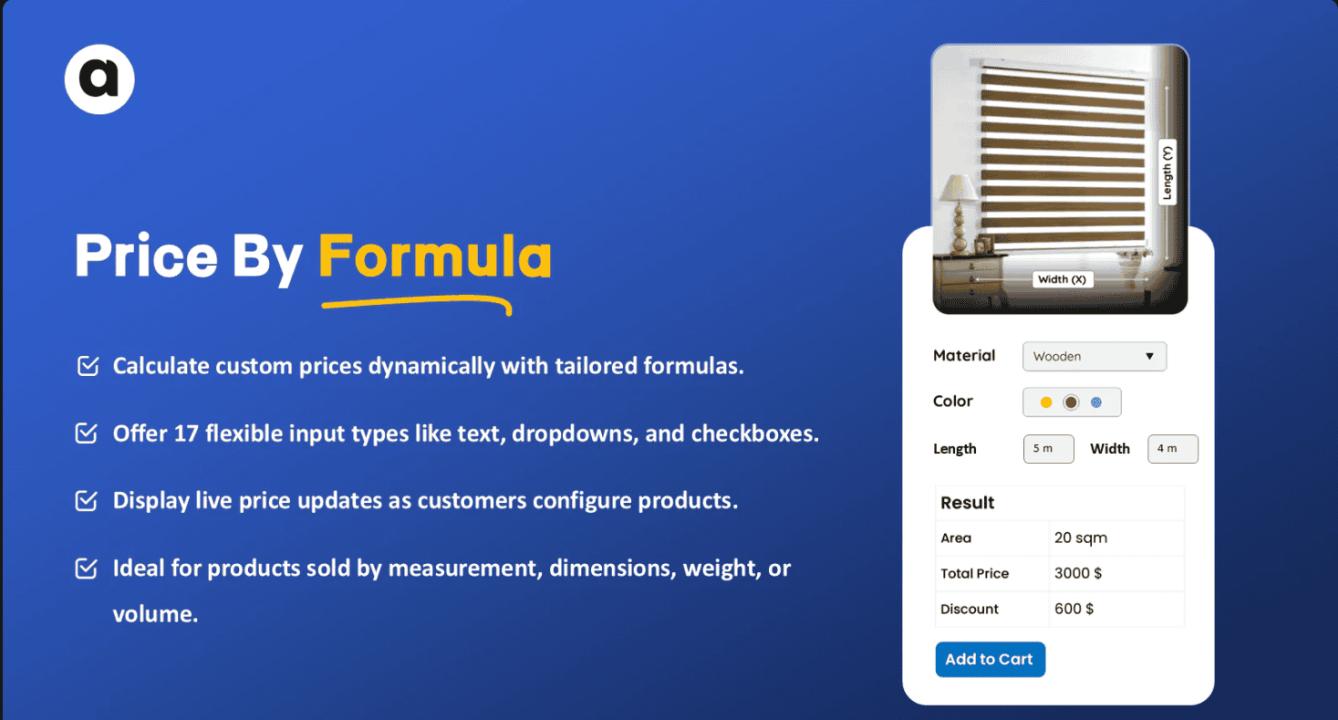

Pricing your products correctly on Shopify is essential to running a profitable store. Set prices too high, and you may scare off potential buyers. Set them too low, and you risk cutting into your margins. That’s where a Shopify Pricing Calculator comes in—a smart tool that helps merchants automatically calculate product prices based on formulas, cost inputs, and business rules.
Whether you're managing a large catalog, selling custom products, or adjusting prices based on customer groups, using a pricing calculator app like PC Price Calculator by Formula or Addify ‑ Dynamic Pricing can simplify operations and improve accuracy.
What Is a Shopify Pricing Calculator?
A Shopify Pricing Calculator is an app or built-in functionality that lets merchants define custom pricing logic for their products. Rather than setting a fixed price manually for each item, merchants use formulas to calculate final prices automatically.
This is especially useful for:
- Custom-sized products (e.g., flooring, fabrics, posters)
- Wholesale pricing based on quantity or customer type
- Real-time price adjustments based on variable inputs (e.g., weight, length, material)
- Dynamic bulk discounts and promotional pricing
These tools not only save time but also help avoid manual errors, ensuring consistent, fair pricing for both the business and customers.
How Does It Work?
Here's a step-by-step overview of how a pricing calculator typically works on a Shopify store:
1. Install a Pricing Calculator App
Shopify doesn’t offer built-in formula-based pricing, so you’ll need an app like PC Price Calculator by Formula or Addify ‑ Dynamic Pricing from the Shopify App Store. These apps plug into your product pages and let you configure advanced pricing logic.
2. Define Product-Specific Rules
Once installed, you can assign a formula to each product or product group. For example:
mathematica
CopyEdit
Final Price = (Length x Width x Material Cost) + Labor Charge
These formulas calculate real-time prices based on the user’s input. If a customer selects specific dimensions or material types, the price automatically updates on the product page.
3. Customize Input Fields
Apps like PC Price Calculator allow you to add custom fields on the product page (e.g., dimensions, weight, color, etc.). This lets customers enter or choose specific options that feed into the formula.
4. Set Discounts or Tiered Pricing
Apps like Addify ‑ Dynamic Pricing let you create quantity breaks or tiered pricing strategies. For instance, “Buy 5–10 units, get 10% off,” or “Buy 20+, get 25% off.” These dynamic adjustments encourage bulk purchases and reward loyal customers.
5. Preview and Test
You can preview how pricing updates based on different customer inputs or order quantities. Always test the user experience to ensure the form works seamlessly and accurately displays the calculated price.
Benefits of Using a Pricing Calculator
- Saves Time: Automates complex pricing structures
- Improves Accuracy: Eliminates manual entry errors
- Boosts Conversions: Offers transparency and custom pricing
- Supports Custom Products: Essential for made-to-order businesses
- Scales Easily: Adjust rules for multiple products or categories at once
Final Thoughts
A Shopify Pricing Calculator is more than just a convenience—it’s a critical tool for merchants with complex pricing needs. Whether you’re selling custom-length materials, offering bulk discounts, or handling wholesale customers, a pricing calculator app helps streamline operations and create a smooth shopping experience.
If you’re looking to boost efficiency and enhance customer satisfaction, exploring dynamic pricing tools on the Shopify App Store is a smart place to start.