You're standing in the router aisle or scrolling through tabs late at night. You see two boxes that look nearly the same. One says "WiFi 6" and the other "WiFi 6E." The price difference makes you question whether that extra letter is just a marketing gimmick or a real improvement for your home network. If you've ever experienced video calls freezing when someone else in the house starts streaming, or if your smart devices lose connection for no clear reason, you know how annoying a weak or crowded network can be. Choosing the wrong router won’t solve those issues. Let’s break down WiFi 6 and 6E in simple terms, without all the technical jargon, so you can decide which one suits your home and your budget.
WiFi 6: The Foundation That Changed Home Networking
WiFi 6, or 802.11ax, offered a significant upgrade over the previous WiFi 5 standard. It provided faster top speeds, but it also improved how networks handle many devices trying to use bandwidth at the same time.
Think about a typical household today. You might have a couple of phones, one or two laptops, a smart TV, several smart speakers, maybe a doorbell camera, a gaming console, and a tablet left charging in the kitchen. All of these devices are constantly communicating with your router, even when you're not using them. Older routers manage this by taking turns, which can get messy quickly. Wi-Fi 6 comes with technology that lets the router talk to multiple devices at the same time and more effectively. This reduces lag and dropped connections, even when your network is busy.
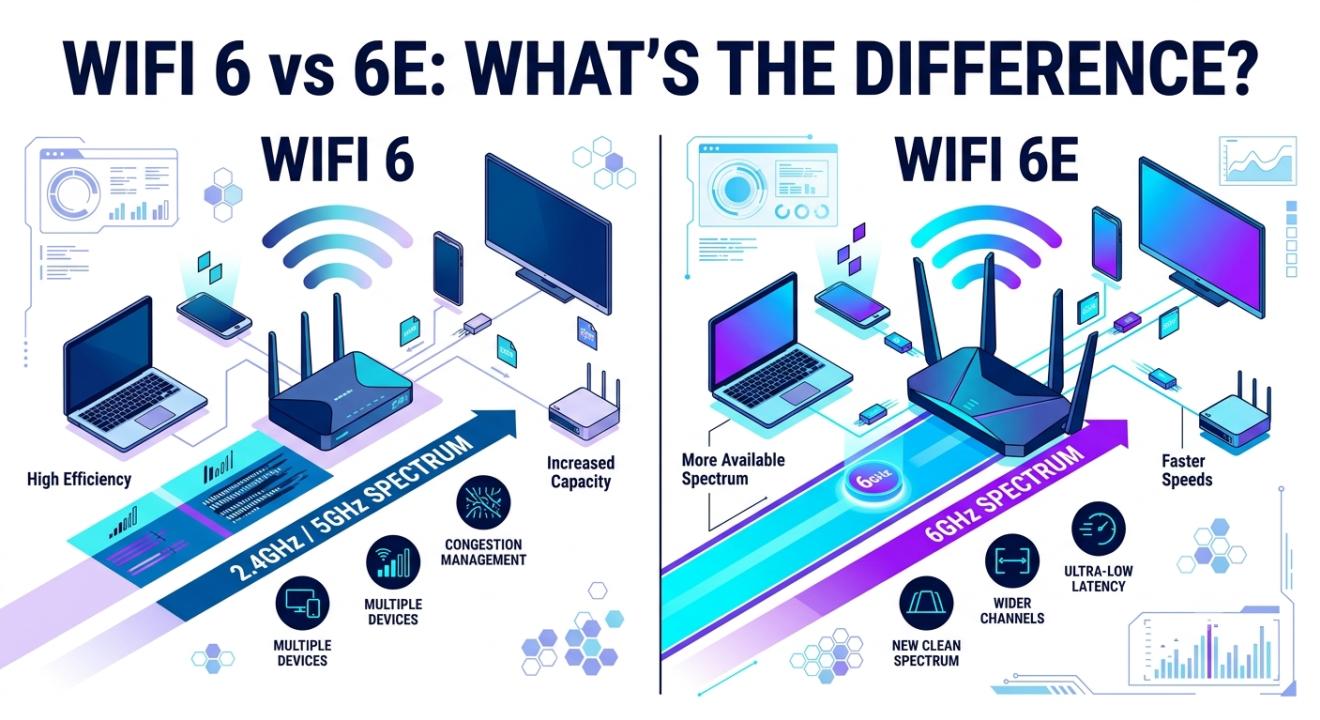
WiFi 6 operates on the 2.4 GHz and 5 GHz bands, just like WiFi 5 and earlier standards. This is beneficial for compatibility, as most devices already use these frequencies. However, it also means WiFi 6 competes for airspace with your neighbor's network, your microwave, baby monitors, and nearly every other device in the area that uses these common bands.
WiFi 6E: Same Core Tech, Brand New Real Estate
Here's where things get interesting. WiFi 6E isn't a completely different technology. It builds on the same foundation as WiFi 6, keeping all those efficiency improvements. The "E" stands for "Extended," and what it extends is access to a new frequency band: 6GHz.
This 6GHz band is like a wide-open highway for WiFi traffic that never existed before. Since it's so new, it doesn't have older devices, nearby networks, or interference from other electronics cluttering it. For people living in apartment buildings with many overlapping WiFi networks or in busy homes where the 5GHz band feels crowded during peak times, this open space can greatly improve consistency and speed.
The catch is that 6GHz signals don’t travel as far and don’t penetrate walls as well as lower-frequency bands. You get a cleaner, faster connection. However, the range is shorter. This means the placement of your router or a mesh setup is more important with WiFi 6E.
WiFi 6 vs 6E: The Real-World Differences That Matter
When people compare WiFi 6 and WiFi 6E, the discussion often gets stuck on technical details that don't really matter in everyday life. Here's what actually changes for you:
Frequency bands available: WiFi 6 uses the 2.4 GHz and 5 GHz bands. Wi-Fi 6E adds 6 GHz, giving compatible devices a third, less crowded option.
Interference and congestion: The 6 GHz band is new, so there are fewer devices using it. If you've noticed your WiFi slows down in the evening when everyone's home and streaming, that's congestion, and 6E helps avoid it.
Device compatibility: This is important. WiFi 6E only helps if your devices also support 6E. Most older phones, laptops, and smart home gadgets only support WiFi 6 or earlier. They will connect to your 6E router, but only over the 2.4 GHz or 5 GHz bands, meaning they won't benefit from the new 6 GHz option.
Range and coverage: WiFi 6 generally covers larger areas better because lower-frequency signals travel farther. WiFi 6E's 6 GHz band is faster but has a shorter range, especially through walls and floors.
Price: WiFi 6E routers and devices usually cost more. The technology is newer, and the chipsets for 6 GHz are more complex to make.
So, Which One Do You Actually Need?
Here's the honest answer: for most households, WiFi 6 is more than enough and might even be the smarter choice right now.
If your home isn’t too crowded with networks, like in suburban or rural areas with fewer nearby WiFi signals, and you have a mix of devices, some newer and some a few years old, WiFi 6 will provide a clear upgrade over older standards without requiring you to replace many of your gadgets.
On the other hand, WiFi 6E is useful in a few specific situations. If you live in a crowded building where WiFi congestion is a common issue, if you’ve recently purchased newer devices that support 6E, such as many of the latest phones, laptops, and VR headsets, or if you rely on ultra-low latency for competitive gaming or professional video editing over WiFi, the extra investment can truly be worth it.
It's also important to consider future-proofing. If you plan to keep your router for the next few years and you're gradually upgrading your devices, choosing WiFi 6E now means you won't need to upgrade your router again just to access 6GHz when more of your devices are compatible.
That said, don't feel pressured to go after the latest label just because it exists. A WiFi 6 router, if placed and set up correctly, will resolve most everyday connectivity issues like buffering, dropped video calls, and smart home devices that occasionally disconnect. WiFi 6E focuses less on fixing those usual problems and more on getting extra performance in specific, often crowded, situations.
Wrapping It Up
At the end of the day, choosing between WiFi 6 and WiFi 6E depends on your living situation, your current devices, and how much you're willing to spend for benefits you may not use fully yet. WiFi 6 brought significant improvements in how networks handle multiple devices, and it remains a reliable option for most homes. WiFi 6E builds on this with access to a cleaner 6GHz band, which performs well in crowded areas and works well with newer, compatible devices. However, its shorter range and higher cost mean it's not necessarily the better option for everyone.
Before you make a purchase, take a moment to check how many devices in your home support 6E, how crowded your WiFi environment currently feels, and how long you plan to use this router. That's really all the research you need to make a confident, informed choice.
Frequently Asked Questions
1. Is WiFi 6E backward-compatible with WiFi 6 devices?
Yes. A WiFi 6E router will connect to WiFi 6, WiFi 5, and older devices using the 2.4 GHz and 5 GHz bands. Those devices just won't use the new 6 GHz band.
2. Do I need new devices to benefit from WiFi 6E?
Yes, to use the 6 GHz band, your phone, laptop, or other device must specifically support WiFi 6E. Otherwise, your devices will connect over the older bands as usual.
3. Is WiFi 6E worth the extra cost for a small apartment?
It can be, especially if your building has many overlapping WiFi networks that cause interference. The shorter 6 GHz range matters less in smaller spaces.
4. Will WiFi 6E improve my internet speed from my provider?
Not directly. Your internet speed depends on your service plan. WiFi 6E helps deliver that speed more efficiently to your devices, especially in busy networks.
5. Should I upgrade from WiFi 6 to WiFi 6E right now?
If your current WiFi 6 setup works well and most of your devices don’t support 6E yet, there’s no urgent need to upgrade. It’s often better to wait until more of your devices support 6E to get full value from the investment.