When a webpage is removed from a website, many site owners simply let it return a 404 error. While this approach works in many situations, it isn't always the most efficient option for search engines or website maintenance.
Understanding the difference between 404 and 410 status codes can help improve crawl efficiency, speed up deindexing, and provide clearer signals to search engines.
What Is a 404 Error?
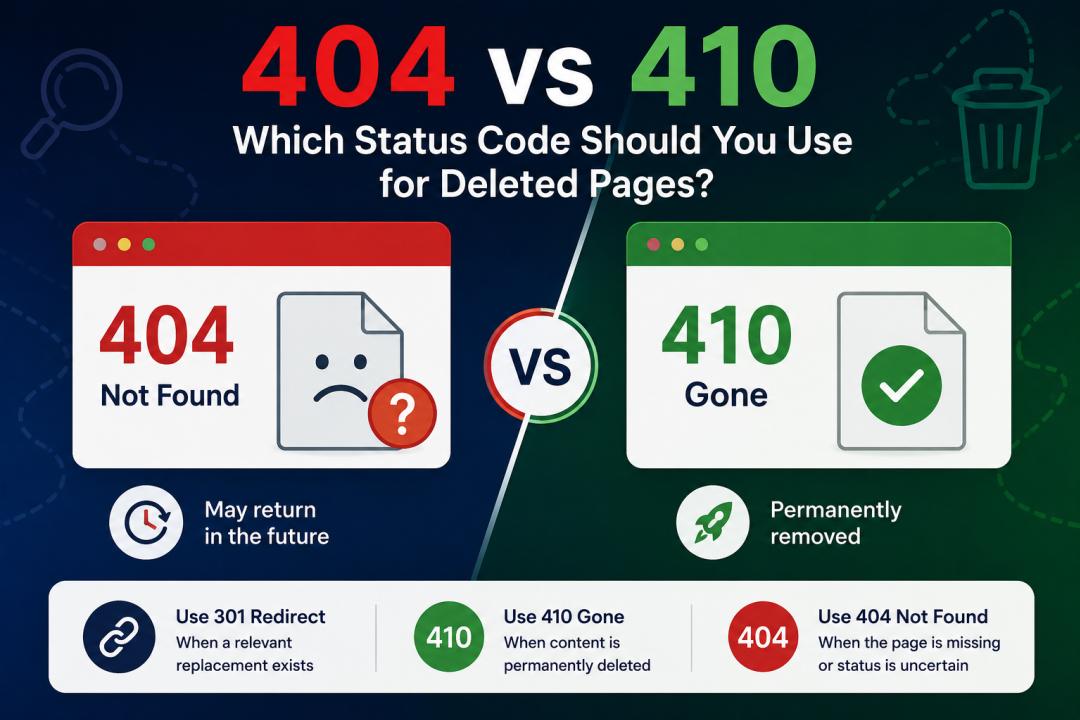
A 404 (Not Found) status code indicates that the requested page cannot be found on the server.
When search engines encounter a 404 page, they typically assume the missing URL may be temporary. As a result, they often continue checking the URL periodically to see if the page returns.
Common Reasons for 404 Errors
- Deleted blog posts
- Changed URLs without redirects
- Broken internal links
- Typing mistakes in URLs
- Removed product or category pages
How Google Handles 404 Pages
Google treats a 404 as a normal part of the web. It understands that pages sometimes disappear. However, Google may continue crawling the URL for weeks or months before removing it completely from its index.
What Is a 410 Error?
A 410 (Gone) status code tells search engines that a page has been permanently removed and will not return.
Unlike a 404, a 410 provides a stronger and more explicit signal that the content is intentionally gone.
How Google Handles 410 Pages
When Google encounters a 410 status code, it generally removes the URL from its index faster than it would for a 404 page. Search engines also tend to stop crawling the URL sooner, helping conserve crawl budget.
404 vs 410: Key Differences
| Factor | 404 Not Found | 410 Gone |
| Indicates Missing Page | Yes | Yes |
| Indicates Permanent Removal | No | Yes |
| Google May Continue Crawling | Longer | Shorter Period |
| Deindexing Speed | Slower | Faster |
| Best For | Temporary or Unknown Removal | Permanent Deletion |
When Should You Use a 404?
A 404 status code is appropriate when:
- The page may return in the future.
- The URL was entered incorrectly.
- Content is temporarily unavailable.
- You are unsure whether the page should be permanently removed.
Examples
- The product page is temporarily unavailable due to stock issues.
- A page was accidentally deleted and expected to be restored.
- Broken or mistyped URLs.
When Should You Use a 410?
A 410 status code is recommended when:
- A page has been intentionally deleted.
- Content is outdated and will never return.
- Spam or low-quality pages are being removed.
- Large-scale content pruning is being performed.
- Old campaign or event pages are permanently retired.
Examples
- Expired promotional landing pages.
- Removed press releases with no future value.
- Thin or duplicate content is being cleaned up.
- Old AI-generated pages were removed during a content audit.
SEO Impact of 404 and 410 Pages
Neither 404 nor 410 status codes directly harm rankings when used correctly.
However, using the appropriate status code can help:
- Improve crawl efficiency
- Reduce unnecessary crawling
- Speed up URL removal from Google's index
- Maintain a cleaner website structure
For permanently removed content, 410 often provides a clearer signal and can accelerate deindexing.
Should You Redirect Instead?
Many website owners redirect every deleted page to the homepage. This is generally not recommended.
Google prefers:
- 301 redirects when a relevant replacement page exists.
- 410 status codes when content is permanently removed.
- 404 status codes when a page is unavailable or missing.
Redirecting unrelated pages can create a poor user experience and dilute relevance signals.
Best Practice Recommendation
Use this simple decision framework:
Use 301 Redirect When:
A highly relevant replacement page exists.
Use 410 Gone When:
The content is permanently deleted and has no replacement.
Use 404 Not Found When:
The page is temporarily unavailable or its future status is uncertain.
Top Thoughts
Both 404 and 410 status codes serve important purposes in technical SEO. While a 404 indicates that a page cannot be found, a 410 clearly communicates that the page has been permanently removed.
For websites performing content cleanup, removing outdated pages, or managing large-scale SEO audits, implementing 410 status codes for permanently deleted URLs can help search engines process those removals more efficiently.
The key is to choose the status code that accurately reflects the page's situation and provides the clearest signal to both users and search engines.