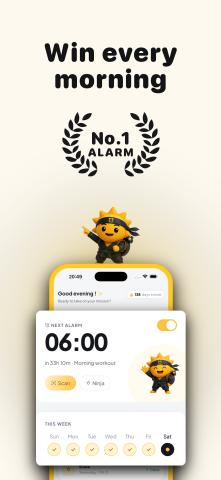
If you've ever set five alarms, hit snooze six times, and still overslept, you're not alone. Traditional alarm clocks rely on willpower, but when you're half asleep, willpower usually loses.
Risly takes a different approach. Instead of letting you tap a snooze button, it removes the snooze button entirely. The alarm only stops after you complete a wake-up mission, making it much harder to fall back asleep.
👉 Official website: https://risly.app/
What Is Risly?
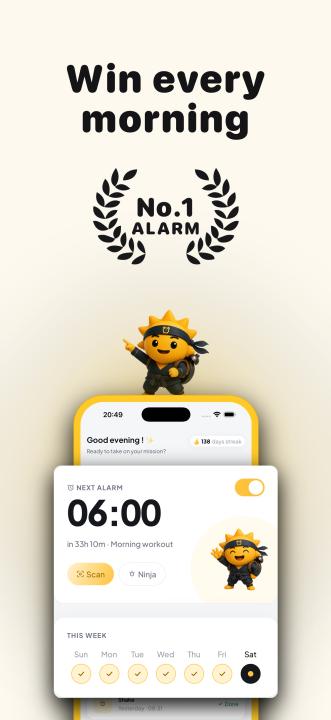
Risly is an anti-snooze alarm app for iPhone built for heavy sleepers and anyone who struggles to get out of bed on the first alarm. Rather than simply playing a sound, the app requires you to complete a physical or mental challenge before the alarm can be dismissed.
According to the website, Risly works through Focus Mode, Do Not Disturb, the silent switch, and even from the locked screen, making it much more difficult to ignore your morning alarm.
Why Traditional Alarms Don't Work
Most alarm apps have the same weakness:
- Unlimited snoozes
- Easy dismiss buttons
- No reason to leave the bed
That creates a familiar cycle:
- Alarm rings
- "Just five more minutes..."
- Repeat several times
- Wake up late and rushed
Risly is designed to break that habit by removing the option to negotiate with yourself.
Learn more about its philosophy here:
Mission-Based Wake Ups
Instead of pressing Stop, Risly asks you to complete a mission.
Available missions include:
📷 Scan an Object
Walk to a real object—such as your coffee machine or toothbrush—and scan it with your camera.
➗ Solve Math Problems
Wake up your brain before the alarm stops.
📱 Shake Your Phone
A simple physical task that helps shake off sleep.
💪 Push-Ups
For people who need the strongest possible wake-up call.
The website also mentions additional missions, including sky photos and missionless mode, planned for future updates.
No Snooze Means No Negotiation
One of Risly's biggest differences is simple:
There is no snooze button.
The website explains that every snooze steals your best sleep while leaving you feeling groggy. Instead of encouraging repeated delays, Risly makes you finish your wake-up mission before silence is earned.
Read more:
Wake-Up Statistics and Streaks
Risly isn't only about waking you up—it also tracks your progress over time.
The app records:
- Wake-up streaks
- Average wake-up time
- Time required to dismiss the alarm
- Favorite mission
Longer streaks unlock progression levels, ranging from Apprentice to Legend, turning consistent mornings into a simple gamified habit.
Built for Heavy Sleepers
Risly is designed specifically for people who:
- Constantly hit snooze
- Sleep through multiple alarms
- Want more consistent mornings
- Need extra motivation to leave bed
Rather than relying on louder sounds alone, the app requires action before the alarm ends.
Risly vs Alarmy
Many people searching for an anti-snooze alarm compare Risly with Alarmy.
Risly has published a detailed comparison explaining how the two apps differ, including their approach to wake-up missions and user experience.
Read the comparison here:
https://risly.app/blog/alarmy-alternatives
Frequently Asked Questions
Does Risly work in Silent Mode?
According to the website, yes. The alarm is designed to ring through Silent Mode, Focus, and Do Not Disturb.
Is there a snooze button?
No. Risly intentionally removes the snooze button.
Which devices are supported?
The website states that Risly is currently built for iPhone running iOS 26 or later.
Is there a free trial?
Yes. Risly offers a 3-day free trial before subscription.
Final Thoughts
Risly isn't trying to become another alarm clock with more sounds or prettier widgets. Its focus is much narrower: helping people stop snoozing and actually get out of bed.
By combining mission-based alarms, the complete removal of the snooze button, wake-up streaks, and progress tracking, Risly offers a different approach to building a consistent morning routine.
If you've tried multiple alarms without success, Risly is worth exploring.
Useful links
- Official website: https://risly.app/
- Anti-Snooze page: https://risly.app/anti-snooze
- Alarmy alternatives: https://risly.app/blog/alarmy-alternatives
- FAQ: https://risly.app/faq