Businesses increasingly rely on web applications to manage operations, serve customers, automate workflows, and connect multiple systems. The right web app development services can help organizations build applications around specific business requirements instead of forcing complex processes into generic software. From enterprise portals and SaaS platforms to marketplaces, healthcare applications, and logistics systems, modern web application development solutions support diverse business models and operational needs.
What Are Web Application Development Solutions?
Web application development solutions are purpose-built applications delivered through web browsers to address specific business, customer, or operational requirements. Unlike informational websites, web applications typically include application logic, databases, authentication, user roles, APIs, integrations, dashboards, and data processing.
Businesses can use web applications to:
- Manage internal operations
- Serve customers through self-service portals
- Process transactions and payments
- Automate workflows
- Connect multiple business systems
- Analyze operational data
- Manage products, orders, and inventory
- Coordinate employees, fleets, or field operations
- Deliver subscription-based software
The right solution depends on users, workflows, data, integrations, security requirements, and growth plans.
Why Businesses Invest in Custom Web Applications
Off-the-shelf software can work well when its features closely match business requirements. However, specialized workflows often create limitations as operations become more complex.
A custom web application can be designed around how your organization actually works. For example, a logistics company may need shipment management, fleet information, driver workflows, customer visibility, and third-party integrations within one platform. A healthcare organization may require appointment workflows, different user roles, secure access, patient information, and reporting.
Customization gives businesses greater control over workflows, user experiences, integrations, and future functionality.
Common Types of Web Application Development Solutions
1. Enterprise Portals
Enterprise portals provide centralized access to business information, applications, workflows, and resources for employees, managers, partners, suppliers, or other authorized users.
Common features include role-based dashboards, document management, workflow automation, approvals, notifications, reporting, and enterprise integrations. For organizations with complex technology environments, enterprise software development services can support broader systems connecting multiple departments and processes.
2. Customer Portals
Customer portals provide secure access to account information, transactions, documents, support requests, payments, and service updates.
Typical features include:
- Account management
- Order and transaction history
- Document access
- Support requests
- Notifications
- Payments
- Service tracking
- Personalized dashboards
They help businesses reduce manual communication and provide customers with convenient self-service experiences.
3. E-Commerce Applications
E-commerce applications support product discovery, purchasing, payments, order processing, customer accounts, and fulfillment.
Custom solutions may include product management, personalized recommendations, pricing rules, multiple payment options, inventory synchronization, order management, shipping integrations, and analytics.
The architecture should also account for traffic spikes, transaction reliability, security, and third-party dependencies.
4. SaaS Platforms
Software-as-a-Service platforms allow customers to access software through the web, usually through subscription or usage-based models.
SaaS applications may require multi-tenant architecture, subscription management, billing, user provisioning, permissions, analytics, integrations, and administration. Scalability is critical because the platform may need to support many customers while maintaining performance and data isolation.
5. Healthcare Applications
Healthcare applications can support appointment management, patient portals, provider workflows, scheduling, billing, communication, and reporting.
These applications require careful consideration of access control, data protection, auditability, integrations, and applicable regulations. Security and privacy should be considered throughout the architecture and development lifecycle.
6. Logistics and Transportation Applications
Web applications can support fleet management, route planning, shipment tracking, dispatch management, driver coordination, transportation management, scheduling, delivery management, and operational dashboards.
These systems may integrate with mapping platforms, GPS systems, payment providers, ERP systems, fleet devices, and other operational software. Reliable data synchronization across these systems is often as important as the user interface.
7. Business Dashboards and Analytics Platforms
Dashboards bring operational data into a centralized interface so teams can monitor important metrics and make informed decisions.
A custom dashboard can combine information from multiple sources based on specific business roles. Executives may need revenue and performance indicators, while operations teams may need workloads, exceptions, transactions, or real-time activity.
8. Marketplace Platforms
Marketplace applications connect multiple groups, such as buyers and sellers or service providers and customers.
Core functionality may include:
- User registration and profiles
- Listings and search
- Messaging
- Payments
- Reviews and ratings
- Order management
- Notifications
- Administrative controls
Because multiple user groups interact within the same system, marketplace architecture must address permissions, transactions, data relationships, and scalability.
Key Components of a Modern Web Application
Frontend
The frontend provides the user-facing experience. It should offer responsive interfaces, intuitive navigation, accessibility, and role-specific interactions.
Backend
The backend manages business logic, authentication, data processing, APIs, workflows, and communication with external systems.
Database
The database stores application information. Its design should consider data volume, relationships, transactions, performance, and scalability.
APIs and Integrations
APIs allow applications to communicate with internal and external systems. Authentication, validation, error handling, monitoring, and versioning help maintain reliable integrations.
Cloud and Infrastructure
Cloud infrastructure provides flexible computing, storage, networking, monitoring, and deployment capabilities. The appropriate model depends on traffic, security, application requirements, and operational needs.
Security
Security should be integrated throughout development. This can involve authentication, authorization, encryption, secure APIs, secrets management, dependency management, vulnerability testing, logging, and monitoring.
How to Choose the Right Web Application Solution
Start by defining the business problem rather than selecting technology first. Consider:
- Business Objectives: Define the problem and measurable outcomes.
- Target Users: Identify who will use the application and their requirements.
- Core Workflows: Document processes the application needs to support or automate.
- Integrations: Identify APIs, databases, payment platforms, communication tools, and other systems that need to connect with the application.
- Scalability Requirements: Estimate users, transactions, data volume, and future expansion.
- Security Requirements: Identify the information being processed and applicable security or compliance requirements.
- Future Roadmap: Ensure the architecture can accommodate future functionality without unnecessary complexity.
Custom vs. Off-the-Shelf Web Applications
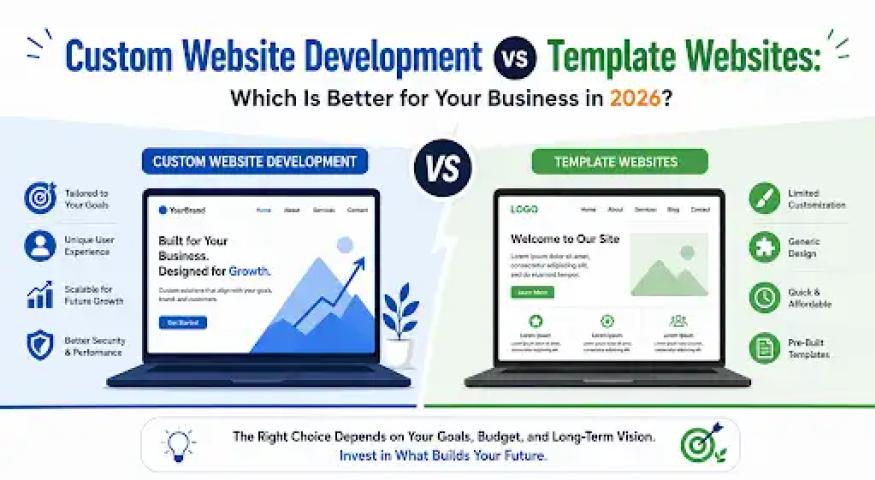
An off-the-shelf platform may be suitable when standard functionality meets most requirements, rapid deployment is important, custom workflows are limited, and existing integrations are sufficient.
A custom solution may be more appropriate when workflows are highly specialized, multiple systems need integration, user experiences require significant customization, unique business logic is involved, or the application is central to business operations.
The goal should not be customization for its own sake. The investment should solve a meaningful business problem and provide enough flexibility to justify the development effort.
What to Look for in a Web Application Development Partner
Evaluate potential development partners based on:
- Relevant project experience
- Technical and architecture expertise
- API and integration capabilities
- Security practices
- UX/UI capabilities
- Testing processes
- Cloud and DevOps expertise
- Communication and project management
- Post-launch support
Look for a partner that can connect technical decisions with business outcomes. For organizations requiring broader product engineering capabilities, custom software development services can also support applications that extend beyond a single web platform.
How the Web Application Development Process Works
A structured development process helps transform business requirements into a reliable production application.
1. Discovery and Requirements
The team identifies objectives, users, workflows, technical requirements, integrations, constraints, and success criteria.
2. UX/UI Design
User journeys, wireframes, prototypes, and interface designs are created to validate the experience.
3. Architecture Planning
The team defines the technology stack, application architecture, database structure, API strategy, security approach, infrastructure, and deployment model.
4. Development
Frontend and backend components are developed, integrated, and tested progressively.
5. Quality Assurance
Testing may include functional, integration, performance, security, compatibility, regression, and user acceptance testing.
6. Deployment and Continuous Improvement
The application is deployed with appropriate monitoring, logging, backups, and operational procedures. Post-launch work can include security updates, bug fixes, performance optimization, integrations, and new features.
How Much Do Web Application Development Solutions Cost?
Costs vary based on application complexity and scope. Major factors include:
- Number of features and user roles
- UX/UI requirements
- Backend and database architecture
- Third-party integrations
- Security and compliance requirements
- Cloud infrastructure
- Testing requirements
- Development team size
- Post-launch support
A simple internal dashboard and a multi-tenant SaaS platform may both be web applications, but their development requirements can differ substantially. Evaluate the complete scope, infrastructure, maintenance, and future enhancements rather than focusing only on the initial quote.
Building Web Applications for Long-Term Business Growth
Modern businesses need web applications that can adapt as users, workflows, integrations, and data requirements change. The right web application development solutions should therefore provide more than immediate functionality. They should offer appropriate architecture, reliable integrations, secure data handling, intuitive user experiences, and a practical path for future expansion.
Whether you need an enterprise portal, customer platform, e-commerce application, SaaS product, healthcare solution, logistics system, marketplace, or business dashboard, start with a clear understanding of your business requirements. From there, the right technology, architecture, development process, and engineering partner can turn those requirements into a scalable digital product.