Startups usually want to move fast.
Once an idea feels promising, the natural instinct is to start development as soon as possible. Build the screens, connect the backend, ship the MVP, and learn from users later.
That approach can work, but it also creates a common problem: teams may spend development time building workflows that were never properly thought through.
A better approach is to do just enough UX work before development begins.
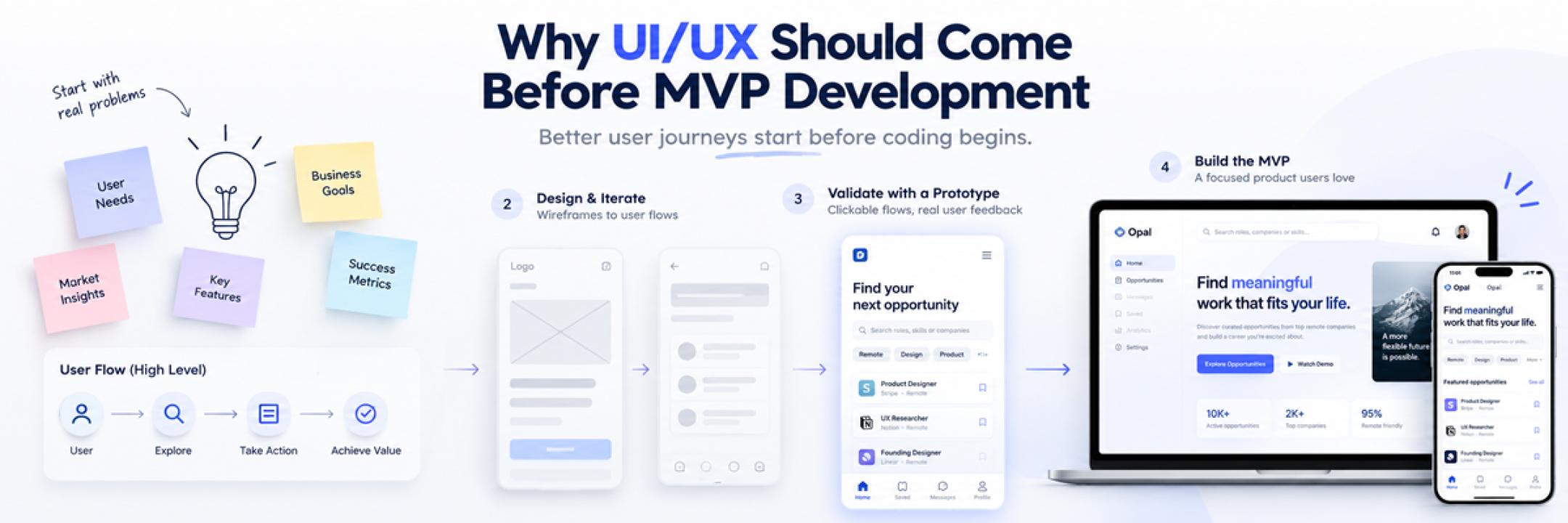
That does not mean spending months on research or creating a perfect design system before launch. It means understanding the user problem, mapping the main journey, testing the structure, and making sure the core experience is clear enough to build.
For early-stage teams, good MVP UX design can reduce rework and make the first version of the product easier for users to understand.
Start With the User Problem, Not the Feature List
One of the easiest mistakes startups make is turning the MVP into a list of features.
A founder may say the product needs dashboards, reports, notifications, integrations, roles, settings, and automation because competitors already offer them.
But an MVP is not supposed to include everything.
It should solve one important problem well enough to test whether users care.
Before discussing screens, ask:
- Who is the user?
- What are they trying to achieve?
- What is the main problem the product should solve?
- What is the first useful outcome they need?
- Which features are necessary for that outcome?
For example, a project management MVP may not need advanced analytics or multiple integrations on day one. It may only need users to create a project, add tasks, assign people, and track progress.
A smaller, clearer product is easier to test and easier to improve.
Map the Core User Journey Before Development
Once the main problem is clear, map the steps a user needs to take.
A simple SaaS journey might look like:
Sign Up → Create Workspace → Add First Project → Invite Team → Complete First Task
This sounds straightforward, but mapping it visually often reveals questions that were easy to miss.
Do users need email verification before creating a workspace?
Should they invite teammates during onboarding or later?
What happens if they skip a step?
Can they use the product without completing setup?
These decisions affect development, not just design.
If the journey is confusing on paper, coding it will not make it clearer.
That is why user flows are useful before detailed UI work begins.
Use Lightweight UX Research to Reduce Assumptions
Startups do not always need a large research programme.
But they do need some evidence.
Even a lightweight discovery process can help answer important questions before development.
Useful sources may include:
- Early user conversations
- Founder interviews
- Customer feedback
- Competitor reviews
- Support questions
- Existing analytics
- Prototype feedback
The goal is not to delay the MVP.
The goal is to avoid building something based entirely on internal assumptions.
For example, a founder may think users need detailed configuration during onboarding. A few early conversations may show that users actually want to reach the product first and configure settings later.
That small insight can change the entire onboarding flow.
Wireframes Help Fix Structure Before Code
Wireframes are one of the most practical tools for early-stage product teams.
They are simple enough to change quickly and detailed enough to test whether the screen structure makes sense.
A wireframe can help answer:
- Is the main action easy to find?
- Is the screen showing too much information?
- Are there unnecessary fields?
- Does the order of steps make sense?
- Is something important missing?
- Will the same layout work on smaller screens?
At this stage, the focus is not visual polish.
It is structure.
If a team discovers that a checkout flow needs to change, it is far easier to update a wireframe than rewrite finished frontend code.
That is one reason why MVP UX design should happen before development rather than after it.
Prototype the Most Important Flow
Once the wireframes are clear, a simple clickable prototype can help the team experience the journey before the product is built.
This is especially useful for:
- Onboarding
- Checkout
- Subscription upgrades
- Role-based workflows
- Dashboard navigation
- Multi-step forms
A prototype does not need to include every feature.
It only needs to represent the most important path well enough for review.
Founders can use it with early users, internal stakeholders, developers, or investors to identify confusing interactions before implementation begins.
If you want to understand how research, user flows, wireframing, prototyping, interface design, and developer handoff fit into a broader product-design workflow, this guide to UI/UX design services provides a more detailed breakdown.
Keep the First UI Simple and Consistent
An MVP does not need visual complexity to feel professional.
In fact, too much visual styling can distract from the real question:
Can users understand and use the product?
The first interface should focus on:
- Clear visual hierarchy
- Consistent buttons
- Readable typography
- Simple navigation
- Reusable components
- Mobile responsiveness
- Accessible interaction patterns
Consistency is more useful than decoration.
If every form behaves differently or the same action uses different >
A small reusable component system can help keep the MVP consistent without requiring a large design system.
Design for Real Product States
Startup teams often design only the ideal flow.
But users also see the imperfect parts of the product.
For example:
- No data exists yet
- The API is still loading
- A form contains an error
- A payment fails
- The user has no permission
- The internet connection is slow
- A list returns no results
These states matter.
An empty dashboard should help the user understand what to do next.
An error message should explain the problem in useful language.
A loading state should confirm that the system is working.
Thinking about these situations before development reduces last-minute product decisions.
Involve Developers Before the Final Handoff
Design and development should not be completely separate stages.
A designer may create an interaction that looks simple but is technically expensive.
A developer may know that a third-party integration has limitations that affect the flow.
Discussing these issues early helps the team find better compromises.
Useful conversations include:
- Which components can be reused?
- What happens on different screen sizes?
- Are there API limitations?
- Which states need to be designed?
- Are interactions technically realistic?
- Which edge cases need special handling?
For an MVP, this collaboration is especially important because resources are limited.
Every avoidable redesign costs time.
Common UX Mistakes Startups Make With MVPs
Some mistakes appear repeatedly in early-stage products.
Building Too Many Features
More features do not automatically create more value.
Every extra feature adds more design, development, testing, and support work.
Copying Competitors Without Understanding Users
Competitor research is useful, but copying another product’s interface without understanding why it works can create the wrong solution for your audience.
Skipping User Flows
Jumping directly into screens often creates disconnected experiences.
Map the journey first.
Ignoring Mobile
Even if desktop is the main platform, responsive behaviour should be considered early.
Fixing mobile layouts late can create unnecessary rework.
Designing Only the Happy Path
Products also need empty, loading, error, and permission states.
Polishing Visuals Before Validating the Experience
A beautiful interface cannot rescue a confusing workflow.
Structure should come first.
How Much UX Does an MVP Actually Need?
An MVP does not need every possible UX activity.
It needs enough design work to reduce the biggest risks.
For many startups, that may mean:
- Understanding the main user problem
- Mapping the core user flow
- Creating wireframes
- Prototyping the most important journey
- Designing a simple, consistent UI
- Reviewing edge cases with developers
That may be enough to move confidently into development.
The amount of UX should match the complexity and risk of the product.
A simple MVP with one user type will need less design work than a SaaS platform with multiple roles, permissions, and workflows.
The goal is not perfection.
It is clarity.
Final Thoughts
MVP stands for minimum viable product.
It should not mean minimum viable experience.
A startup does not need to solve every problem before launch, but the core journey should still make sense.
Users should understand what the product does, how to get started, and how to complete the main task without unnecessary friction.
Doing UX work before development helps teams test the structure while changes are still easier and cheaper to make.
Start with the user problem.
Map the journey.
Test the flow.
Then build.
That sequence can help startups move fast without creating avoidable product problems later.