Why Was My Wi-Fi “Fast” but Still Terrible?
A few months ago, I was frustrated with my Wi-Fi.
Speed tests seemed fine. My ISP said everything was “working perfectly.” Still, my video calls froze, code repositories took forever to clone, and I lost connection each time I moved to another room. If you’ve ever wondered, “Why is my Wi-Fi bad even though I’m paying for good internet?”, this story is for you.
I’m a developer, not a network engineer. But after exploring my router settings, experimenting, breaking things, and fixing them again, I discovered something simple yet powerful: using 2.4 GHz Wi-Fi and 5 GHz Wi-Fi correctly transformed my home network.
This isn’t just a theoretical guide. It’s a practical overview of what worked, what didn’t, and how Dual-band Wi-Fi solved problems I didn’t even know existed.
The Hidden Problem: Treating Wi-Fi Like a Single Thing
For years, I thought Wi-Fi was just… Wi-Fi.
One network name, one password, and devices connect. Done.
I didn’t realize my router was managing two different Wi-Fi frequencies, each with different behaviors. By allowing everything to auto-connect, I created congestion, interference, and frustration.
Once I understood the difference between 2.4 GHz and 5 GHz, things finally clicked.
Understanding 2.4 GHz Wi-Fi (The Reliable Old Workhorse)
Let’s start with what most devices connect to by default.
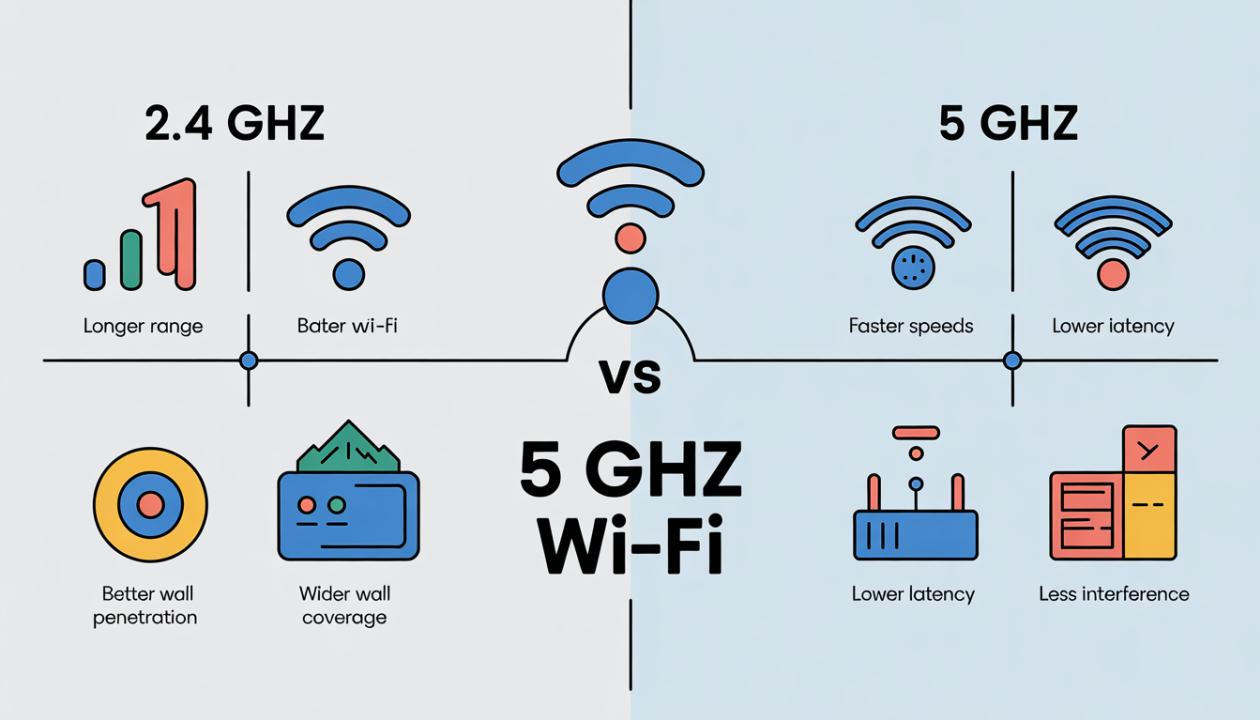
2.4 GHz Wi-Fi has been around forever, and for good reason:
It travels farther
It penetrates walls better
It works well for basic tasks
When I checked my router logs, I found that almost every device in my apartment was on 2.4 GHz: phones, smart TV, smart bulbs, speakers, and even my work laptop. That’s when the problems started to make sense.
What 2.4 GHz Is Great At
Covering larger areas
Connecting low-power devices
Maintaining signal through walls and floors
Where It Falls Apart
Slower speeds
Heavy interference (Bluetooth, microwaves, neighbors’ Wi-Fi)
Limited channels
In crowded apartment buildings, this band gets noisy fast. That noise was killing my real-time tasks like video calls and screen sharing.
Discovering 5 GHz Wi-Fi (The Speed I Was Missing)
Then I tested 5 GHz Wi-Fi, and the difference was immediate.
Same internet plan. Same router. Same laptop.
But suddenly:
Downloads finished faster
Video calls stabilized
Latency dropped noticeably
It felt like switching lanes on a traffic-jammed highway.
Why 5 GHz Felt Better
Much higher speeds
Less interference
More available channels
The Tradeoff
Shorter range
Weaker signal through walls
This explained why my connection was amazing in my home office but terrible in the kitchen. I was unknowingly switching bands constantly.
The “Aha” Moment: Using Dual-band Wi-Fi Intentionally
The real breakthrough came when I stopped letting the router decide everything.
Instead of one combined network name, I split my Wi-Fi into two clearly labeled networks:
One for 2.4 GHz Wi-Fi
One for 5 GHz Wi-Fi
This is where Dual-band Wi-Fi became clear to me, not just as a feature, but as a strategy. I began to assign devices intentionally.
How I Actually Set Things Up (My Real Configuration)
Here’s what worked for me after trial and error:
Devices on 5 GHz
Work laptop
Personal laptop
Phone
Tablet
Gaming console
Anything performance-sensitive or interactive went here.
Devices on 2.4 GHz
Smart lights
Smart plugs
TV
Printer
Older devices
Some devices don’t need blazing speed; they just need stability. After I made this change, network congestion dropped immediately. My router stopped juggling many devices on a crowded band
The Results: What Changed After One Week
I didn’t expect miracles, but the improvements were obvious.
Fewer dropped video calls
Faster builds and downloads
Better roaming between rooms
More stable smart devices
No more random buffering at night
The biggest benefit? Consistency. Even during peak hours, my work sessions remained smooth.
A Practical Wi-Fi Frequency Comparison (From Experience)
Here’s how I’d summarize it after living with both:
2.4 GHz Wi-Fi = reach and reliability
5 GHz Wi-Fi = speed and performance
Neither frequency is “better.” They serve different purposes. The mistake I made was treating them the same.
Common Mistakes I Made (So You Don’t Have To)
If you’re troubleshooting Wi-Fi issues, watch out for these:
Letting every device connect automatically
Assuming higher speed plans fix bad Wi-Fi
Ignoring interference from neighbors
Using one network name for everything
Placing the router without thinking about the frequency behavior
Fixing Wi-Fi isn’t always about buying new hardware. Sometimes it’s just a smarter configuration.
Why This Matters for Developers Specifically
As developers, our workflows depend on:
Stable connections
Low latency
Reliable uploads and downloads
A flaky network wastes time and focus.
Once I optimized my setup, even simple things felt better:
Git pulls were faster
Docker images downloaded smoothly
Cloud tools stayed responsive
It reminded me that infrastructure doesn’t have to be complex, just intentional.
When Dual-band Wi-Fi Isn’t Enough
To be honest, this isn’t a silver bullet.
If you:
Live in a very large home
Have thick concrete walls
Share networks with dozens of neighbors
You might also need:
A mesh system
Better router placement
Channel optimization
But understanding frequency usage is still step one.
Conclusion: Wi-Fi Didn’t Get Faster, I Got Smarter
I didn’t change my ISP.
I didn’t upgrade my plan.
I didn’t buy a fancy router.
I just learned how 2.4 GHz Wi-Fi, 5 GHz Wi-Fi, and Dual-band Wi-Fi actually work and used them purposefully.
If your Wi-Fi feels unreliable, inconsistent, or "fast but slow," don’t panic. Start with a simple comparison of Wi-Fi frequencies and assign clear jobs to each band.
Sometimes, better internet isn’t about more speed; it’s about making fewer mistakes.
Frequently Asked Questions (FAQs)
1. Should I use 2.4 GHz or 5 GHz Wi-Fi for work?
If you’re close to the router and need performance, 5 GHz usually works better. For distance and stability, 2.4 GHz can be more reliable.
2. Is Dual-band Wi-Fi better than single-band?
Yes. Dual-band Wi-Fi gives you the flexibility to balance speed and range across different devices.
3. Why does my Wi-Fi slow down at night?
More nearby networks compete for the same frequencies, especially at 2.4 GHz, leading to interference.
4. Can I use both bands at the same time?
Absolutely. That’s the whole point of Dual-band Wi-Fi: distributing devices across frequencies.
5. Do newer devices automatically choose the best band?
Sometimes, but not always. Manual setup often delivers more consistent results.