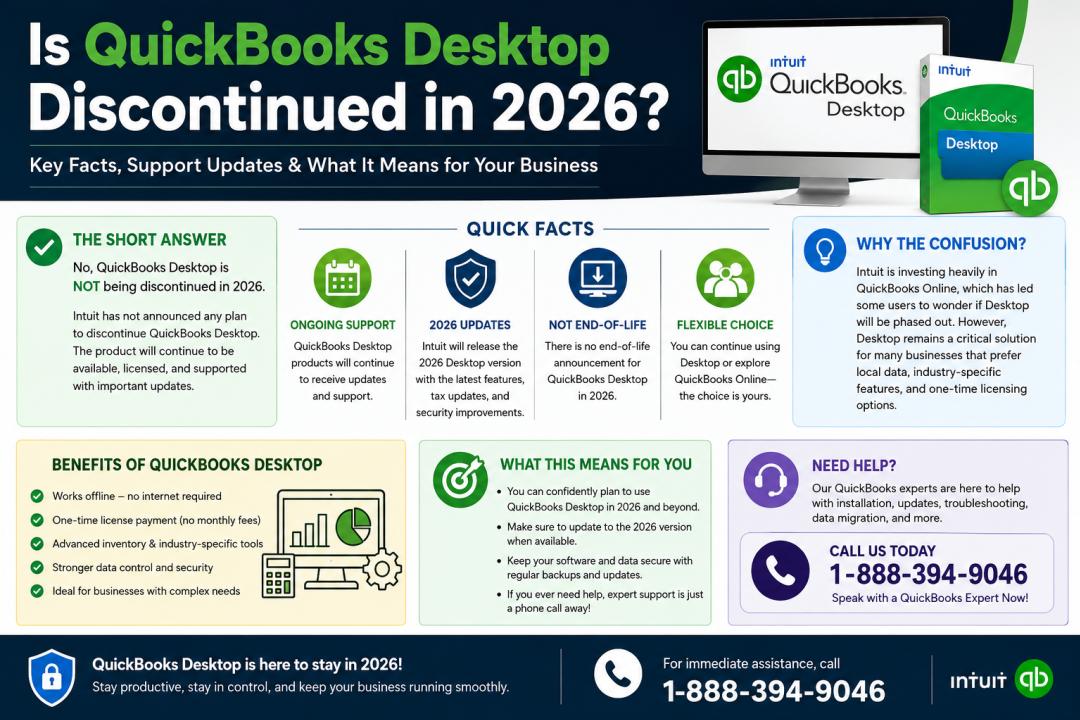
Many businesses that rely on QuickBooks Desktop are asking the same question: Is QuickBooks Desktop going away in 2026? With Intuit continuing to expand its cloud-based services and subscription models, users are understandably concerned about the future of their accounting software. Small businesses, accountants, bookkeepers, and payroll professionals want to know whether they should continue using QuickBooks Desktop or prepare to move to another solution.
The good news is that QuickBooks Desktop is not completely disappearing in 2026. However, there are important changes happening that users must understand. Intuit has shifted its focus toward subscription-based products and cloud solutions like QuickBooks Online, but QuickBooks Desktop still remains available for many users. The key is understanding which versions are supported, what services may stop working, and how these changes could impact your business operations.
In this complete guide, we will explain everything you need to know about QuickBooks Desktop in 2026, including support timelines, discontinued services, upgrade options, benefits, drawbacks, and frequently asked questions.
Understanding QuickBooks Desktop in 2026
QuickBooks Desktop is still widely used by businesses that prefer locally installed accounting software. Many companies choose Desktop because of its advanced reporting, industry-specific features, inventory management, and one-time data control.
However, Intuit has gradually shifted from traditional perpetual licenses to subscription-based desktop products such as:
- QuickBooks Desktop Pro Plus
- QuickBooks Premier Plus
- QuickBooks Enterprise
As technology evolves, Intuit continues encouraging users to migrate toward cloud-based accounting systems. This shift has created confusion among users who believe QuickBooks Desktop may completely disappear in 2026.
The reality is more balanced. QuickBooks Desktop is not entirely ending, but older versions will lose support and certain online-connected services.
Is QuickBooks Desktop Being Discontinued in 2026?
The short answer is no — QuickBooks Desktop is not fully discontinued in 2026. However, Intuit follows a discontinuation policy for older versions.
Typically, Intuit supports QuickBooks Desktop versions for around three years after release. Once a version reaches its discontinuation date, services connected to that version stop working.
This means users may lose access to:
- Payroll services
- Online banking
- Payment processing
- Technical support
- Security updates
- Live support features
For example, if you are using an older version released several years ago, it may stop receiving support in 2026.
Businesses that want uninterrupted services will need to upgrade to a newer supported version.
If you need help determining whether your QuickBooks version is still supported, you can contact support specialists at 888-394-9046 for assistance with upgrades, migrations, and troubleshooting.
Why Are People Concerned About QuickBooks Desktop?
There are several reasons why business owners are worried about the future of QuickBooks Desktop.
Shift Toward Cloud Technology
Intuit heavily promotes QuickBooks Online because cloud accounting allows remote access, automatic updates, and subscription-based revenue.
As more companies move toward remote work and online collaboration, cloud solutions are becoming increasingly popular.
Subscription Model Changes
QuickBooks Desktop no longer operates mainly as a one-time purchase product. Most versions are now annual subscriptions.
This change has caused concern among longtime users who preferred perpetual licenses.
Reduced Availability
Certain QuickBooks Desktop versions have become harder to purchase directly from Intuit.
This has led users to believe the software may soon disappear entirely.
End of Support Announcements
Each year, Intuit announces discontinuation dates for older versions. These announcements often create confusion because users mistake end-of-support notices for the complete shutdown of QuickBooks Desktop.
Which QuickBooks Desktop Versions Will Still Work in 2026?
In most cases, supported versions released within the previous three years should continue working in 2026.
Users with outdated editions may still be able to open company files and perform basic accounting tasks offline. However, connected services and security updates may no longer function.
The exact availability depends on:
- Your QuickBooks version
- Subscription status
- Payroll activation
- Online service usage
- Operating system compatibility
Businesses should regularly review Intuit’s support policies to avoid interruptions.
What Happens If You Continue Using an Unsupported Version?
Many businesses continue using unsupported QuickBooks Desktop versions because the software itself may still open and function offline.
However, there are several risks involved.
Security Risks
Unsupported software no longer receives security patches or vulnerability updates. This can expose sensitive financial data to cyber threats.
Payroll Interruptions
Payroll services rely on tax table updates. Once support ends, payroll calculations may become inaccurate.
Banking Connection Failures
Online banking feeds and transaction downloads may stop functioning.
Compatibility Issues
Older versions may not work properly with newer Windows operating systems.
No Technical Support
If errors occur, official customer support may no longer provide assistance.
For businesses experiencing issues with unsupported versions, calling 888-394-9046 can help you explore upgrade and recovery options.
Should You Upgrade QuickBooks Desktop Before 2026?
Upgrading your software before support ends is usually the safest option.
Here are some important reasons to consider upgrading:
Better Security
Newer versions include improved data protection and encryption features.
Improved Performance
Recent editions often offer faster processing speeds and improved stability.
Access to New Features
Updated versions may include enhanced reporting, automation, and inventory tools.
Continued Payroll and Banking Services
Maintaining a supported version ensures uninterrupted access to connected services.
Compliance Benefits
Tax rules and payroll regulations frequently change. Updated software helps maintain compliance.
QuickBooks Desktop vs QuickBooks Online
One major reason for concern about QuickBooks Desktop is Intuit’s strong push toward QuickBooks Online.
Understanding the differences between the two products can help businesses decide which option fits their needs.
QuickBooks Desktop Advantages
- Stronger inventory management
- Advanced reporting capabilities
- Industry-specific editions
- Local file control
- Faster processing for large data files
QuickBooks Online Advantages
- Cloud access from anywhere
- Automatic backups
- Real-time collaboration
- Easier integrations with apps
- Automatic updates
Which One Is Better?
The answer depends on your business requirements.
Businesses with complex inventory, manufacturing, or advanced reporting often prefer QuickBooks Desktop.
Companies needing remote access and collaboration may benefit more from QuickBooks Online.
Will QuickBooks Enterprise Continue in 2026?
Yes, QuickBooks Enterprise is expected to continue in 2026.
Enterprise remains one of Intuit’s flagship desktop accounting solutions for medium-sized businesses.
It offers:
- Advanced inventory tracking
- Custom user permissions
- Enhanced reporting
- Large company file support
- Payroll integration
- Industry-specific tools
Many businesses using Enterprise are likely to continue receiving support and updates beyond 2026.
Common Signs It’s Time to Upgrade QuickBooks Desktop
If you notice any of the following issues, it may be time to upgrade your QuickBooks software:
- Frequent crashing or freezing
- Banking errors
- Payroll update failures
- Slow performance
- Compatibility issues with Windows
- Missing support for third-party applications
- Security concerns
Upgrading before problems become severe can prevent costly downtime.
How to Prepare for QuickBooks Desktop Changes in 2026
Businesses should take proactive steps to avoid disruptions.
Review Your Current Version
Check which QuickBooks Desktop edition and release you currently use.
Back Up Company Files
Always create secure backups before upgrading or migrating.
Evaluate Business Needs
Determine whether Desktop or Online better fits your long-term goals.
Test Compatibility
Ensure your hardware and operating system support newer QuickBooks versions.
Consult Professionals
Accounting software experts can help evaluate upgrade options and migration strategies.
If you need professional assistance understanding QuickBooks Desktop support changes, migration planning, or troubleshooting, you can contact experts at 888-394-9046.
Benefits of Staying With QuickBooks Desktop
Despite the popularity of cloud accounting, many businesses continue using QuickBooks Desktop for good reasons.
Full Data Control
Desktop users store data locally, which some companies prefer for privacy and security.
Industry-Specific Features
QuickBooks Desktop includes specialized editions for industries like:
- Manufacturing
- Contracting
- Retail
- Nonprofits
- Professional services
Powerful Reporting
Desktop versions provide more detailed and customizable reports compared to many online alternatives.
Inventory Management
Businesses with large inventories often prefer Desktop because of advanced tracking features.
Challenges QuickBooks Desktop Users May Face
Although QuickBooks Desktop remains useful, users should also consider some limitations.
Limited Remote Access
Unlike cloud solutions, Desktop software requires additional setup for remote access.
Annual Subscription Costs
Subscription pricing may continue increasing over time.
Dependency on Local Systems
Desktop software depends on your local computer’s performance and storage.
Manual Backups
Users must manage backups carefully unless using cloud-hosted services.
Future of QuickBooks Desktop Beyond 2026
While no one can predict Intuit’s long-term plans with complete certainty, QuickBooks Desktop is still expected to remain available for many businesses after 2026.
However, the accounting software industry is steadily moving toward cloud-based ecosystems.
Businesses should stay informed about:
- Product support timelines
- Subscription policy changes
- Security updates
- Payroll service availability
- Migration tools
Companies that prepare early will face fewer disruptions if future changes occur.
FAQs About QuickBooks Desktop in 2026
1. Is QuickBooks Desktop shutting down completely in 2026?
No, QuickBooks Desktop is not completely shutting down in 2026. However, older versions may lose support, security updates, and connected services.
2. Can I still use QuickBooks Desktop without a subscription?
Some older perpetual-license versions may still function offline, but newer Desktop editions generally require subscriptions.
3. What happens when QuickBooks Desktop support ends?
When support ends, users may lose payroll updates, online banking, technical support, payment processing, and security updates.
4. Will my QuickBooks company file still open after discontinuation?
Yes, unsupported versions often continue opening locally, but connected online services may stop working.
5. Is QuickBooks Online replacing QuickBooks Desktop?
QuickBooks Online is becoming Intuit’s primary focus, but QuickBooks Desktop still remains available for many businesses.
6. Should I switch from QuickBooks Desktop to QuickBooks Online?
That depends on your business needs. Desktop is often better for advanced inventory and reporting, while Online offers remote access and cloud collaboration.
7. How do I know if my QuickBooks version is supported?
You can check Intuit’s support policies or contact QuickBooks specialists for guidance.
8. Will QuickBooks Enterprise continue after 2026?
Yes, QuickBooks Enterprise is expected to continue receiving support and updates.
9. Is it risky to use an unsupported QuickBooks version?
Yes, unsupported software may expose your business to security vulnerabilities, compatibility issues, and payroll interruptions.
10. Where can I get help upgrading QuickBooks Desktop?
You can contact QuickBooks support professionals at 888-394-9046 for assistance with upgrades, migrations, troubleshooting, and setup.
Final Thoughts
QuickBooks Desktop is not completely going away in 2026, but important support and subscription changes are affecting many users. Businesses using outdated versions should prepare for potential disruptions involving payroll, banking, security updates, and technical support.
For many companies, QuickBooks Desktop still remains a powerful and reliable accounting solution. However, staying informed about support timelines and upgrade requirements is essential.
Whether you decide to continue using QuickBooks Desktop, upgrade to a newer version, or migrate to QuickBooks Online, planning ahead can help ensure a smooth transition.
Understanding the future of QuickBooks Desktop allows businesses to make smarter financial software decisions while protecting their accounting operations and data security.