Compare Two Lists - Easy List Comparison Tool
| Founded year: | 2025 |
| Country: | United Kingdom |
| Funding rounds: | Not set |
| Total funding amount: | Not set |
Description
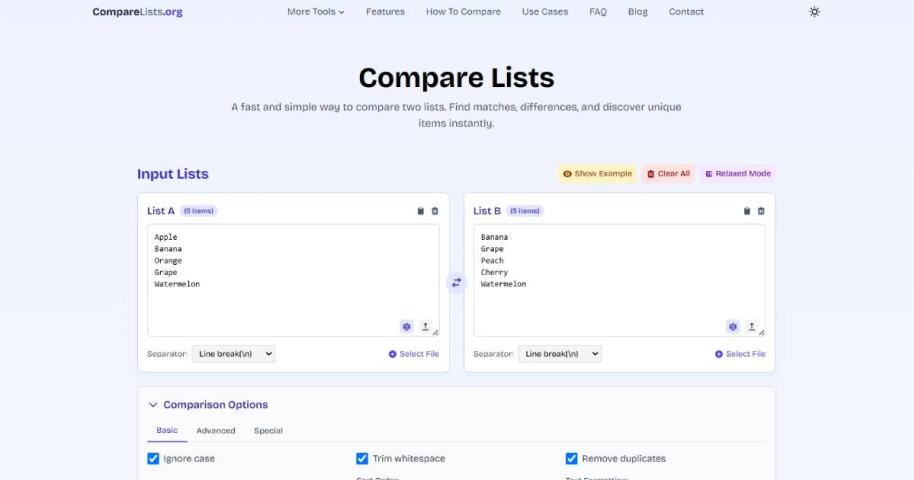
Dual List Input: The interface is clearly divided into two main sections, "List A" and "List B," where users can input their data.Multiple Input Methods: Users can add lists by:
Typing or pasting text directly into the text boxes.
Dragging and dropping a .txt file onto the designated area.
Clicking the "Select File" button to upload a file from their computer.
Core Comparison Function: A prominent "Compare" button is located at the bottom, which initiates the comparison process between the two lists.
User-Friendly Tools:
Swap Lists: An icon between the two boxes allows users to instantly swap the contents of List A and List B.
Clear and Reset: Each list has its own "Clear" button to empty the text box, and a global "Reset" button at the top right corner restores the tool to its initial state.
Item Count: Below each input box, an "Item count" dynamically displays the number of items in the list.
Advanced Options: A "Settings and Tools" section suggests that the tool may offer customizable options for the comparison, such as case sensitivity, sorting, or handling duplicates.