MiniMax H3 Max Video Generator is an independent online studio for turning text, still images, or first-and-last frames
| Founded year: | 2026 |
| Country: | United States of America |
| Funding rounds: | Not set |
| Total funding amount: | $1000 |
Description
MiniMax H3 Max Video Generator (h3maxai.com)Launch Date: 2026
Pricing: Paid (Google sign-in; monthly plans from $12, one-time packs from $10)
Website: https://h3maxai.com
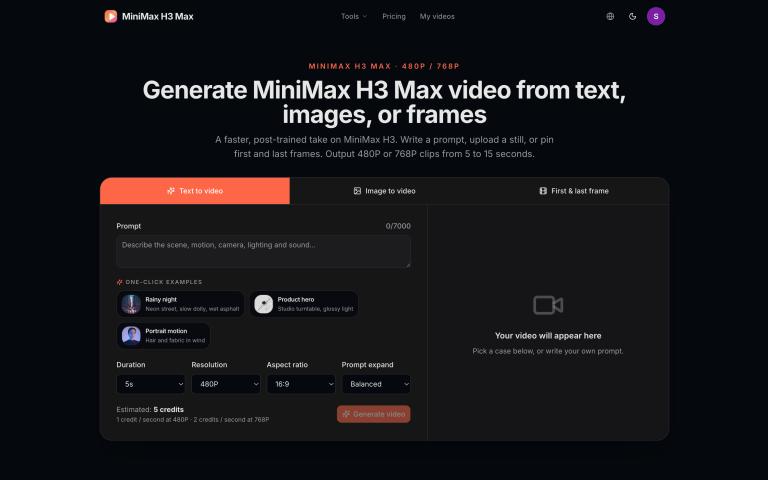
MiniMax H3 Max Video Generator is an independent online studio for turning text, still images, or first-and-last frames into short video. It runs MiniMax H3 Max in the browser—no desktop install—so creators can generate 5–15 second clips at 480P or 768P, sign in with Google, and pay with credits. The site is built for product ads, social clips, fashion motion, concept tests, and animatics. h3maxai.com is not the official MiniMax website and is not affiliated with MiniMax or its owners.
Highlights
Three generation modes on one page: text to video, image to video, and first-last frame.
Faster MiniMax H3 Max output at 480P and 768P, from 5 to 15 seconds.
Simple credits: 1 credit = 1 second at 480P; 768P uses 2 credits per second.
Google sign-in, Stripe checkout, and automatic credit return when a job fails.
English and 中文, with one-click examples you can load and then edit.
Key Features
The generator keeps the working studio on the landing page so you can prompt, upload, and preview without bouncing between tools:
Text to video: Write camera, lighting, performance, and motion. Choose 21:9, 16:9, 4:3, 1:1, 3:4, or 9:16.
Image to video: Upload a still as the first frame. The prompt adds motion while the photograph stays recognizable. Aspect ratio follows the image.
First and last frame: Lock an opening still and a destination still. The prompt describes the journey between them—weather, travel, or a costume change.
Output controls: Duration 5–15 seconds, 480P or 768P, plus Balanced or Quality prompt expansion (expansion does not change credit cost).
One-click examples: Gallery cases load the prompt and images; you can swap a still, shorten the clip, or switch resolution before you generate.
Credits and billing: Starter $12/mo (80 credits), Creator $29/mo (220), Studio $79/mo (650). Packs: $10 / 55, $25 / 150, $60 / 400. Failed tasks return reserved credits.
Feature Description
Model
MiniMax H3 Max (post-trained MiniMax H3 for tighter prompts and faster generation)
Modes
Text to video, image to video, first & last frame
Output
480P or 768P, 5–15 seconds
Aspect ratios
21:9, 16:9, 4:3, 1:1, 3:4, 9:16 on text-to-video; image jobs follow the still
Credits
1 credit / second at 480P; 2 credits / second at 768P
Access
Google sign-in; Stripe plans and one-time packs
Languages
English and 中文
Site
Independent studio at h3maxai.com — not MiniMax official
Benefits
Ship a clip in one sitting. Prompt, upload, and preview live on the same page instead of exporting stills into a separate editor.
Predictable cost. Credits scale only with duration and resolution. A 5-second 480P clip costs 5 credits; the same length at 768P costs 10.
Safer iteration. Failed generations return reserved credits, so you can revise the prompt or frames without paying for a missing file.
Identity-aware motion. Image and first-last-frame modes keep composition and subject close to your stills—useful for products, portraits, and key art.
Social-ready ratios. Landscape, square, and 9:16 vertical are available on text-to-video without a second tool.
No extra account stack. Google login and Stripe credits; history sits under My videos after you sign in.
Use Cases
Product and ecommerce: Turn a pack shot into a slow orbit, a dolly-in, or a 5–8 second hero loop for ads and PDPs.
Social and ads: Generate 9:16 or 16:9 clips for TikTok, Reels, and YouTube Shorts from a prompt or a keyframe.
Fashion and beauty: Animate fabric, hair, and studio light from a still while keeping the look of the original photo.
Concept and pre-vis: Test camera moves and lighting before a shoot; first-last frame can go from a rainy street to a ridgeline in one shot.
Before/after stories: Pin start and end frames for day-to-night landscapes, costume changes, or travel reveals.
Scenario Example use
Product marketers
5s 480P preview, then 768P hero orbit for a campaign
Social creators
9:16 text-to-video from a prompt, or animate a selfie as the first frame
Fashion teams
Image-to-video with wind and a slow push-in on existing lookbook stills
Filmmakers / animatics
First-last frame to interpolate between two storyboard frames
Agencies
Iterate prompts and duration with credits that refund on failed jobs
Vibes
The site feels like a compact video bay: generator on top, example wall in the middle, specs and FAQ below. You stay on one URL, load a case, tweak duration or 480P vs 768P, and generate. It is practical rather than flashy—built for people who already know the shot they want and need MiniMax H3 Max to finish it quickly.
Why Choose MiniMax H3 Max Video Generator?
Choose h3maxai.com if you want MiniMax H3 Max in the browser with three modes, clear credit math, and Google + Stripe instead of a desktop pipeline. Text invents the shot; a still holds identity; two frames lock the beginning and the end. Output is short-form by design (5–15 seconds), which matches ads, social, and concept tests. Independent studio, not the official MiniMax site—official channels remain the source for company news; this page is for running jobs.
Suggested tags: AI video generator, text to video, image to video, first last frame, MiniMax H3 Max, 480P, 768P, social video, product video
Suggested short blurb (1–2 sentences): Run MiniMax H3 Max online for text to video, image to video, and first-last frame. Generate 5–15 second clips at 480P or 768P with Google sign-in and credits at h3maxai.com.