
In the age of digital marketing, testimonials are more than just “nice to have.” They are powerful conversion engines that transform skeptical visitors into confident buyers. But collecting, managing, and showcasing customer feedback — especially video testimonials — can be a complicated, time‑consuming process… unless you use the right tool.
That’s where Testimly.com comes in.
In this deep, expert review, we’ll explore everything you need to know about Testimly — what it does, how it works, who it’s best for, what we like and don’t like, how it compares to alternatives, real usage examples, and whether it’s worth your investment in 2026.

1. What Is Testimly? — A Clear Overview
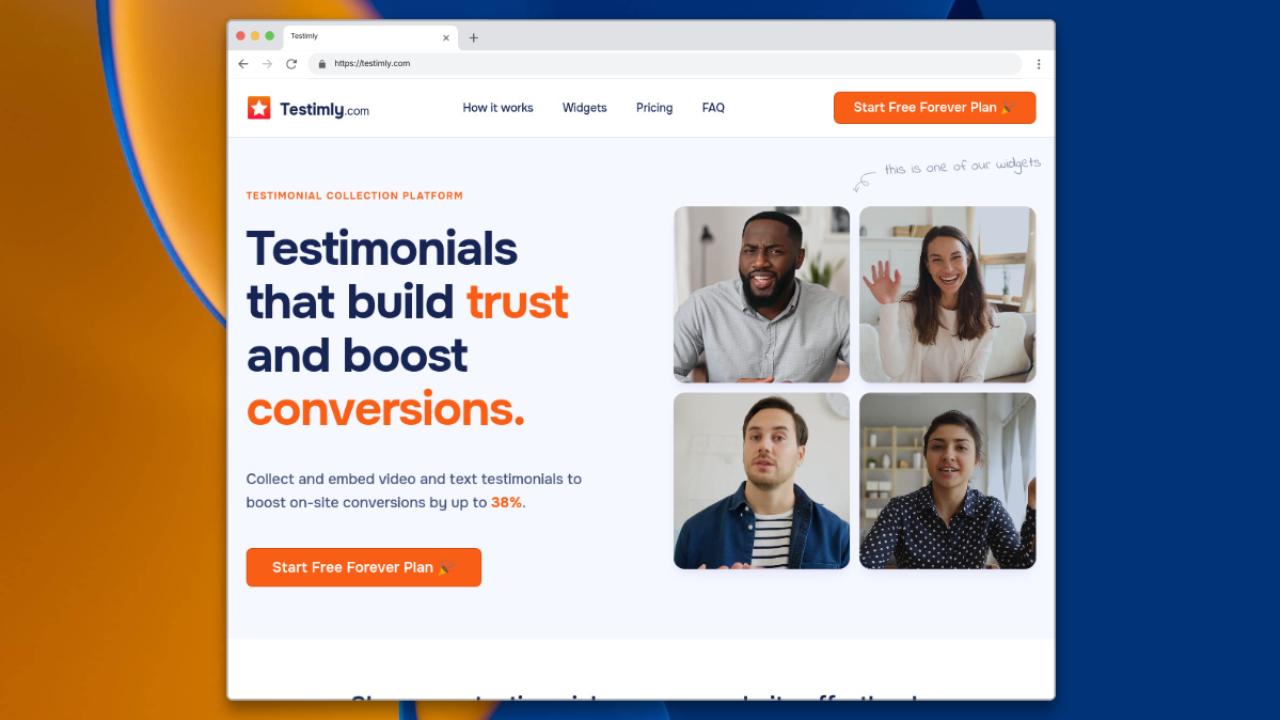
Testimly.com is a dedicated testimonial collection and display platform that helps businesses capture video and text testimonials from customers and embed them on their websites without any coding required. At its core, Testimly’s mission is simple:
➡️ Make it effortless for businesses to collect authentic customer stories and turn them into social proof that boosts conversions.
It does this by offering:
-
Customizable testimonial collection pages
-
Browser‑based video recording (no downloads or logins)
-
No‑code testimonial widgets for websites
-
A central dashboard to manage, approve, and organize submissions
Branding and customization tools to match your company >
With a free forever plan available and optional paid tiers, Testimly is positioned as a flexible solution for small to mid‑sized businesses, ecommerce brands, coaches, SaaS companies, and more.
At a high level, Testimly helps you do three things:
1. Collect Testimonials
Create branded collection pages that let customers submit text or video feedback easily.
2. Manage & Approve Submissions
Moderate testimonials inside a dashboard and choose what gets displayed.
3. Display Testimonials
Embed beautiful widgets (carousel, grid, wall of love, etc.) anywhere on your website.
2. Why Testimonials Matter (Especially Video)
Before we dive deeper into Testimly’s nuts and bolts, it’s worth understanding why testimonials matter — and why video testimonials matter even more.
Across industries, marketers know that:
🔹 Testimonials build trust — showing real customers talking about real success.
🔹 They reduce hesitation when prospects are unsure about a purchase.
🔹 They serve as social proof, which research repeatedly shows improves conversion rates.
And video testimonials take this a step further:
📹 Video testimonials convey emotion, nuance, and authenticity that text alone can’t match.
📹 They help create an emotional connection with prospective customers.
📹 Video often boosts time on page — a metric that can improve SEO indirectly.
That’s why a tool like Testimly that makes video testimonial collection simple — no downloads, no complicated setup — can be such a valuable asset.
3. Deep Dive: Testimly Features Explained
Let’s break down key Testimly features and what they really mean for your business.
Customizable Testimonial Collection Pages
Every brand has its own look and feel — and Testimly lets yours shine.
The collection pages you create can be:
-
Branded with your logo
-
Styled with your colors and fonts
-
Configured to collect text, video, or both
This level of customizable branding makes the request experience feel native to your company, not a generic third‑party widget.
Browser‑Based Video Recording (No Downloads)
One of Testimly’s biggest advantages is its frictionless browser recording tool. Customers can record a testimonial right in their browser — no downloads, no plugins, no hassles.
This dramatically increases completion rates, because every extra step (downloads, login, email signup) reduces the number of people who actually finish the testimonial.
Text Testimonials — Easy & Flexible
Not everyone wants to record video — and Testimly recognizes that. So, text testimonials are fully supported too. Users can choose the best feedback format for their audience or even request both.
Moderation & Approval Workflow
Once testimonials arrive, Testimly provides tools to:
-
Review submissions
-
Approve or decline
-
Organize by product, service, or testimonial type
This workflow helps you maintain quality and control over what goes live on your site, preventing accidental publication of off‑brand or unhelpful responses.
Responsive Testimonial Widgets
The platform includes several no‑code widgets that let you display testimonials anywhere with a simple embed code.
Common widget formats include:
-
Carousel sliders
-
Grid galleries
-
“Wall of Love” displays
-
Single testimonial highlight blocks
All widgets are responsive and customizable to match your site design, whether you're using Shopify, WordPress, Wix, Webflow, or another platform.
White‑Label Branding Options
If you want a fully professional look, paid plans let you remove Testimly branding and replace it with your own — great for agencies, consultants, or premium brands.
Video Downloads & Repurposing
With appropriate plans, you can download your video testimonials (e.g., MP4s) and repurpose them across social media, email campaigns, ads, and presentations. This lets you get more mileage out of each piece of social proof.
4. Pricing Breakdown — Free to Paid to Lifetime
One thing that makes Testimly unusual in the testimonial software landscape is its pricing flexibility.
Here’s a breakdown:
Free Forever Plan
The free plan is surprisingly generous and includes:
-
Up to 10 text testimonials
-
Up to 2 video testimonials (30 seconds each)
-
1 active “space” (a place to collect testimonials)
-
2 active widgets
This plan is enough to test the ROI of testimonials on your site before investing.
Growth Plan (Subscription)
For about ~$15.83/month (billed annually):
-
Unlimited text and video testimonials
-
Video length up to 2 minutes
-
Unlimited widgets
-
White‑labeling
-
Video downloads
-
Premium support
This plan is aimed at growing small to mid‑sized businesses that need no limitations.
Lifetime Deal
Testimly also offers a one‑time payment lifetime deal (around $249). This includes all premium features forever. That’s an outstanding value compared to many competitors that charge ongoing monthly fees.
5. Testimly vs Alternatives
To understand Testimly’s place in the market, let’s compare it to a few similar tools:
| Feature | Testimly | Senja | Testimonial.to | Famewall |
|---|---|---|---|---|
| Free Plan | ✅ Yes | Limited | Yes (very limited) | Basic |
| Unlimited Testimonials | Paid | Paid | Paid | Paid |
| Browser Video Recording | ✅ Yes | Yes | Yes | Yes |
| White‑Label Branding | Yes | Yes | Yes | Yes |
| Lifetime Deal | ✅ Yes | No | No | No |
| No‑code Embeds | Yes | Yes | Yes | Yes |
Testimly’s strengths are its generous free plan and flexible pricing — especially the lifetime deal which many competitors don’t offer.
However, some platforms may offer more advanced workflow automation or integrations — so the ideal choice depends on your exact needs.
6. Real User Feedback & Conversion Impact
Although direct crowd‑sourced feedback on Testimly specifically is limited online, many businesses highlight the general impact testimonials — especially video — have on conversion. For example, marketers have shared that video testimonials can lead to significantly higher sales and engagement than text alone.
One common pain point across communities is the difficulty of collecting testimonials without the right tooling. Users often start with email asks or manual forms and get low response rates. Solutions like Testimly or similar tools remove friction by providing an easy link that users click and then record or type their feedback — boosting completion rates by a wide margin.
If you’re struggling to get consistent testimonials, tools that streamline the process can make a big difference.
7. Who Should Use Testimly?
Testimly is ideal for:
✅ Small to Mid‑Sized Businesses — Affordable plans and free tier
✅ Startups & SaaS Companies — Easy integration into landing pages
✅ Ecommerce Brands — Show social proof on product pages
✅ Agencies — White‑label options and client presentation
✅ Coaches & Consultants — Authentically showcase client success
8. Recommended Best Practices for Using Testimly
To get the most out of testimonial tools like Testimly, we recommend:
Ask at the Right Time
Send your testimonial request right after a positive interaction — e.g., after onboarding or a successful purchase.
Offer Options
Not everyone wants to record video. Give users the choice of video or text to maximize response rates.
Use Widgets Strategically
Embed testimonials on high‑impact pages — homepages, pricing pages, checkout pages.
Repurpose Video Testimonials
Download and use on social media, email sequences, or in ads for maximum ROI.
9. Detailed Pros & Cons
What We Like 👍
✔ Very generous free plan with real video support
✔ Browser‑based recording — no downloads or plugins
✔ Unlimited testimonial and widget support on paid plans
✔ White‑labeling and video download options
✔ Excellent value — especially the lifetime deal
✔ Works with WordPress, Shopify, Wix, Webflow, and more
What We Don’t Like 👎
✘ Advanced analytics aren't as comprehensive as some enterprise tools
✘ Team collaboration features are limited
✘ No built‑in CRM or automation integrations (like workflows or triggers)
✘ Best suited for small to medium businesses — not large enterprises with complex needs
10. Final Verdict & Rating
After spending extensive time researching and analyzing Testimly — its features, pricing, use cases, and real‑world impact — here’s our conclusion:
Testimly.com is a powerful, affordable, and user‑friendly testimonial platform that delivers real value for small to mid‑sized businesses. Its free plan is generous enough to start seeing results right away, and paid or lifetime plans unlock professional features without breaking the bank.
Whether you're looking to collect more video testimonials or simply make the most of customer feedback on your site, Testimly provides a solid, easy‑to‑use solution.
⭐ Final Rating: 4.6 / 5
| Category | Rating |
|---|---|
| Ease of Use | ⭐⭐⭐⭐⭐ |
| Value for Money | ⭐⭐⭐⭐⭐ |
| Features | ⭐⭐⭐⭐ |
| Customization | ⭐⭐⭐⭐ |
| Support | ⭐⭐⭐⭐ |
| Scalability | ⭐⭐⭐ |
| (Out of 5 stars) |
If you’d like, I can also create a short SEO meta description, FAQ section with schema markup, or social media snippets for this review.