Quick Overview
- PHP 8.2 and above is the foundation for secure, modern WordPress development, not just an added skill. Full Site Editing
- (FSE) and block-based development are now the norm; classic themes are outdated.
- JavaScript (React/ES6) is essential since the Block Editor runs entirely on it.
- Understanding REST API and using Git-based workflows distinguishes professional developers from hobbyists.
- Knowledge of Security and Core Web Vitals directly safeguards your business and your search rankings.
Here's a common situation: a business owner hires a "WordPress developer," pays a reasonable rate, waits for weeks, and ends up with a slow site, broken checkout pages, or worse, a security breach six months later. This happens not because they hired someone dishonest, but because they didn't know what to look for.
Understanding the key technical skills and qualities to assess in a WordPress developer before hiring can help you avoid this issue. The WordPress platform of 2026 is very different from what it was just three years ago. Full Site Editing, block-based architecture, and increasing enterprise use have changed what it means to be "skilled" in this field.
This guide outlines the specific technical skills you should check for, explained in simple language without assuming you know how to code.
Why the Skill Bar Has Risen in 2026
WordPress now powers about 43% of all websites on the internet. This suggests that developers should be easy to find, but it also means the platform has become more complex behind the scenes. It is no longer just a blogging tool. Companies are using it to manage full e-commerce operations, SaaS landing pages, and enterprise content hubs.
The result is a significant gap between developers who can install plugins and those who have a deep understanding of the platform's structure. When you are trying to figure out how to hire WordPress developers, closing that gap begins with knowing which specific technical skills to inquire about and why they are important for your project.
The Core Technical Skills to Evaluate
Let's go through these one by one. Some skills are essential; every developer should have them. Others are modern skills that set good developers apart from great ones in 2026.
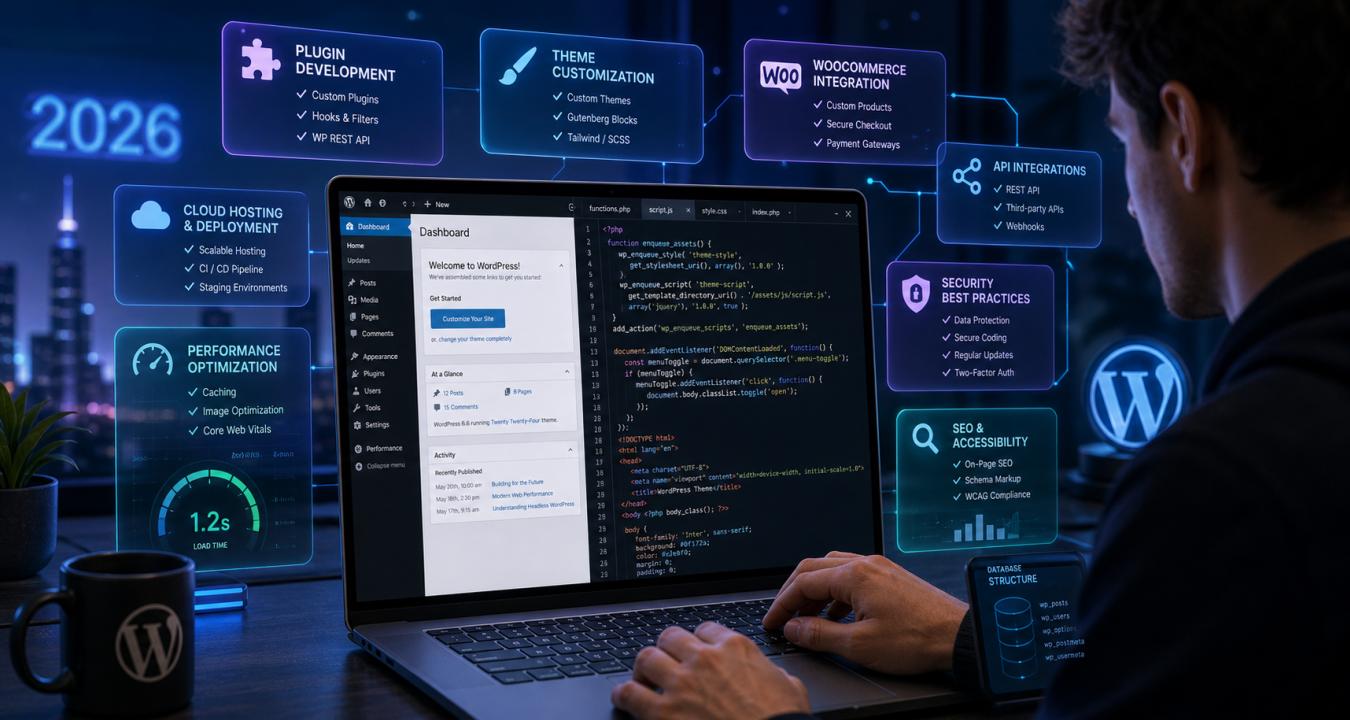
- PHP 8.2+ Proficiency: WordPress is built on PHP, so this is essential. The version is more important than most realize. PHP 8.2+ adds strict security compliance, performance improvements, and modern syntax. A developer writing PHP 7.x code is using outdated methods that create both performance and security risks. Ask candidates directly: "What version of PHP are you writing for, and how do you handle deprecation warnings?"
- HTML, CSS, and Responsive Design: Every WordPress developer, whether front-end or full-stack, must have a solid understanding of HTML and CSS. Specifically, they should grasp responsive design, ensuring a site looks and works well on mobile, tablet, and desktop. With over 60% of web traffic coming from mobile, this is not just a bonus; it's essential. Look for portfolio examples you can test on your phone.
- JavaScript (ES6+) and React Basics: Many older WordPress developers fall short in this area. The Block Editor (Gutenberg) relies on React, a modern JavaScript framework. Any developer building or customizing blocks in 2026 needs to be comfortable with JavaScript at an ES6+ level. They don’t need to be a React engineer, but they should understand components, state, and how the editor interacts with WordPress data. If they look confused when you mention this, that’s a warning sign.
- Full Site Editing (FSE) and Block Development: FSE is the standard for creating modern WordPress themes. It replaces outdated PHP template files with a block-based system controlled through theme.json. Developers who haven't transitioned to FSE are falling behind. Ask them to explain what theme.json does. A strong answer covers typography tokens, spacing scales, and global color palettes. A weak answer would just say, "it's a settings file."
- MySQL and Database Management: WordPress stores everything—posts, users, settings, plugin data—in a MySQL database. A developer who understands database structure can write efficient queries, avoid performance issues caused by bloated tables, and troubleshoot problems such as "the site randomly slows down." WP-CLI is often used for quick database operations. Competence here suggests a senior-level professional.
- REST API Integration: WordPress has a built-in REST API that lets it communicate with external applications, such as CRMs, payment platforms, marketing tools, and mobile apps. In 2026, almost no serious business uses WordPress in isolation. A developer who can create custom REST API endpoints can connect your site to nearly any third-party system. This is one of the clearest differences between mid-level and senior WordPress talent.
- WordPress Security Practices: About 94% of WordPress security vulnerabilities come from poorly coded plugins and themes. A developer with proper security training should know data sanitization and validation, nonce verification for forms, secure user authentication, SSL implementation, and how to safely manage core and plugin updates. A good vetting question is, "How do you handle user-submitted data in a plugin to prevent SQL injection?"
- Core Web Vitals and Performance Optimization: Google's Core Web Vitals are active ranking factors. A slow site frustrates users and harms search visibility. A skilled developer should know how to optimize image loading, implement caching strategies, lessen render-blocking scripts, and achieve a PageSpeed score in the 90s. If a developer isn’t familiar with these metrics by name, your site's SEO could be at risk from the start.
- Version Control (Git) and Staging Environments: A developer using Git keeps a complete history of every code change. This means mistakes can be undone, and teams can collaborate without overwriting each other's work. Equally important is the need for a staging environment before making anything live. A developer who works directly on your live site is taking unnecessary risks with your business.
Skills That Often Get Overlooked
WooCommerce Specialization: If you're building or managing an online store, WooCommerce expertise goes beyond basic WordPress development. With the rapid e-commerce evolution, it's essential to choose a developer skilled in handling custom product types, integrating payment gateways, optimizing checkout processes, and managing high-traffic sales events. A general WordPress developer may not offer the same level of specialized knowledge as a dedicated WooCommerce expert.
Headless WordPress Familiarity: Headless WordPress uses WordPress for backend content management, while a separate frontend handles the display. Its use is increasing in larger businesses. You might not need it now, but hiring a developer who knows this concept shows they are up to date with the platform’s direction. It demonstrates real commitment to their work.
How to Confirm These Skills Before Making a Commitment
Talking about skills in an interview is very different from showing them. Here are practical ways to verify what you're hearing.
- Test live sites yourself: Ask for URLs of sites they've built, then run them through Google PageSpeed Insights. Numbers don't lie.
- Assign a small paid test project: Even a 2-3 hour task reveals communication speed, code quality, and whether their process matches their pitch.
- Ask about their update management process: A professional developer has a clear, documented process for handling WordPress core, theme, and plugin updates, not just "I update things when I remember to."
- Request GitHub access if available: A public repository shows actual code >
Conclusion
Hiring a WordPress developer without a skills checklist is like hiring a chef without tasting their food. The platform has matured enough that the difference between average and excellent is significant. This difference shows up directly in your site's speed, security, and search rankings.
The key technical skills and qualities to prioritize in a WordPress developer in 2026 are PHP 8.2+, modern JavaScript, Full Site Editing, REST API knowledge, security practices, Core Web Vitals optimization, and a disciplined Git-based workflow. Match the specialization to your project: choose a WooCommerce expert for e-commerce or a headless-aware developer for enterprise builds.
Frequently Asked Questions
Q1. What programming languages should a WordPress developer know?
PHP, HTML, CSS, JavaScript, and MySQL. These are essential for theme development, styling, Block Editor customization, and database management.
Q2. Is PHP still important in 2026?
Yes. PHP 8.2 or higher is the current standard. Older versions can create security and compatibility problems.
Q3. Do WordPress developers need to know React or JavaScript?
Yes. The Block Editor uses React. Even with classic themes, modern JavaScript (ES6 and above) is needed for dynamic features and API calls.
Q4. What is Full Site Editing, and should my developer know it?
FSE is the new method for building WordPress themes using blocks and theme.json rather than PHP templates. Any developer creating new sites in 2026 should be familiar with it.
Q5. How can I evaluate a developer's skills without being technical?
Check their live sites on Google PageSpeed Insights. Ask how they manage updates and deployments. Start with a small paid task before committing.