WordPress runs a huge chunk of the internet at this point. But "runs on WordPress" and "actually built to last" aren't the same thing, and it's easy to confuse the two. Plenty of WordPress sites are basically held together with a pile of plugins nobody fully remembers installing, a theme that got customized once back in 2022 and never touched since, and a hosting setup that hasn't been reviewed in years. It works. Until the day it doesn't.
A future-ready site is a different animal. It's built assuming things will change traffic grows, new integrations get bolted on, the business itself looks nothing like it did two years ago. Whether a site can actually handle that kind of shift usually comes down to one thing: who built it in the first place.
Why Most WordPress Sites Aren't Built to Last
Most businesses build for right now and figure they'll deal with growth whenever it shows up. Fair enough, in theory. Except retrofitting a site for scale after the fact is way more painful and expensive than just building with some room to grow from day one. A site that was never meant to handle more than a couple hundred visitors a day starts cracking the second real traffic hits it.
Same story with functionality. A site built around rigid, hardcoded features works great right up until the business needs something nobody planned for a new payment method, a CRM hookup, a totally different content structure. At that point you're not really adding a feature anymore. You're rebuilding the whole thing around one.
What Dedicated WordPress Developers Actually Bring to the Table
This is honestly where the gap between a quick freelance gig and working with dedicated WordPress developers becomes pretty obvious. A freelancer on a fixed scope tends to build exactly what's in the brief. Nothing more. A dedicated developer especially one who's been embedded in the project long enough to actually understand where it's headed — tends to build with the next stage already in the back of their mind.
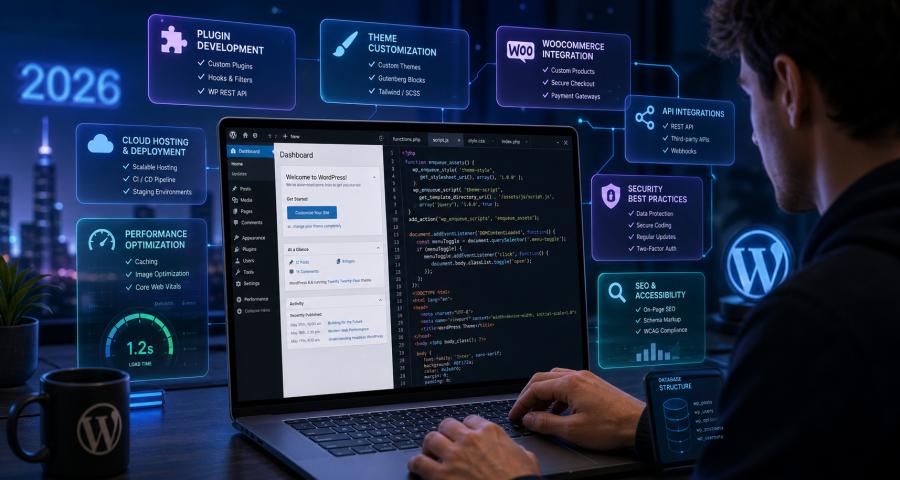
That could mean structuring the database so it supports future custom fields instead of cramming everything into whatever already exists. Could mean picking a theme architecture that won't fall apart the moment someone wants a new page template. Or it might just be setting up the plugin structure so a routine WordPress core update doesn't quietly break three unrelated things.
None of this is visible on day one, by the way. It shows up eighteen months down the line — when the site handles a traffic spike without keeling over, or when adding a new feature takes a week instead of turning into a month-long rebuild nobody budgeted for.
Performance and Security Aren't Optional Anymore
Search engines don't have much patience for slow sites these days. Neither do people, honestly. A future-ready WordPress build has to think about Core Web Vitals, image optimization, caching, clean code — from the start, not as some fire drill after Google Search Console starts throwing warnings at you.
Security's the same deal. WordPress is popular, which is exactly why it's such a common target. A site built without security in mind — sloppy user permissions, plugins nobody's updated in a year, zero real backup plan — is basically a liability sitting there waiting to become a problem. Good developers bake this into the build itself. They don't bolt it on afterward as an afterthought.
Headless WordPress and the API-First Shift
One of the clearer signs of where WordPress is heading is the growing move toward headless setups — where WordPress handles the content side and a separate frontend framework handles what the user actually sees and interacts with. Not the right call for every project, to be clear. But for businesses planning to scale across multiple platforms web, mobile, maybe some app down the line it's worth understanding how this actually works.
The thing making headless architecture possible in the first place is the WordPress REST API. If that term's unfamiliar and you want to understand why it matters for scalability, this breakdown of what REST API actually is covers the mechanics without assuming you already have a technical background. Understanding it clears up a lot about why some WordPress builds age well and others just... don't.
Making the Decision to Bring in Dedicated Talent
For a lot of businesses, the real turning point is realizing a future-ready site isn't something you can just bolt onto an existing build later. It has to be part of the plan from the start. That's usually around when businesses start looking at the option to hire wordpress developers with 14 day money back guarantee attached it's a way to bring in dedicated talent without fully committing to a long engagement before knowing whether the working relationship even fits.
The appeal isn't just the safety net either. A guarantee like this actually pushes both sides to prove themselves early — the business gets a genuine look at how the developer works day to day, and the developer has real incentive to show up and deliver from week one instead of easing in slowly.
Don't Skip Reading the Actual Terms
As reassuring as a guarantee sounds on paper, it's worth actually reading the terms and condition instead of assuming you already know what's covered. When does the evaluation window really start? What actually qualifies for a refund? What's left out entirely? These details matter a lot more than the "14-day guarantee" headline suggests. A guarantee that's vague on this stuff isn't nearly as useful as one that just spells it out plainly.
Checking the Track Record Beyond the Guarantee
A trial period only gives you a narrow slice of how a team actually works. For the fuller picture, it helps to look at a longer history of client feedback which is where checking reviews on Clutch genuinely earns its place. A pattern of detailed, consistent reviews across different projects tells you a lot more about long-term reliability than any single trial window ever could.
Conclusion
A future-ready WordPress site isn't really about chasing trends or over-engineering something that should be simple. It's about building in enough flexibility that growth doesn't force you to tear everything down and start from scratch. That kind of build takes developers who think past the immediate request people who care about how something works today, sure, but also whether it'll still hold up three years from now.
Whether that's a more scalable theme setup, cleaner plugin architecture, real security practices, or exploring headless through the REST API, the thread running through all of it is intention. The businesses that end up with sites that genuinely hold up long-term are usually the ones that treated the build as an investment from day one, not just another box to check.
FAQs
What actually makes a WordPress website "future-ready"?
It's mostly about the structure underneath, not how the site looks on the surface. A future-ready build accounts for scalability, clean code, security, and room for features you haven't thought of yet so growth doesn't mean rebuilding from zero.How's a dedicated WordPress developer different from a freelancer here?
A freelancer usually builds exactly what's in the brief, nothing more. A dedicated developer working closely with a business over time tends to build with future needs already in mind, since they actually understand where things are headed.
Do I need headless WordPress?
Probably not, honestly not unless you're planning to scale content across multiple platforms like web, mobile apps, or something else down the line. For a standard business site, traditional WordPress does the job just fine.
Why does the REST API matter for future-readiness?
It's what lets WordPress separate content management from how that content actually gets displayed, which is the whole foundation of headless setups. Understanding it explains a lot about why some sites scale more easily than others.
Should I pick a developer just because of the money-back guarantee?
No, not on its own. It's a solid way to lower risk early, sure, but it should sit alongside things like technical skill, communication >