Deploying a web application involves much more than writing code. Developers often need to configure hosting, containers, databases, environments, domains, deployments, logs, and monitoring before an application is ready for production. Light Cloud is designed to simplify this process by bringing these different parts of cloud deployment into a single workflow.
From GitHub to a Live Application
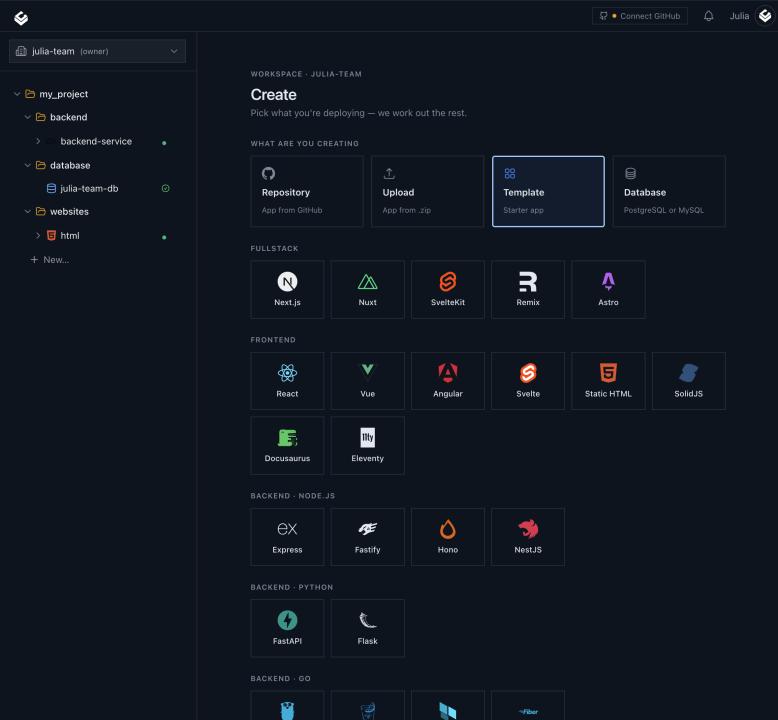
Light Cloud is built around a GitHub-based development workflow. Developers can connect their repository and use their existing Git workflow to trigger deployments instead of manually uploading files or configuring infrastructure for every project.
Once the repository is connected, Light Cloud can build and deploy the application. This creates a straightforward workflow: write code, commit changes, push to GitHub, and deploy.
The platform supports different application architectures, including static websites and containerized applications. It can also handle PostgreSQL databases, making it possible to deploy a complete application stack from one platform. The Light Cloud platform is therefore particularly useful for developers building modern full-stack applications.
For a deeper look at this workflow, Light Cloud has also published an article about deploying full-stack applications in minutes, explaining how the platform brings frontend applications, containerized backends, and PostgreSQL together.
Preview Environments for Branches and Pull Requests
One of the most useful parts of a modern deployment workflow is the ability to test changes before they reach production.
Developers frequently work on features in separate Git branches. Instead of running everything locally or manually creating a temporary server, Light Cloud can provide preview environments for branches and pull requests.
This gives developers a live URL where they can test a new feature, review changes with teammates, or share an unfinished version with a client.
Preview environments are particularly useful for teams working on multiple features simultaneously. Each change can be tested independently before being merged into the production application.
Containers and Managed Databases
For applications that require more than static hosting, Light Cloud supports container-based deployments. Applications can run using Google Cloud infrastructure, allowing developers to use containerized workloads without having to manage a complete Kubernetes environment themselves.
Light Cloud also supports managed PostgreSQL databases. This allows developers to keep their application services and database infrastructure within the same deployment platform instead of manually connecting several different cloud providers.
The platform's approach is especially relevant for SaaS developers who need a frontend, backend API, and database but don't want to spend days configuring infrastructure.
Scaling Without Constant Infrastructure Management
Modern applications don't always need the same amount of computing resources throughout the day. Development environments and smaller applications may have long periods with little or no traffic.
Light Cloud uses Google Cloud Run for container workloads, including scale-to-zero capabilities. This allows containers to scale down when they are not being used, which can help developers avoid paying for compute resources that are sitting idle.
For developers interested in cloud economics, Light Cloud also discusses its approach in its article on cloud pricing and usage-based infrastructure.
Deployment Visibility and Debugging
Getting an application online is only part of the deployment process. When something fails, developers need to understand what happened.
Light Cloud provides deployment information, logs, and application metrics so developers can investigate problems without constantly switching between different infrastructure dashboards.
This can make it easier to diagnose failed builds, deployment problems, and runtime issues. Having deployment and application information available within the same environment also creates a more streamlined development experience.
Designed for AI-Assisted Development
The development workflow is also evolving as AI coding tools become increasingly common. Developers can now use AI assistants to generate features, modify code, troubleshoot problems, and work with existing repositories.
Light Cloud is designed to fit into this workflow through integrations with tools such as Claude and GitHub Copilot. This allows deployment and infrastructure tasks to become part of an AI-assisted development process rather than requiring developers to leave their coding environment every time they want to deploy or inspect an application.
Who Is Light Cloud For?
Light Cloud is primarily aimed at developers who want to spend more time building software and less time managing infrastructure.
It can be useful for individual developers, indie hackers, startups, SaaS teams, and development agencies building websites, APIs, prototypes, and full-stack applications.
The core idea is simple: connect your code, deploy it, create preview environments when necessary, and manage your application from one cloud platform.
For developers who want a simpler alternative to manually configuring multiple cloud services, Light Cloud provides a streamlined way to move from a GitHub repository to a deployed application while keeping modern development workflows at the center.