
In the competitive landscape of fashion and eCommerce, product imagery plays a critical role in influencing purchasing decisions. One technique that has become essential for showcasing apparel with clarity and professionalism is ghost mannequin photography—also known as the invisible mannequin effect.
This guide provides a comprehensive overview of ghost mannequin photography, covering everything from studio setup and shooting best practices to advanced post-production workflows. Whether you're a professional photographer, a fashion retailer, or a creative director, mastering this technique can significantly elevate the quality of your visual content.
What Is Ghost Mannequin Photography?
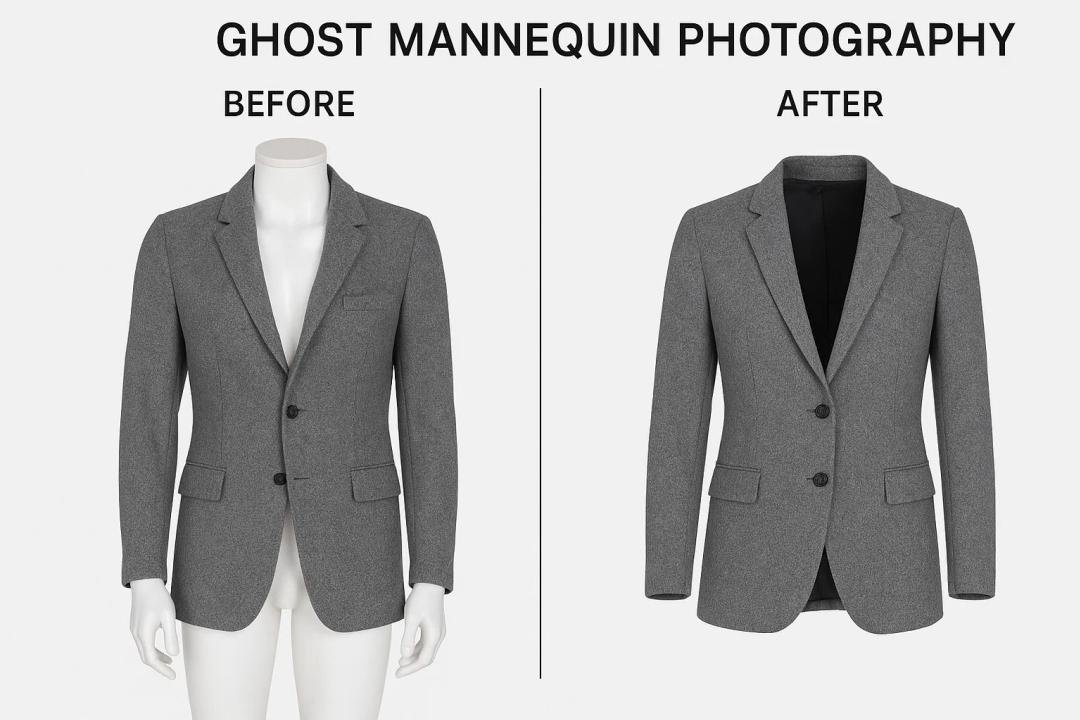
Ghost mannequin photography is a post-production technique that involves photographing apparel on a mannequin and then digitally removing the mannequin in editing, leaving a “hollow” 3D representation of the garment. This creates a polished, lifelike appearance while keeping the viewer’s focus solely on the product.
Key Benefits:
- Enhanced Product Visualization: Showcases fit and form without distractions.
- Consistent Branding: Offers a uniform aesthetic across product lines.
- Cost-Effective: Eliminates the need for live models in every shoot.
- Professional Presentation: Adds depth and dimension to product photography, mimicking the in-store experience.
Equipment & Studio Setup
1. Camera & Lens
A DSLR or mirrorless camera with manual settings and a high-resolution sensor (20MP or higher) is recommended—prime lenses such as 50mm or 85mm offer excellent clarity and minimal distortion.
2. Stable Tripod
A sturdy tripod ensures framing consistency, especially crucial for composite shots during post-production.
3. Lighting
Use continuous soft lighting (e.g., softboxes, diffusers, or umbrella lights) for even, shadow-free illumination. Aim for a balanced lighting setup with minimal reflections and harsh contrasts.
4. Detachable Mannequin
Invest in a mannequin with removable parts (such as the neck, arms, or chest insert). This flexibility simplifies both shooting and editing.
5. Neutral Backdrop
A seamless white or light grey backdrop works best for clean cut-outs and ensures the garment remains the focal point.
Photography Workflow
1. Garment Preparation
- Steam or press all clothing to eliminate wrinkles.
- Use clips, pins, or padding to ensure a snug, natural fit.
- Align seams, collars, and sleeves symmetrically.
2. Capture the Primary Shot
Photograph the garment on the mannequin from multiple angles: front, back, and profile. Ensure the camera remains in a fixed position throughout the session.
3. Capture the Inner Components
Remove the garment and turn it inside out or adjust it to expose interior areas (e.g., neckline, inner labels, or sleeve interiors). Photograph these separately; these images will be used in post-processing to complete the ghost effect.
Post-Production: Creating the Ghost Mannequin Effect
Editing software such as Adobe Photoshop is essential for executing this technique. Here's a professional post-production workflow:
Step 1: Cut Out the Garment
Use the Pen Tool or Layer Masking to isolate the garment from the mannequin. Maintain clean, accurate edges.
Step 2: Composite the Interior
Import the secondary images showing the garment's interior. Align and blend them seamlessly with the primary image to reconstruct the neckline or other hidden areas.
Step 3: Refine the Image
- Adjust exposure, contrast, and white balance for consistency.
- Retouch imperfections such as dust, lint, or wrinkles.
- Ensure symmetry and natural curvature in all garment elements.
Step 4: Export for Web or Print
Save the final images in both web-optimized (JPEG/WebP) and high-resolution formats (TIFF/PSD) depending on your distribution needs.
Final Thoughts
Ghost mannequin photography is not merely a visual technique—it’s a strategic investment in your brand’s image. When executed correctly, it bridges the gap between product and consumer, offering an immersive, tactile experience through imagery alone.
For brands aiming to scale or refine their product presentation, mastering this technique (or working with professionals who do) is essential to remaining competitive in the digital retail space.
Need Help Getting Started?
We, Clipping World, offer ghost mannequin service, including studio shooting and post-production editing. Contact us to elevate your product imagery with precision and polish.