With the rapid shift toward digital
insurance services in India, accessing your car insurance policy online has
become simple and convenient. Whether you need a soft copy for traffic
verification, policy renewal, or claim filing, downloading your car insurance
policy online ensures quick access anytime, anywhere.
This article explains the complete
process of downloading a car insurance policy online in India, common
challenges users face, and tips to keep your policy handy at all times.
Why You Should Download Your Car Insurance Policy Online
A digital copy of your car insurance
policy is useful in multiple situations:
- You have misplaced the physical policy document
- Traffic authorities request insurance proof
- You need policy details during a claim
- You want to review coverage, add-ons, or exclusions
- You are planning to renew or switch insurers
As per Indian regulations, digital
insurance documents are legally valid and accepted across the country.
Details Required to Download Car Insurance Policy
Before starting the download
process, keep the following information ready:
- Vehicle registration number
- Policy number (if available)
- Registered mobile number or email ID
- Date of birth or PAN details (if required)
These details help verify ownership
and ensure secure access to your policy.
Step-by-Step Guide to Download Car Insurance Policy Online
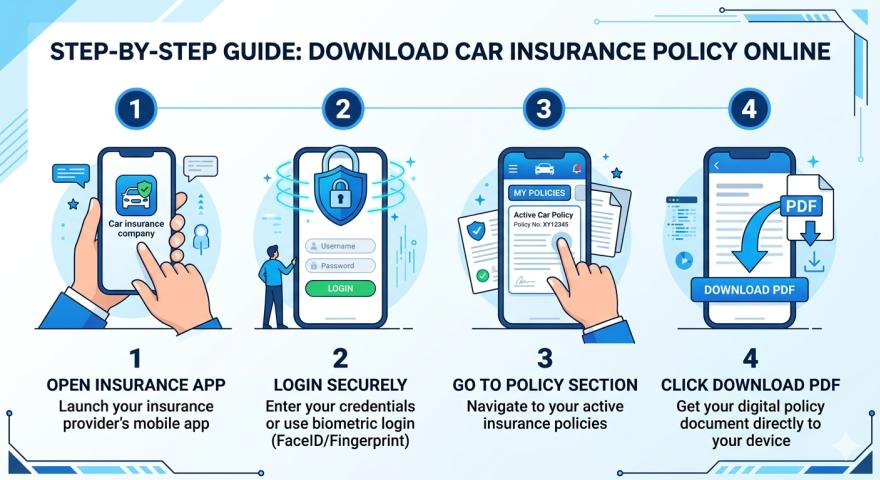
Step
1: Visit the Insurer’s Website or Mobile App
Go to the official website or mobile
application of your car insurance provider. Look for options such as “Customer
Login,” “My Policies,” or “Download Policy Document.”
Step
2: Log in Using Registered Details
Log in using your registered mobile
number, email ID, or policy number. Most insurers authenticate users through
OTP verification.
Step
3: Select the Active Car Insurance Policy
If multiple policies are linked to
your account, choose the relevant active car insurance policy.
Step
4: Download the Policy Document
Once the policy opens, download it
in PDF format. You can save it on your device or print it for future use.
How
to Download Car Insurance Policy Without Policy Number
If you don’t have your policy
number, you can still retrieve your policy using:
- Vehicle registration number
- Engine or chassis number
- Registered mobile number
If online retrieval fails, customer
support can help resend the policy document after basic verification.
Is
Digital Car Insurance Policy Valid in India?
Yes, a downloaded car insurance
policy is fully valid in India. Traffic police and regulatory authorities
accept digital policy documents shown on mobile devices, provided the policy is
active and clearly readable.
Always ensure:
- The policy has not expired
- Vehicle and owner details are accurate
- Insurer name and policy number are visible
Common
Issues While Downloading Car Insurance Policy Online
Some users may face issues such as:
- OTP not received on registered mobile number
- Incorrect or outdated contact details
- Policy not reflecting on the dashboard
- Technical errors on insurer portals
In such cases, updating your contact
details or reaching out to customer support usually resolves the issue quickly.
Tips
to Keep Your Car Insurance Policy Accessible
- Save the policy PDF on your phone and email
- Store a copy in cloud storage
- Keep contact details updated with your insurer
- Download the policy immediately after renewal
These simple steps ensure you always
have your insurance proof when needed.
Conclusion
Downloading your car insurance
policy online in India is a quick and reliable process that eliminates
paperwork and delays. With just a few details, you can access your policy
document anytime for verification, claims, or reference.
Platforms like Square Insurance
make insurance management easier by helping users access policy documents,
understand coverage details, and stay informed throughout their insurance
journey.
Download the Square Insurance POS – Apps on Google Play today to manage your car insurance policy, track renewals, and access policy documents anytime, anywhere.