Most printing businesses work to balance costs and the quality of printed images. Reaching that goal is difficult amid rising ink and operational costs, as well as the need for eco-friendly printing processes.
And this is when the prepress solutions come into play. Using GCR reseparation, print businesses can reduce ink consumption without compromising print quality. In this manner, printing costs will be reduced, color reproduction will be improved, and the whole process will be simplified.
According to Printing Industries of America, proper color management techniques will allow for the saving of resources and the improvement of efficiency in commercial printing. This blog discusses different ways to use prepress solutions to reduce ink usage through GCR reseparation.
Understanding The Cost of Excessive Ink
Ink is one of the highest operational costs in commercial printing. Every additional ink drop will increase production costs. Also, excessive ink can cause problems during printing, such as longer drying time, smudging, color variations, and increased waste.
Almost all print files are created without considering the efficiency of ink usage in commercial printing. Whereas designers focus on visual effects, printers should consider both print quality and visual effects.
Prepress solutions help reduce the gap between the visual and technical aspects of printing, creating print files that are optimized for printing while still maintaining a perfect visual effect. Instead of sending the artwork file to the press, prepress experts optimize it and make it more suitable for commercial printing.
An Overview Of Gray Component Replacement (GCR)
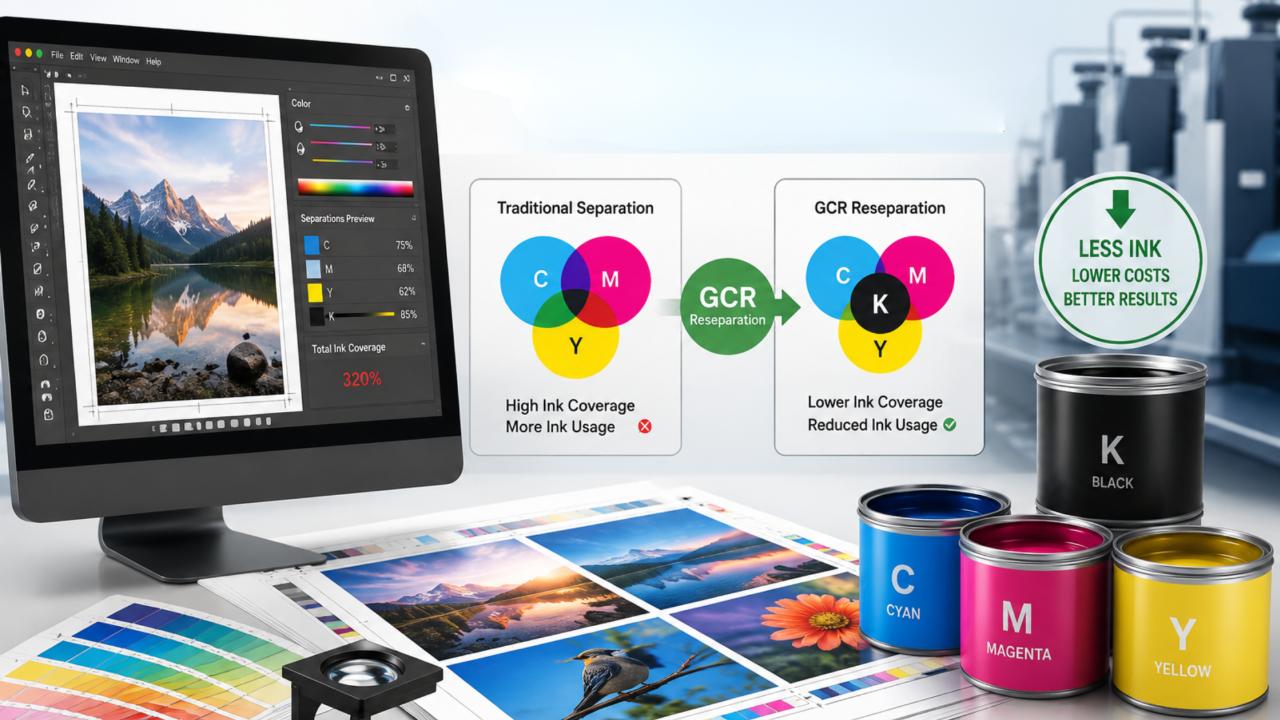
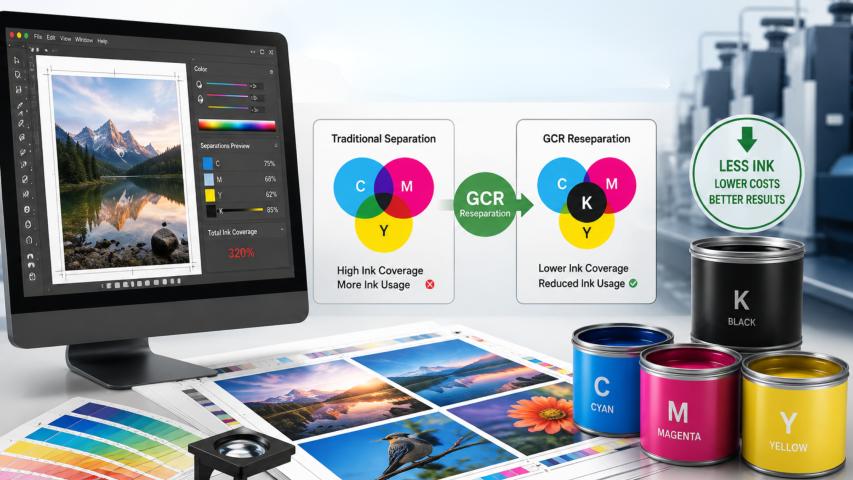
One of the most effective ink reduction techniques in commercial printing is gray component replacement (GCR). The standard CMYK color separation process requires combining cyan, magenta, and yellow inks to produce dark colors and grays.
Even though it produces the right color, it uses a lot of ink. In gray component replacement, a percentage of the gray is replaced with black ink.
So instead of printing dark gray with high amounts of cyan, magenta, and yellow inks, GCR substitutes parts of these colors with black ink while producing the same visual effect.
This technique brings a variety of advantages, such as:
Reduced ink consumption.
Improved printing consistency.
Improved shadow details.
Shorter drying time.
Production cost savings.
Because black ink is more stable than a three-color mixture, printing results are more predictable.
What Is GCR Reseparation?
Most artwork files come from designers who have created them in the CMYK color palette. But they are usually not optimized for efficient printing. Here is where GCR reseparation can help. Instead of altering the original artwork, prepress experts create color separations in prepress from the existing files using optimized GCR settings.
Artwork is analyzed during the process to substitute excess cyan, magenta, and yellow inks with black ink.
This is more efficient and doesn't compromise the ART.
The client will see the same colors; it's just that the printer is using less ink to achieve them.
How Prepress Solutions Improve Ink Optimization?
Most ink savings happen before a job ever reaches the press. Today's prepress workflows use several tools to reduce unnecessary ink while preserving color accuracy.
Optimized Color Management
Efficient color management is important to maintaining color consistency from screen to proof and from proof to final print.
Applying optimized color profiles prevents printers from overusing ink due to inaccurate color conversions. Good calibration will also prevent expensive press adjustments during production.
Total Ink Coverage Control
Each printing press has maximum total ink coverage (TAC) recommendations. If CMYK inks go beyond this threshold, several problems might occur:
Ink dries up more slowly.
Colors become muddy.
Paper may offset onto itself.
Printing quality is inconsistent.
Prepress experts adjust artwork to meet TAC limits without altering the final print. This way, the press operates more effectively.
DeviceLink Profiles
Another useful technology used in print-ready file optimization is DeviceLink profiles. Unlike regular ICC profiles, DeviceLink profiles allow converting one CMYK color space to another directly, without additional color shifts.
It helps to optimize ink usage while maintaining color accuracy. DeviceLink technology also maintains a smooth gradient and a balanced neutral gray scale.
Better CMYK Color Separation Means Better Printing
CMYK color separation affects the appearance of an image and the quality of printing. When color separation is poorly done, the following is usually seen:
Excessive ink saturation.
Inconsistent gradients.
Variable hues.
Prolonged drying time.
Paper waste.
Optimized color separation results in better overall balance of all four inks.GCR creates cleaner shadows and reduces excess cyan, magenta, and yellow ink values. This balance will improve both the appearance and effectiveness of the print job.
Role Of Color Stability In Printing
One of the most irritating aspects during long press runs is color inconsistency. Even small changes in cyan, magenta, or yellow may affect the look of printed sheets. Using GCR reduces the need to mix three colors to achieve a neutral color tone.
Black ink carries most of the tonal information, greatly improving color stability in printing, especially during long runs when small variations in the press inevitably occur.
Stable color means:
Less waste.
Higher client satisfaction.
Fewer press adjustments.
Predictable printing results.
Fast Production Due To An Efficient Prepress Workflow
An organized prepress workflow helps each stage of production. Instead of detecting problems during printing, prepress experts discover and solve them before the files are sent to the press. Typical workflow improvement includes:
File inspection.
Color correction.
GCR reseparation.
Total ink coverage adjustment.
Profiles conversion.
Proof generation.
Print-ready file optimization.
Each step helps to prevent production problems and reprints. The files are properly optimized and ready to print right from the start.
Practical Example: Reduction Of Ink Usage For A Product Catalog
Consider a case where a company prepares a 120-page product catalog with many product photos.
Original artwork has many shadow areas created with a large amount of cyan, magenta, and yellow inks. Prepress experts perform GCR reseparation with optimized DeviceLink profiles.
After modification, the files keep their rich appearance while reducing unnecessary inks and maintaining Total Ink Coverage (TAC) within the press restrictions.
As a result, the printer will use less ink during printing, drying time will be improved, colors will remain consistent across thousands of copies, and the whole process will be done at reduced cost and with less waste.
Environmental Advantages Of Reduced Ink Consumption
In addition to saving money, reduced ink consumption contributes to environmentally friendly printing. Lower ink consumption means lower:
Use of chemicals. Use of energy for the drying process. Production waste. Cleaning materials. Number of reprints.
With proper paper consumption and recycling, GCR becomes a part of sustainable printing practices. Nowadays, many businesses consider environmentally friendly production practices as a key criterion when selecting a printing company.
Why Should Businesses Invest In Professional Prepress Solutions?
Some companies pay too much attention to the printing equipment while trying to increase efficiency. But the best press cannot compensate for poor artwork preparation. Preparing artwork correctly before it reaches the press often has a greater impact on print quality than upgrading equipment alone.
Benefits include:
All these improvements will save the business money and deliver better results to clients.
Achieve Better Ink Usage Reduction Using Prepress Solutions with GCR Reseparation
Modern prepress solutions can help businesses save money and improve printing performance. They also provide a way to implement environmentally friendly practices. With GCR reseparation, printers can achieve efficient ink optimization, maintain correct total ink coverage (TAC), and produce cleaner CMYK color separation without sacrificing visual quality.
Along with good color management, DeviceLink profiles, and an efficient prepress workflow, these techniques will deliver reliable, high-quality printing results, making every ink drop work harder. Digital prepress services will enhance print accuracy and reduce waste.