A team building a physical device that controls smartphones over USB recently ran into a strange problem that illustrates something worth knowing for anyone working with external input devices and mobile operating systems: a bug that looks like a hardware compatibility issue can actually be a software routing problem hiding one layer deeper than expected.
The device in question plugs into a phone and emulates a keyboard and mouse, allowing it to operate the phone the same way a person would, without any app installed on the target device. During testing, an unusual pattern emerged. Ordinary letter keys worked correctly every time. Keyboard shortcuts that use modifier keys, such as copy and paste, select all, or capitalized letters, intermittently failed. The device's own logs showed every command being sent successfully. Nothing happened on the phone's screen.
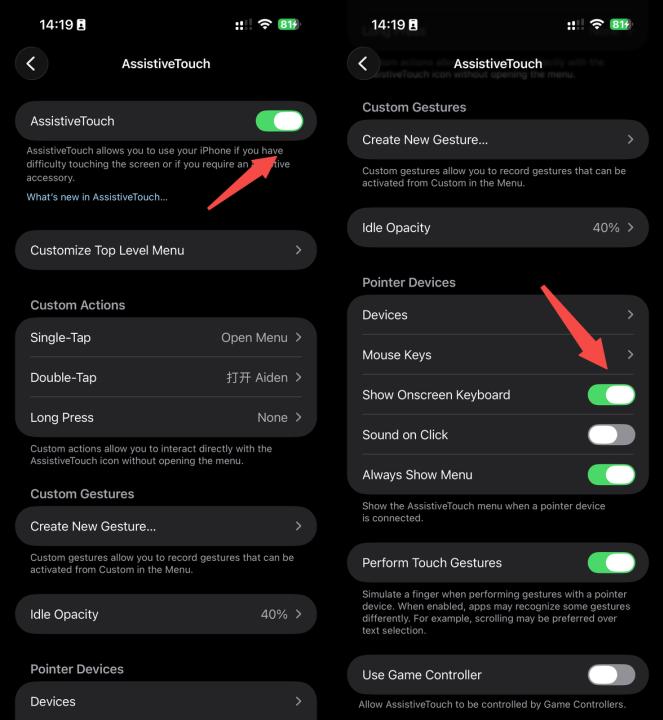
The first instinct in a situation like this is to suspect the hardware or the low-level communication protocol. The team checked several things that are common suspects in external keyboard problems: accessibility settings, low-level device descriptors, timing between keystrokes, and stale connections left over after the device reconnected. Some of these checks turned up real, separate issues worth fixing. None of them explained the core failure.
The actual cause turned out to be more specific and more interesting. System logs on the phone distinguish between a plain keystroke and a keyboard shortcut, and they record which app on the phone is supposed to receive each shortcut. In working cases, a shortcut like paste was correctly delivered to whichever app was active on screen. In failing cases, the exact same shortcut was recognized correctly by the operating system, but delivered to the home screen process instead of the actual foreground app.
That distinction changed the entire direction of the investigation. The keyboard input itself was never lost or misread. The failure was happening after the system had already correctly understood what was being requested, in the step where it decides which app should receive that command.
Isolating the actual trigger required a controlled comparison rather than guesswork. The team tested a keyboard-only setup against the identical keyboard with an ordinary mouse also connected, with every other setting held constant. The keyboard-only setup succeeded on every attempt. Adding the mouse brought the failure back immediately. Removing the mouse again restored normal behavior.
To confirm the cause wasn't specific to their own device, the team reproduced the identical failure on two completely unrelated products: a standard gaming keyboard that includes a built-in virtual mouse function, and a separate wireless keyboard that reports a mouse capability in its own device description. Neither of those products has any relationship to the team's own hardware. The pattern held across all of them: whenever the operating system detected both a keyboard and mouse capability present at the same time, under a specific accessibility setting, keyboard shortcuts could be misdirected to the wrong destination on the device.
That combination of evidence pointed to a conclusion worth stating plainly: this was not a compatibility issue with any particular piece of external hardware. It was a routing behavior inside the operating system itself, one that most developers working with external keyboards would have no obvious way to anticipate, since it only appears under a specific combination of conditions that isn't intuitive from the outside.
Without access to the operating system's own source code, the team could not determine the exact internal mechanism causing the misdirection, only that it was consistent and reproducible across multiple independent devices.
The solution they arrived at is a workaround rather than a true fix, since the underlying behavior lives inside software they don't control. The device now switches between two different operating modes: one that includes both keyboard and mouse capability for normal use, and a keyboard-only mode that activates briefly whenever a shortcut needs to be sent. Once the shortcut completes, mouse capability is restored. The practical effect is that the operating system never sees the specific combination of conditions that causes the misrouting, at the exact moment it would otherwise matter.
This kind of debugging story is worth documenting publicly for a simple reason: a bug that reproduces across completely unrelated hardware is very likely to affect other developers working on similar problems, and there's a reasonable chance some of them have already encountered the same failure and quietly attributed it to unreliable hardware rather than a deeper software issue.
More on this project, including the full technical writeup with test data: https://aidenai.io