A still image is rarely the hard part. The hard part is deciding what should happen next.
A product photo may need a slow push toward the label, a hand entering at the right moment, and room tone that does not feel pasted on. A portrait may need a glance toward the camera without changing the person’s face. In both cases, the first output is usually a direction—not the final shot. The creative work happens in the loop: write a brief, generate, watch the whole clip, change one thing, then run it again.
That is why **H3 Max by fal** is worth paying attention to. fal says its post-trained MiniMax H3 variant can generate a five-second video in under three seconds. If that holds for your prompt and queue conditions, it changes the cost of trying several small creative directions before committing to one. It does **not** remove the need for a clear image, a precise brief, or a full review of the output.
## The quick answer
**H3 Max is fal’s post-trained version of MiniMax H3, not a new model release from MiniMax.** It is aimed at creators and teams who value short turnaround time, strong prompt adherence, and polished visuals for text-to-video and image-to-video work. fal’s published image-to-video interface accepts both a starting image and an optional end image, so it can also support a directed first-to-last-frame shot.
Choose it when the most expensive part of your process is waiting to see whether a small change in action, camera movement, or sound direction actually works. Keep the original MiniMax H3 in the conversation when you need its broader multimodal reference workflow or its 2K regeneration path. The two share a foundation, but they are not the same product or the same production trade-off.
## First, clear up the name
The name makes it easy to assume that MiniMax has announced an “H3 Max” tier. That is not what happened.
MiniMax released the original [MiniMax H3](https://www.minimax.io/blog/minimax-h3) as a general-purpose, multimodal video system. The company describes H3 as handling text, images, video, and audio in a unified context, with native stereo audio and outputs up to 15 seconds. Its complete production system includes a 768p base generation stage plus a separate in-context regeneration step for 2K output.
fal started from H3’s open weights, added its own post-training data, and co-optimized the result with its own inference system. That resulting service is H3 Max. In fal’s own words, the post-training work targets stronger prompt adherence and visual aesthetics, while the serving stack targets much higher throughput. The distinction matters because it tells you what you are evaluating: not a simple rebrand, and not necessarily the entire original H3 pipeline delivered through a faster endpoint.
| Question | Original MiniMax H3 | H3 Max by fal |
|---|---|---|
| Who developed the model product? | MiniMax | fal Research, using MiniMax H3 open weights as the starting point |
| Core positioning | Broad multimodal generation and reference-aware creation | Fast production-oriented generation with post-training focused on prompt adherence and aesthetics |
| Published high-resolution path | A 768p base output can be passed through MiniMax’s H3-Regenerate-2K workflow | fal’s published H3 Max endpoint lists 480p and 768p pricing rather than a 2K option |
| Image-to-video control visible on the public endpoint | MiniMax H3 supports first/last-frame and broader reference modes in its system | The fal endpoint exposes a starting Image URL and an optional End Image URL |
| The practical question | “How much context and output detail do I need?” | “How many good creative iterations can I afford to run while I am still directing the shot?” |
The table should not be read as a quality verdict. It is a way to stop comparing two different workflows as if they were just two labels on the same dropdown.
## Why faster generation changes the workflow—not the brief
Video models have usually pushed creators toward a familiar bad habit: write a large, overloaded prompt because every attempt feels expensive. One prompt asks for a product reveal, a camera orbit, a hand interaction, a scene change, typography, dialogue, music, and a dramatic ending. If the result breaks, you do not know which instruction caused the problem.
Fast generation makes a different method more realistic. Instead of one sprawling request, work through a short sequence of purposeful tests:
1. **Lock the frame.** Start with the image, subject, composition, and lighting that must remain recognizable.
2. **Test one visible action.** Add one motion that a viewer could describe in a few words: “the bottle turns a quarter turn,” “the subject raises her eyes,” or “the fabric moves in a light breeze.”
3. **Choose one camera instruction.** A slow push-in, a static camera, and a side tracking shot are three separate experiments—not a single recipe.
4. **Add sound as part of the scene.** If the model is generating audiovisual output, name the relevant cue: a zipper, a room tone, a soft footstep, or one spoken line.
5. **Review the full clip.** Check the last second, transitions, hands, text, reflected surfaces, and whether the intended subject stayed stable.
That discipline is useful with any model. The reason H3 Max is interesting is that, according to fal, its speed makes the loop less punishing. A creative lead can test “camera first” and “action first” versions in the same working session rather than treating each generation as a final bet.
### Read the speed claim carefully
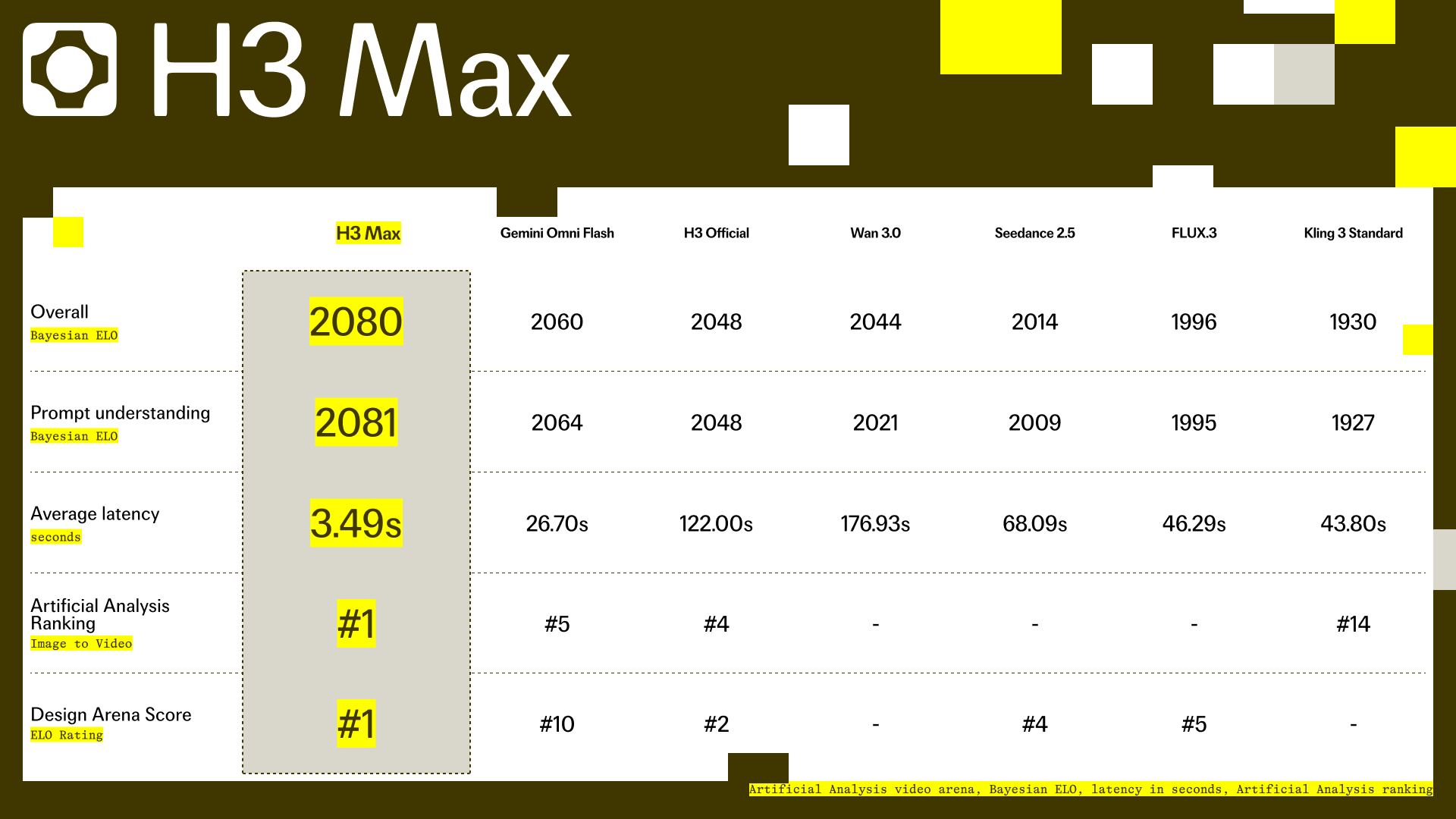
fal’s release post says H3 Max can generate a five-second video in under three seconds and describes that as roughly 35× the throughput of the official MiniMax H3 endpoint. The same launch material presents internal human-preference comparisons across overall preference, prompt understanding, and aesthetics. That is useful information, but it is not the same as a promise that every request will arrive in three seconds or look best for every task.
The published comparison visual itself reports a 3.49-second average latency for its H3 Max measurement, while the surrounding announcement uses the simpler “under three seconds” headline. Prompt expansion, queue conditions, output duration, aspect ratio, and the rest of your pipeline can all change the total time a creator actually waits. A faster model can make iteration cheaper; it cannot turn an ambiguous brief into a directed shot.
## H3 Max for image-to-video: where first-to-last-frame control helps
On fal’s public H3 Max image-to-video page, the visible inputs include a prompt, duration, resolution, prompt expansion mode, **Image URL**, and **End Image URL**. The end image is not just an extra reference. It gives you a destination frame, which can make a short clip easier to direct.
Use a single starting image when the ending is intentionally open. This is the right choice for simple, low-risk motion: a person turns slightly toward window light, a bag strap shifts as someone walks, or a watch catches a moving reflection. You want the model to animate a stable composition, not travel to a completely new state.
Use first and last frames when the story needs to land somewhere specific. A product can begin in a wide countertop scene and finish in a tight label-focused composition. A fashion look can begin front-facing and end on a three-quarter profile. A UI concept can begin as a quiet device mockup and end with the key state already visible. The model’s job becomes a bridge between two deliberate states, which is usually more manageable than asking it to invent the whole progression from one frame.
<video controls preload="metadata">
<source src="https://v3b.fal.media/files/b/0aa7ec74/bNpa9-5B0ZKqsrGfdqxZt_minimax-h3.mp4" type="video/mp4">
Your browser does not support embedded video. Please use a browser that supports HTML5 video.
</video>
*A public image-to-video example. Watch the full motion and audio before judging the result; a clean opening frame does not guarantee a clean ending.*
The frames still need to agree with each other. Keep the same aspect ratio, a compatible subject scale, similar lighting direction, and a plausible transition. If the first frame is a daylight close-up and the last frame is a night-time wide shot from the other side of the room, the model may spend its short duration resolving a contradiction rather than creating persuasive motion.
## A prompt structure built for rapid iteration
The best prompt for a fast model is not a shorter prompt. It is a prompt that makes the next correction obvious.
For image-to-video, separate the instructions into five layers: what must remain stable, what moves, how the camera behaves, what the scene sounds like, and what must not happen. This gives you a repeatable brief that can be adjusted one layer at a time.
> **Keep:** the product’s teal glass bottle, white label, centered composition, and soft side lighting unchanged.
> **Action:** a hand enters slowly from the left, rotates the bottle slightly, and leaves the frame.
> **Camera:** static medium close-up; no zoom, no orbit, no cut.
> **Sound:** a quiet tabletop touch and subtle room tone; no voiceover or music.
> **Avoid:** added packaging, rewritten label text, extra fingers, or a change in bottle shape.
The last line is not a magic negative prompt. It is a production note. If the output still changes the label or invents an extra object, simplify the visible action before making the prompt longer. For many product images, the better second attempt is “no hand—only a slow turn and a moving highlight,” not a second paragraph of instructions.
Here are three small tests worth running before you commit to a larger sequence.
| If you need to learn… | Run this first | What to review |
|---|---|---|
| Whether the source image is stable | Static camera, one subtle subject motion | Identity, product geometry, background drift, and unexpected objects |
| Whether camera direction is being followed | Keep the subject still; test one push-in or one side track | Framing, horizon stability, distortion at the edge of the frame |
| Whether audio improves the shot | Reuse the successful visual brief; add one diegetic cue | Cue timing, lip sync if relevant, and whether audio changes the visual interpretation |
This approach is deliberately unglamorous. It is also how you avoid spending ten rapid generations testing ten variables at once.
## When H3 Max is the right kind of fast
H3 Max makes the most sense when the shot is short, the visual direction is specific, and you expect to make several close variations. A social teaser, product motion study, title treatment, single-character beat, or first-to-last-frame transition can all benefit from a low-latency loop.
It is less obviously the right choice when your priority is maximum resolution, a large mixed set of image/video/audio references, or a complex multi-shot story that needs a lot of context. The original MiniMax H3 system is designed around richer multimodal context and an explicit 2K regeneration workflow. Other models may also fit better when their particular reference or editing tools match the job. “Faster” is only the winning metric when it is the bottleneck you actually have.
A useful decision rule is simple:
> **If you are still deciding what the shot should do, favor a fast iteration loop. If you already know exactly what it must preserve and deliver, favor the model and workflow with the control or resolution that fits that final requirement.**
This is also why benchmark headlines should be treated as a starting point, not a purchase order. Before a team adopts any model, use three to five representative inputs that you have the right to use: a portrait with subtle movement, a product with readable details, a scene with one deliberate camera move, and, if relevant, a first-to-last-frame transition. Score the entire clip, not the hero frame.
## The real cost question: how many useful decisions can you make?
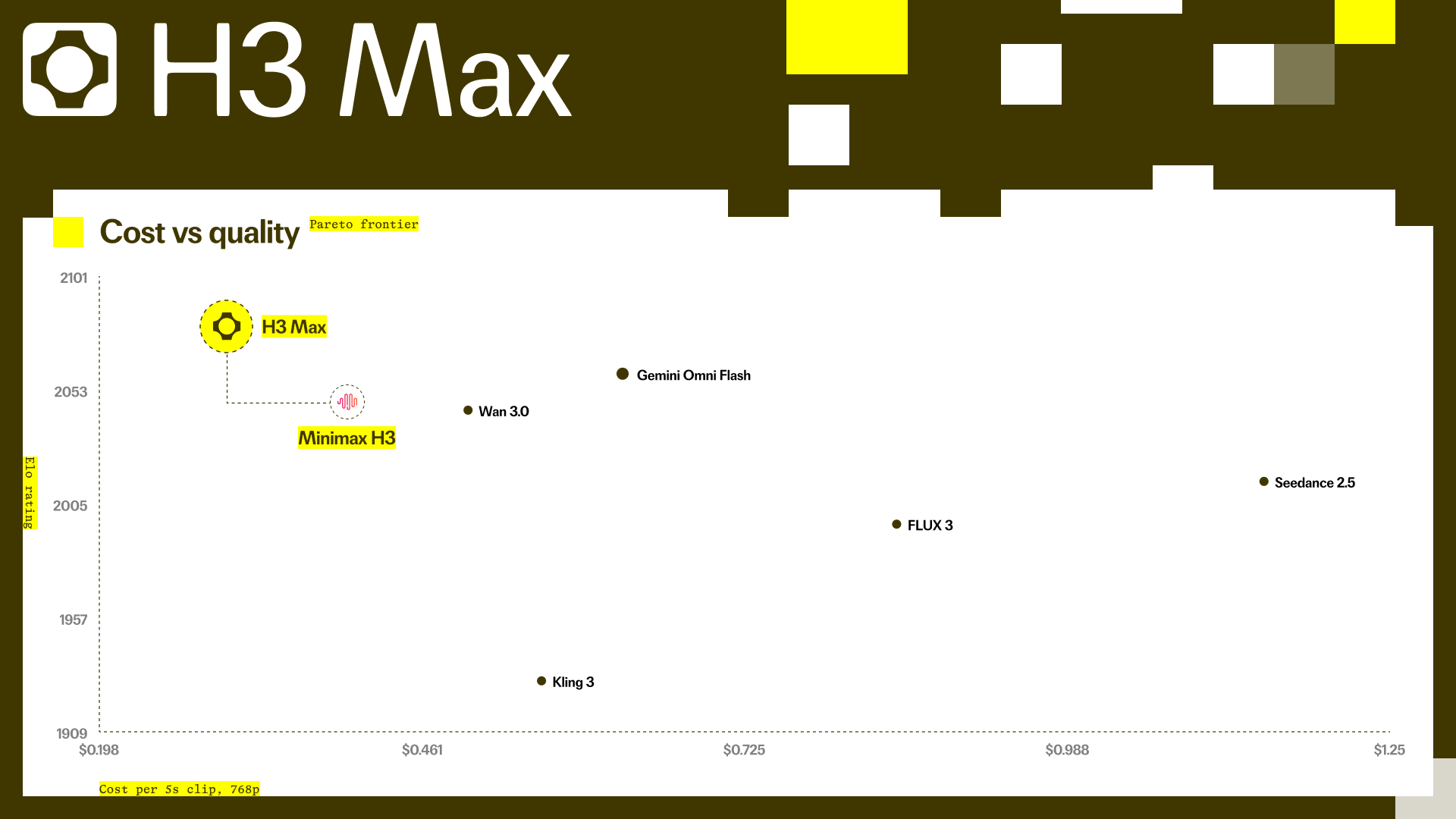
fal’s model page listed a temporary launch rate of $0.025 per second at 480p and $0.04 per second at 768p when this article was prepared, with a note that the 50% launch promotion ends on September 1 and then moves to $0.05 and $0.08 per second. Check the [live H3 Max image-to-video page](https://fal.ai/models/minimax/h3-max/image-to-video) before budgeting, because model prices and promotions can change quickly.
The more useful question is not “what is the cheapest five-second generation?” It is “how many of those generations lead to a usable decision?” A slow model can be inexpensive on paper but costly when a team avoids testing alternatives. A fast model can create waste if every run changes the subject, action, camera, and sound at the same time. Treat inference price, waiting time, review time, and revision rate as one production cost.
## A practical way to test the same discipline in your own workflow
You do not need to wait for a model integration to improve the way you direct image-to-video. Start with a source image that is sharp, intentional, and cleared for use. Write one action and one camera instruction. Generate a short result. Then change only the single detail that matters most.
That is the focused workflow behind [Image to Video AI](https://imagetovideoai.tools/): begin with a still image, direct the motion, generate a video, and review what actually changed. It is useful when you want to test the brief itself—the image, motion language, and shot logic—before committing to a particular model or a larger production. H3 Max has not been assumed to be available on this site; the point is to make your creative direction portable rather than tied to one model’s marketing headline.
## Frequently asked questions
### Is H3 Max an official MiniMax model?
No. MiniMax released H3. H3 Max is fal’s post-trained variant built from MiniMax H3 open weights and served through fal’s own inference stack. Refer to it as **H3 Max by fal** or **fal’s post-trained MiniMax H3 variant** to avoid suggesting that MiniMax announced a new H3 Max model tier.
### Does H3 Max support image-to-video and first-to-last-frame video?
fal’s public H3 Max image-to-video endpoint exposes an Image URL and an End Image URL. That supports a starting-image workflow and an optional destination-frame workflow. The best use is a short, plausible transition between compatible images—not a request to solve several unrelated scene changes in one clip.
### Is H3 Max always faster than the original MiniMax H3?
fal reports substantially higher throughput in its launch evaluations, but real elapsed time depends on the request, model settings, queue conditions, and any extra work in your pipeline. Treat the published speed result as a reason to test your own representative prompts, not as a guaranteed service-level result.
### Does faster inference mean H3 Max is the best model for every AI video project?
No. A speed-first workflow is valuable when you need to compare many closely related directions. If you need richer multimodal references, a different editing method, or a 2K output path, the original H3 system or another model may be a better fit. Match the model to the real creative constraint.
### What should I test first with a new image-to-video model?
Test one clear input at a time: subject stability, a single visible action, one camera move, and one audio cue. Review the full output at normal speed. Once one layer works, add the next. This produces better evidence than a single elaborate “cinematic” prompt.
## The bottom line
H3 Max is notable because it shifts the conversation from “can this model make a good clip?” to “can I direct a better clip through more deliberate iterations?” fal’s speed claims and post-training work make that proposition worth testing, especially for short image-to-video shots and first-to-last-frame transitions.
But speed is not authorship. The image still needs a purpose. The action still needs to be visible. The camera still needs one job. And the final judgement still belongs to the person who watches the whole video, catches the drift, and decides whether the result is ready to use.