Introduction
Think about how your team currently connects AI models to databases, APIs, and internal tools. You probably build new integrations every time a new AI tool arrives, right? That's exhausting and error-prone. MCP server development changes this. The Model Context Protocol creates a single layer where you expose your systems once, and any AI model your team adopts can use them without rebuilding integrations. This guide walks you through everything you need to know about building production-ready MCP architecture that actually scales, from planning and security to deployment and maintenance. By the end, you'll understand not just how MCP servers work, but why they matter for your business.
What Is MCP Server Development and Why It Matters?
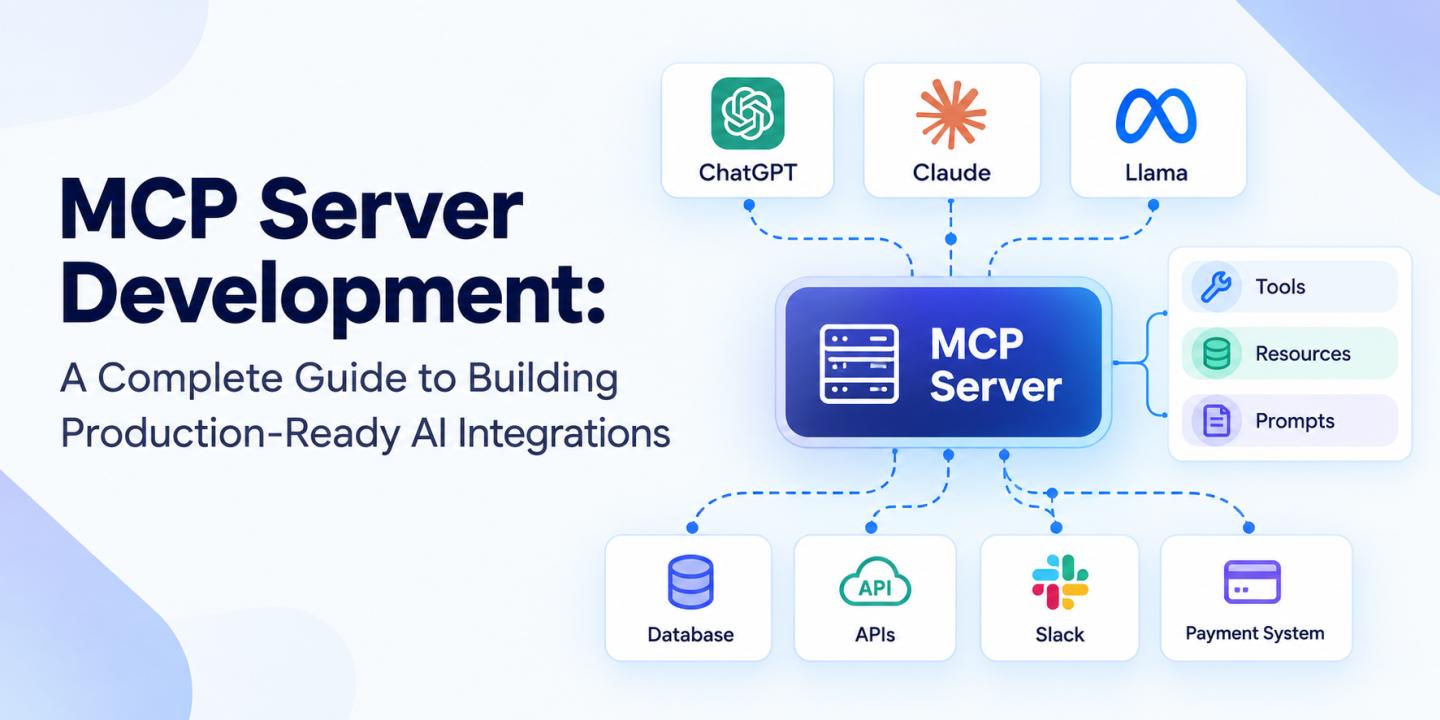
Let's cut through the jargon. MCP server development is about creating a structured bridge between AI models and your internal systems. Instead of Claude connecting directly to your Slack workspace, your database, and your payment system through three separate integrations, you build one MCP server that exposes all three. Claude talks to the server. Your Slack API talks to the server. The database talks to the server. Everything is centralized, secure, and consistent. This approach is different from building separate integrations each time, which is why custom MCP servers have become the standard for enterprise teams.
Here's why production teams care about this:
- One integration, many AI models: Build it once, use it with Claude, GPT, or any compatible AI model without duplicating work.
- Security at the server level: You control authentication, encryption, and access permissions in one place instead of scattering them across multiple integrations.
- Faster AI adoption: Your team launches new AI use cases by adding tools and prompts, not by spending weeks rebuilding integrations.
- Reduced context confusion: AI models get consistent, structured data from the same source every time through better MCP server integration.
Without an MCP server, you're basically asking each new AI tool to learn how to talk to your systems from scratch. With one, you're saying, "here's the standard way to interact with us."
Quick Comparison: MCP vs. Traditional Approaches
Core Components of Production MCP Servers
An MCP server has three main moving parts. Understanding these components is essential before you start building.
- Tools
MCP tools are actions: They let your AI models do things in the real world. Need to create a record in your CRM? That's a tool. Want to trigger a workflow? Tool. Fetch a file? Tool.
Each tool has a schema (basically a blueprint that tells the AI model what it can do, what parameters it needs, and what it'll get back). Good schema design is critical for production systems. If your schema is vague or poorly documented, the AI model will make mistakes.
- Resources
MCP resources are read-only data access: They're different from tools because the AI isn't changing anything; it's just looking at structured information.
Think of it this way: a tool might be "create a customer record," but a resource would be "show me all active customers." MCP resources give AI models the context they need to make smart decisions without exposing raw database access.
- Prompts
Prompts are reusable instructions: They guide how the AI model uses your tools and resources. Maybe you want the model to always check the customer status before creating an order. You'd write that as a prompt in your MCP server instead of telling every developer to include it in their own prompts.
This standardization matters. It means every team member gets consistent AI behavior, and you don't maintain the same logic in fifty different places.
Planning Your MCP Architecture
Before you write a single line of code, plan your MCP architecture. I know, nobody wants to hear it. But architecture decisions made in week one save you from painful rewrites in month three.
Define Your Scope
Start with the obvious question: What systems does this server need to expose?
Not every database, not every API. Just the ones your AI workflows actually need. If your customer service team is using AI to handle tickets, they probably need access to your ticketing system, customer records, and maybe your knowledge base. That's it. They don't need access to your payroll system.
Also think about data sensitivity early. If you're exposing customer financial data, your security requirements look different than if you're just connecting to a product catalog. Map this out. It changes everything downstream.
Schema Design Best Practices
Your MCP server's schemas are your contract with AI models. Write them clearly, version them intentionally, and test them relentlessly.
A few principles:
- Be specific.:"User ID" is clearer than "ID." "Email address" beats "Contact info."
- Plan for versioning.:Your APIs change over time. Build versioning into your schema from day one.
- Handle errors at the server level: Don't let raw database errors bubble up to the AI. Catch them, translate them, and return something meaningful.
- Validate inputs: If a parameter should be an email address, validate it before it reaches your database. This prevents MCP tools from receiving malformed data.
Scalability Planning
Think about the future. How many teams will use this server? How many concurrent requests will it handle? What's your latency requirement?
These aren't just "nice to have" questions. They determine whether you build on Lambda or Kubernetes, whether you need caching layers, and how you structure your database queries. Answer them upfront.
For organizations building multi-agent systems, scalability becomes even more critical. AI agent development requires servers that can handle simultaneous requests from multiple autonomous agents without bottlenecks. Plan for that complexity early.
Building & Implementing Your MCP Server
This is where theory meets reality. Let's talk about how you actually build and deploy this thing.
Start local, test extensively: Build your MCP server in your development environment with real (or realistic) data. Connect it to your actual AI models, not just in theory but in practice. See if Claude actually understands your schemas. See if the AI makes the mistakes you expect or if it surprises you. Good MCP server implementation means testing with real-world scenarios before any production deployment.
Security isn't optional: Your MCP server is now a security perimeter. Treat it that way. MCP server security needs to be built in from the start, not added later as an afterthought:
- Authenticate every request: Use API keys, OAuth, or tokens, picking something that works for your infrastructure.
- Encrypt sensitive data in transit: HTTPS/TLS, always.
- Log everything: Who accessed what? When? Why? You'll need this for debugging and compliance.
- Limit permissions: Just because an AI can call a tool doesn't mean it should. Use role-based access control (RBAC) to restrict what each team can access.
Build for reliability: Production systems fail sometimes. Plan for it during MCP server implementation:
- Implement retry logic: If a downstream API hiccups, don't give up immediately.
- Set rate limits. You don't want one runaway AI prompt consuming all your database connections.
- Have fallback behaviors: What happens if your cache is down? Your backup database?
Custom MCP servers need to balance flexibility with control. You might extend an open-source MCP server for standard tools, but build custom implementations when you need:
- Industry-specific logic
- Internal tool exposure
- Custom authentication rules
- Complex data transformation
The key is knowing when to build custom and when to reuse.
Security, Compliance & Deployment
You've built something solid. Now make sure it doesn't fall over or get hacked.
Enterprise Security
This is non-negotiable. Your MCP server sits between AI models and your most important systems. It needs to be bulletproof. Organizations deploying artificial intelligence services at scale need servers that treat security as a foundational requirement, not a feature added later.
- Role-based access control: Not all teams need access to everything. The finance team's AI doesn't need to see HR records.
- API key rotation: Change your keys regularly. Automate it if you can.
- Encryption. In transit (TLS). At rest (for sensitive data in logs or caches). No exceptions.
Monitoring & Observability
You can't fix what you can't see. Build observability in from the start for every MCP server integration:
- Log everything: Every request, every response, every error. You'll need this when something goes wrong at 2 AM.
- Track performance metrics: How long do requests take? Are they getting slower over time? Is one tool hogging resources?
- Alert on anomalies: Unusual traffic patterns. Tools failing. Response times spiking. Set up alerts so you know before your users do.
Go-Live Strategy
Don't flip a switch and hope for the best. Rolling out an MCP server with proper MCP server security measures to production should be careful and measured:
- Start with a canary release: Send 10% of traffic to the new server. Watch for issues. If it's solid, gradually increase to 20%, 50%, 100%.
- Have a rollback plan: If something goes wrong, you need to get back to the previous version in minutes, not hours.
- Test under load: Your local testing looked great, but what happens when 100 concurrent requests hit it? Load test before go-live.
Common Pitfalls & Production Lessons
Learn from other people's mistakes so you don't have to make them yourself.
Schema drift.:The server exposes one version of a tool, your documentation says something else, and your team builds around the wrong assumption. Keep schema and documentation synchronized.
- Insufficient error handling: Raw database errors leak to AI models. Bad. Catch exceptions, translate them, return sensible messages.
- Not planning for versioning: Your MCP server will change. Plan for running multiple versions simultaneously.
- Security scope creep: You expose one internal tool, then another, then another. Before you know it, the MCP server has access to everything. Be intentional about what you expose and control access at the server level.
- Poor observability: Production breaks, and you can't figure out why. Logs are your lifeline.
- Over-exposing sensitive tools: Just because you can expose your payment API doesn't mean you should. Not every team needs it. Control permissions carefully at the server layer.
- Single points of failure: If your MCP server is down, all your AI workflows break. Build redundancy in.
- Ignoring maintenance: An MCP server isn't a "set and forget" thing. Dependencies update, security patches drop, usage patterns shift. Budget for ongoing care.
- Not testing multi-agent scenarios: Two AIs hitting your server simultaneously? Handled correctly? Test this before production.
- Underestimating database load: Each tool call might trigger queries. Ten concurrent AI workflows might trigger a hundred queries. Your database needs to handle it.
Production Readiness Checklist
- Planning
During the planning phase, define the server's scope clearly, map data sensitivity, and establish scalability targets. Watch out for scope creep and make sure compliance requirements are considered early.
- Development
During development, version schemas early, build comprehensive error handling, and test extensively. Avoid vague error messages and make sure edge cases are covered.
- Deployment
Before deployment, implement RBAC, configure encryption, and establish monitoring. Avoid rushing to production and make sure logging is consistent across the MCP server.
- Maintenance
After deployment, audit logs regularly, optimize slow queries, and keep dependencies current. Technical debt and missed security patches can create problems as usage grows.
Conclusion
MCP server development isn't just a technical detail. It's strategic infrastructure for AI-powered organizations. Building production-ready infrastructure requires thinking through architecture, security, and operations from day one. The teams that treat MCP servers as core infrastructure (not an afterthought) scale their AI adoption faster and with significantly fewer integration headaches. Start with solid architecture, invest in security and observability, and plan for the maintenance burden ahead. Your future self will thank you.
Ready to Get Started?
If you're planning an MCP server for your organization, don't skip the architecture phase. Get it right from the beginning. Our MCP server development services team has helped enterprises across fintech, healthcare, and e-commerce build production-ready MCP systems that scale. If you'd like to discuss your specific use case, we're here to help.