Preparing for the CCIE Data Center lab exam requires more than theoretical knowledge—it demands hands-on experience with the right tools and environments. Building an effective lab setup can significantly improve your understanding of real-world data center scenarios. If you’re planning to enroll in CCIE Data Center training in Bangalore, having clarity on the required hardware and software will help you maximize your learning outcomes.
Many aspirants also choose a structured CCIE Data center Course in Bangalore to complement their self-study, but setting up your own lab—physical or virtual—is essential for mastering configurations and troubleshooting.
Why a Dedicated Lab is Important
The CCIE Data Center lab exam is highly practical and tests your ability to configure, manage, and troubleshoot complex environments. A proper lab setup helps you:
Practice real exam scenarios
Understand device behavior deeply
Build troubleshooting confidence
Gain hands-on experience with enterprise technologies
Hardware Requirements for CCIE DC Lab
While physical labs can be expensive, they provide unmatched realism. Depending on your budget, you can start small and scale up.
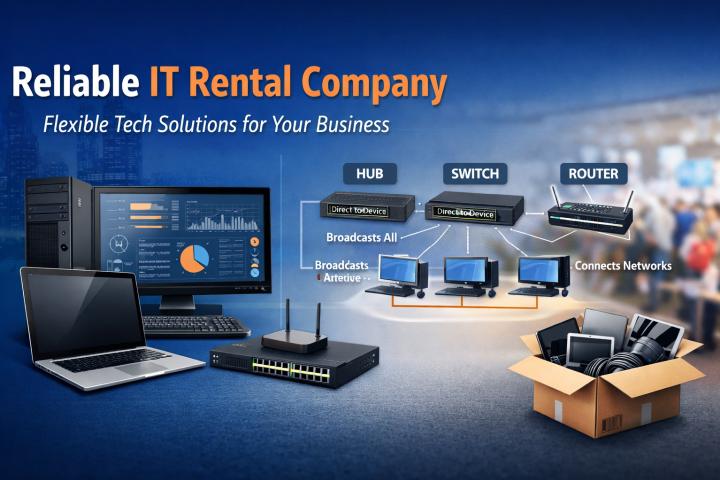
1. Servers and Compute Resources
A high-performance server or workstation is the backbone of your lab.
Minimum 16–32 GB RAM (64 GB recommended)
Multi-core CPU (Intel i7/i9 or AMD equivalent)
SSD storage for faster virtualization
This setup supports multiple virtual machines and network simulations.
2. Cisco Nexus Switches
Nexus switches are central to CCIE Data Center preparation.
Nexus 9000 Series (preferred for modern topics like VXLAN EVPN)
Nexus 7000/5000 (optional for legacy understanding)
If physical devices are not feasible, virtual options can replicate most features.
3. Storage Devices (Optional)
For SAN and storage networking practice:
Basic NAS/SAN solutions
Storage simulators
These help you understand Fibre Channel, iSCSI, and storage protocols.
4. Network Accessories
Managed switches
Cables (Ethernet, fiber if applicable)
Rack space (optional but useful for organization)
Software Requirements for CCIE DC Lab
For most aspirants, software-based labs are the most practical and cost-effective approach.
1. Network Simulation & Emulation Tools
These tools allow you to create virtual topologies:
EVE-NG (Enterprise Virtual Environment)
GNS3
Cisco Modeling Labs (CML)
They support Nexus images, routers, and integration with other platforms.
2. NX-OSv and Virtual Images
Cisco provides virtual images of its operating systems:
NX-OSv (for Nexus simulation)
CSR1000v (for routing scenarios)
These are critical for practicing configurations like VXLAN, VLANs, and routing protocols.
3. VMware / Virtualization Platforms
Virtualization software helps run multiple devices on a single machine.
VMware Workstation
VMware ESXi
VirtualBox (for lighter setups)
4. Cisco ACI Simulator
Application Centric Infrastructure (ACI) is a major part of the CCIE DC blueprint.
ACI Simulator allows practice without physical hardware
Helps understand policy-based networking
Useful for GUI and API-based configurations
5. Automation Tools
Modern data centers rely heavily on automation.
Python
Ansible
REST APIs
Practicing automation will give you an edge in both exams and real-world roles.
Suggested Lab Setup (Balanced Approach)
For most candidates, a hybrid lab works best:
High-performance PC or server
EVE-NG or CML for simulation
NX-OSv and ACI simulator
Optional physical switch (if budget allows)
This approach balances cost and functionality while covering most exam topics.
Budget Considerations
You don’t need an expensive setup to succeed. Here’s how to optimize:
Start with virtual labs
Use trial licenses and community editions
Upgrade hardware gradually
Share lab resources with peers
Common Mistakes to Avoid
Many aspirants struggle due to poor lab planning:
Over-investing in hardware too early
Ignoring automation tools
Not aligning lab setup with exam blueprint
Skipping troubleshooting practice
Focus on relevance rather than complexity.
Preparation Tips
Follow the official CCIE Data Center blueprint closely
Practice daily, even if for a short duration
Document your configurations and mistakes
Simulate real-world scenarios, not just basic setups
Consistency matters more than the size of your lab.
Conclusion
Setting up the right hardware and software for your CCIE Data Center lab training in Bangalore is a crucial step in your certification journey. Whether you choose a fully virtual environment or a hybrid setup, the goal is to gain hands-on experience with real-world technologies like Nexus switching, ACI, and automation tools. A well-planned lab not only improves your exam readiness but also builds practical skills required in enterprise data center roles. In conclusion, focus on building a scalable, cost-effective lab environment and commit to consistent practice to achieve success in CCIE Data Center.