Modern teams struggle with scattered tasks, unclear priorities, and inefficient communication across tools. This is where Trello project management becomes a powerful solution for bringing structure and clarity into workflows. Built for simplicity yet powerful enough for complex operations, it enables IT managers and tech teams to visualize, organize, and track work seamlessly in real time. Whether managing software development cycles, IT operations, or cross-functional projects, Trello helps eliminate chaos and improve execution speed. In this guide, we explore how Trello transforms workflow efficiency and how organizations can unlock its full potential with strategic implementation.
1. Understanding Workflow Chaos in Modern Teams
Many organizations face workflow breakdowns due to disconnected tools, unclear ownership, and poor task visibility. Teams often waste time searching for updates instead of executing meaningful work. This inefficiency slows delivery and reduces overall productivity.
Trello helps address these challenges by introducing a visual system that organizes tasks into structured boards.
Task Fragmentation Reduction – Consolidates scattered tasks into a unified, visual workflow system for better clarity.
Improved Task Visibility – Ensures every team member can see project status in real time across boards.
Eliminates Email Dependency – Reduces reliance on long email threads for task updates and communication tracking.
Centralized Workflow Tracking – Keeps all project activities organized in one accessible and structured platform.
Faster Decision Making – Enables leaders to quickly identify bottlenecks and resolve issues efficiently.
2. How Trello Project Management Simplifies Task Organization
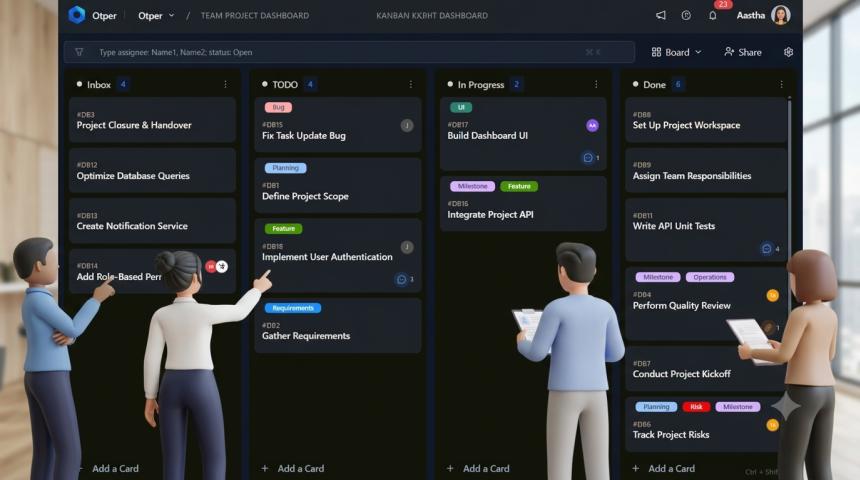
Trello uses a card-and-board system that visually represents work progress. This structure helps teams break down complex projects into manageable tasks. IT managers can assign, prioritize, and track tasks without losing context.
Its simplicity is what makes it powerful for both technical and non-technical teams.
Visual Task Boards – Organizes work into columns that represent stages of project progress clearly.
Drag-and-Drop Flexibility – Allows easy movement of tasks across stages without technical complexity.
Task Prioritization Control – Helps teams highlight urgent work and manage deadlines effectively.
Team Collaboration Enhancement – Enables multiple stakeholders to contribute within shared task cards.
Workflow Standardization – Ensures consistent project execution across departments and teams.
3. Enhancing Team Collaboration and Accountability
One of the biggest challenges in IT and software teams is maintaining accountability. Trello solves this by assigning clear ownership and tracking progress at every stage. Teams no longer rely on manual updates or fragmented reporting systems.
This leads to better coordination and improved delivery timelines.
Clear Task Ownership – Assigns responsibilities to individuals for improved accountability and execution clarity.
Real-Time Comments and Updates – Enables instant communication within task cards for faster feedback cycles.
Activity Tracking Logs – Records every change, ensuring transparency across all project activities.
Shared Project Visibility – Keeps all stakeholders aligned with current project status and updates.
Reduced Miscommunication – Minimizes confusion by centralizing all discussions within task cards.
4. Improving Agile Development with Trello
Agile teams require flexibility, speed, and continuous iteration. Trello supports Agile methodologies by allowing teams to manage sprints, backlogs, and continuous delivery pipelines efficiently. IT teams can adapt quickly to changing requirements.
This makes Trello an ideal tool for DevOps and software development environments.
Sprint Planning Boards – Helps teams organize and manage Agile sprint cycles effectively.
Backlog Prioritization System – Allows structured prioritization of upcoming development tasks.
Continuous Workflow Updates – Supports real-time updates for evolving project requirements.
Integration with Dev Tools – Connects with GitHub and CI/CD tools for streamlined development.
Faster Iteration Cycles – Enables quick adjustments based on feedback and testing outcomes.
5. Automation for Smarter Workflow Management
Manual task tracking slows down productivity and increases human error. Trello automation features help eliminate repetitive tasks, enabling teams to focus on strategic work. IT managers benefit from reduced operational overhead.
Automation ensures smoother and faster workflow execution.
Rule-Based Task Automation – Automatically moves tasks based on predefined triggers and conditions.
Deadline Reminders – Sends automatic alerts for approaching deadlines and overdue tasks.
Task Assignment Automation – Assigns tasks instantly based on workflow rules.
Checklist Completion Triggers – Advances tasks when predefined checklists are completed.
Reduced Manual Effort – Eliminates repetitive administrative work for improved efficiency.
6. Integrations That Expand Trello’s Capabilities
Trello integrates with multiple tools used by IT and software teams, including communication, development, and reporting platforms. This ensures seamless workflow continuity across systems.
Integration flexibility makes it a central hub for project execution.
Slack Integration for Communication – Enables real-time updates and alerts directly within team chat channels.
Jira Connectivity for Development – Bridges Agile development workflows with advanced tracking systems.
Google Drive Integration – Provides easy access to project documents and shared files.
Time Tracking Tools Support – Helps monitor productivity and task completion timelines.
Power-Ups for Customization – Extends Trello functionality based on specific business needs.
7. Scaling Enterprise Workflows with Trello
As organizations grow, managing multiple teams and projects becomes complex. Trello scales effectively by supporting multiple boards, advanced permissions, and enterprise-grade features. IT leaders can maintain control while enabling flexibility.
This ensures consistent performance across large teams.
Multi-Team Workspace Management – Organizes different teams under unified project structures.
Advanced Permission Controls – Restricts or grants access based on roles and responsibilities.
Cross-Project Visibility – Enables leadership teams to monitor all projects in one dashboard.
Enterprise-Level Security Features – Ensures data protection and compliance across workflows.
Scalable Workflow Architecture – Supports growing business needs without performance issues.
Conclusion
Transforming chaotic workflows into structured systems requires the right combination of strategy and tools. With Trello project management, IT managers and software teams can achieve clarity, efficiency, and scalability in project execution. Its visual boards, automation capabilities, and integrations make it a powerful solution for modern enterprises seeking operational excellence. Organizations looking for advanced optimization can further enhance their systems through Atlassian Trello consulting, ensuring proper setup, customization, and workflow alignment. By adopting the right practices and expert guidance, teams can move from reactive task handling to proactive, high-performance project delivery that drives measurable business outcomes.