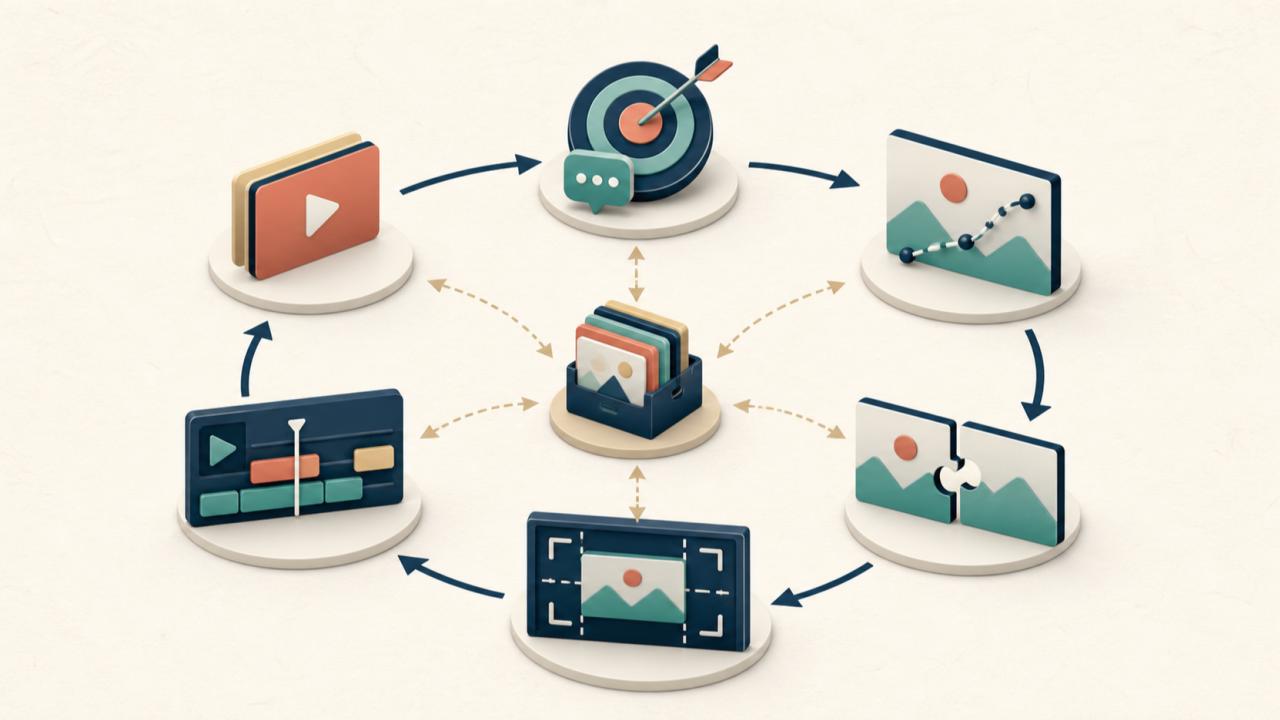
An AI video workflow for startups should make creative decisions easier, not simply produce more clips. The real bottleneck usually appears after the first generation: the team cannot explain what worked, reviewers change several things at once, and every new social format starts another round of guesswork.
For a lean marketing team, the better goal is a small production system. One approved product image becomes the visual anchor. A short brief defines the job of the clip. Controlled iterations reveal which motion, framing, and message deserve another round.
Start With a Campaign Decision, Not a Prompt
Before opening a generator, decide what the video must help a viewer understand or do. “Make this image cinematic” describes a >
A useful one-page brief can stay short:
- Audience: Who should recognize themselves in the scene?
- Channel: Where will the clip appear, and how will people encounter it?
- Single message: What is the one idea the viewer should retain?
- Shot objective: What must move, reveal, or change?
- Fixed elements: Which product details, colors, or composition choices must remain stable?
- Allowed variation: What may change between versions—camera move, background activity, pacing, or framing?
- Next action: What should the edit make easy to do after the clip?
This brief is more valuable than a long prompt library because it gives every reviewer the same standard. A founder can still make a fast call, but that call is tied to the campaign rather than personal taste.
Use an Approved Frame as the Source of Truth
Text-to-video can be useful for exploration, but a startup often already has an approved product photo, illustration, or key visual. Using that asset as the start frame reduces ambiguity. The team begins with known packaging, colors, and composition instead of asking a prompt to invent all of them at once.
The current interface for a flux ai video generator exposes a start frame, an optional end frame, a prompt field, model and version choices, resolution, and aspect ratio controls. Those controls are most useful when they map to decisions in the brief.
For example:
- Upload the approved image as the start frame.
- Add an end frame only when the final composition matters, such as a clean product hold or a layout that will carry a CTA in editing.
- Describe one primary motion and one camera behavior in the prompt.
- Choose the ratio for the destination channel before generating.
- Keep the first batch narrow enough that the team can identify why one result is stronger.
The point is not to make the prompt as detailed as possible. It is to keep the generation aligned with an asset and a decision the team has already approved.
Change One Variable per AI Video Batch
When every version changes the camera, motion, setting, pacing, and framing, comparison becomes subjective. Controlled variation creates usable information.
Start with a baseline prompt that states the subject, the required action, the camera behavior, and the visual constraints. Then create small batches in which one variable changes:
- Batch A: same frame and action, different camera movement.
- Batch B: same camera movement, different action intensity.
- Batch C: same creative direction, different channel ratio or composition.
- Batch D: same winning motion, revised ending for easier editing.
Record the prompt and settings beside each exported candidate. A simple naming system such as product-hook-camera-ratio-v01 is enough. The record prevents a common failure: the team likes a clip but cannot reproduce the decisions behind it.
Controlled batches also make rejection useful. “Version three is wrong” does not help the next attempt. “The motion hides the product label during the first beat” gives the team a specific variable to correct.
Review Every Clip in Five Passes
Trying to judge everything at once encourages vague feedback. A five-pass review is faster because each pass asks one question.
1. Message clarity
Can a viewer understand the subject and purpose without reading a long caption? If the main object is unclear in the opening moment, stronger motion will not rescue the clip.
2. Motion quality
Does the movement support the message, or is it merely decorative? Look for sudden speed changes, distracting background activity, or camera motion that competes with the product.
3. Visual continuity
Check the details the business actually cares about: product shape, label placement, color, key accessories, and the relationship between foreground and background. Write down the exact discontinuity instead of using a general label such as “AI artifact.”
4. Channel fit
Imagine the clip inside the actual feed, landing page, or product update. Is the subject large enough? Is there room for captions or interface chrome? Does the framing survive the intended crop?
5. Editability
The best generation is not always the most dramatic one. A slightly calmer result may be easier to trim, loop, combine with text, or hand to an editor. For a startup, that flexibility often creates more campaign value than a single impressive shot.
Turn One Winner Into a Variant System
Once the team has a useful base clip, resist the urge to start a completely new concept. First extract the campaign variants that share the same visual idea.
One base direction can support:
- a product-led version that shows the object immediately;
- a problem-led version that opens on the use context;
- a compact feed version with tighter framing;
- a wider landing-page version with space for copy;
- an edit-friendly version with a cleaner final hold.
This is where the original brief earns its keep. The fixed elements protect brand and product clarity, while the allowed variations give the team room to adapt the creative. Each variant should have a reason to exist; changing a ratio or camera move without a distribution need only adds inventory.
Measure the Workflow Before You Measure the Winner
Campaign performance matters, but a young workflow first needs operational signals. These do not require the team to pretend that a small test proves a universal marketing result.
Track a few practical questions:
- How many generations reached the review stage?
- Which rejection reason appeared most often?
- Which prompt or setting change resolved that issue?
- How many usable channel variants came from one approved concept?
- Could another teammate understand and reuse the production record?
Later, connect the published variants to the metrics the channel already uses. The production log explains what changed; the channel data shows how audiences responded. Keeping those two records connected helps the next campaign begin with a tested decision rather than an empty prompt box.
Common Mistakes That Waste Iterations
The most expensive mistakes are usually process mistakes, not prompt-writing mistakes.
Starting without an approved message. The team debates the clip because it never agreed on the job of the clip.
Changing too many variables. A better result appears, but nobody knows whether the improvement came from motion, framing, the source image, or chance.
Reviewing by taste alone. Feedback such as “make it pop” creates another subjective round. Feedback tied to message, continuity, channel fit, and editability creates a testable next step.
Generating every format from scratch. This breaks continuity and multiplies approvals. Build variants from a winning direction first.
Keeping only final files. Without prompts, settings, and rejection notes, the team loses the learning that should make the next campaign faster.
FAQ
Does a startup need a large prompt library?
No. A small set of documented briefs and successful prompt decisions is usually more useful than a large collection without context. Save the reason a prompt worked, not just the text.
Should every campaign use both a start frame and an end frame?
No. Use an end frame when the final composition is important to the concept or edit. If the ending can remain open, adding another constraint may not help.
How many versions should a team generate?
Use the smallest batch that can answer the current question. The right number depends on the tool, budget, and review capacity. Stop when the next generation no longer tests a clear variable.
What should founders review personally?
Founders are most useful when approving the message, fixed product details, and acceptable brand boundaries. Motion refinements and format adaptations can then follow the agreed brief.
Conclusion
A lean AI video workflow for startups turns generation into a repeatable business process: brief the shot, anchor it to an approved frame, vary one decision, review with clear criteria, and preserve what the team learned. If you want a working surface for that process, the flux ai video generator provides the core frame, prompt, model, resolution, and ratio controls needed to begin testing a controlled campaign direction.